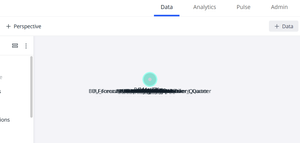
Semantic Layer tables stack up like a deck of cards
Hi All, About once a month, all of the tables in our semantic layer stack on top of one another. I'm not sure why. It takes me about an hour to put them back in their right places. Has anyone else had this problem, and if so, how did you stop it from recurring? Cheers.68Views0likes7Comments
Seeking Best Practice for Live Detail Reporting in Sisense (Replacing SSRS)
Afternoon Sisense community, Our team is looking to replicate the functionality of a crucial SSRS report within Sisense. This report is used by a department to obtain a detailed list of jobs for a specific month. The workflow involves: Running the report for a selected month (typically the current or previous month). Reviewing the output for discrepancies. Updating the source system based on the review. Re-running the report immediately to verify the changes (requiring live data). Current Sisense Implementation & Performance Issue I've attempted to recreate this report's dataset using a Live Model connected to a Redshift SQL View. The view is complex: It contains approximately 50 columns of detailed data. It involves JOINs across 15 different tables to consolidate all necessary dimensions and metrics. The Issue: The performance of this Live Model is unacceptable. Users are accustomed to the SSRS report running a stored procedure and returning the filtered data in under 30 seconds. My Sisense Live Model is timing out. Constraints & Goal Requirement: The data must be live (no ElastiCube, as users need immediate reflection of system changes after updates). Target Performance: Sub-30-second return for monthly filtered data. Request for Guidance Given the high number of columns, multiple joins, and the strict requirement for live data with fast filtering (specifically by month), what would be the recommended best practice for implementing this detailed report in Sisense? Are there specific Sisense configurations, data modeling techniques for live connections that would address this performance bottleneck while meeting the "live" requirement? Thank you for your insights!115Views0likes6Comments
Ability to Specify Provider in Pulse Alerts
-------------------------------------------------------------------Problem Statement: Inability to Scope System Alerts by Data Provider Currently, Pulse System Alerts for build failures are binary—either enabled for everything or disabled. In complex enterprise environments, we often run hybrid deployments where ElastiCubes are powered by vastly different backend providers (e.g., legacy MSSQL/Oracle vs. modern Snowflake/Redshift/BigQuery). When a legacy database goes down for maintenance, or when we have non-critical local CSV cubes failing, our administrators are flooded with Pulse notifications. This noise often causes us to miss critical failures in our primary Snowflake cloud data warehouse, which has direct cost and SLA implications. Proposed Feature: Provider-Based Alert Routing We need the ability to configure Pulse System Alert rules based on the underlying Provider or Connectivity Type of the ElastiCube. Specifically, in the Pulse > System Alerts > Build Failed configuration, please add a condition logic or filter that allows us to include/exclude specific providers. Configuration Example: Alert Rule 1: Send to CloudOps Team IF Build Fails AND Provider = Snowflake, Redshift. Alert Rule 2: Send to DBA Team IF Build Fails AND Provider = MSSQL, Oracle. Alert Rule 3: Do NOT send alert IF Provider = CSV, Excel. Business Impact Noise Reduction: Eliminates "alert fatigue" by filtering out expected failures from dev/test environments or legacy systems. Targeted Incident Response: Ensures the right team (Cloud Ops vs. Legacy DBAs) receives the alert immediately, reducing Mean Time to Resolution (MTTR). Cost Management: Helps prioritize failures that impact billable cloud compute consumption.9Views0likes0CommentsHow To Troubleshoot Build Failures (Linux OS)
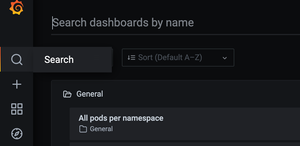
HOW TO TROUBLESHOOT BUILD FAILURES (Linux OS) Building an ElastiCube imports the data from the data source(s) that have been added. The data is stored on the Sisense instance, where future dashboard queries will be run against it. You must build an ElastiCube at least once before the ElastiCube data can be used in a dashboard. This article will help you understand and troubleshoot common build failures and covers the following: Steps of the Build Process Troubleshooting Tools Troubleshooting Techniques Common Errors & Resolutions Please note the following was written for Sisense on Linux as version L2022.5. Steps of the Build Process 1. Initialization: The initialization stage of the build process prepares the platform for the data import, which includes checking and deploying the resources geared towards performing the build. 2. Table Import: This step imports the data from the external data platforms into the ElastiCube. The ec-bld Pod runs two to three concurrent containers, meaning that two to three pods can be processed simultaneously. The build pod, which uses the given connector frameworks (old or new, based on the connector used), connects to the given source(s). By default, 100,000 lines of data are read and imported per cycle during this phase. The MServer is responsible for getting the data from the connectors and writing it to storage into Sisense’s database (MonetDB). While importing the data, the process uses the given query assigned to the given data source (either the default Select All or a custom query). 3. Custom Table Columns: This step of the build process runs the data enrichment logic defined in the ElastiCube modeling. There are three types of custom elements: Custom Columns (Expressions) Custom Tables (SQL) Custom Code Tables (Python-based Jupyter Notebooks) Custom Elements uses the data previously imported during the Base Tables phase as its input. The calculations/data transformation happens sequentially one after the other based on the Build Plan/Dependencies generated earlier in the process between finalizing the Initialization phase and at the starting of the Base Tables phase. Calculations occur locally based on the data in the ElastiCube, and can consume lots of CPU and RAM based on the complexity of the Expressions/SQL/Python Jupyter Notebooks. 4. Finalization: These steps in the process finalize the ElastiCube’s build and readies it for use. The steps include: I. The current (up-to-date) data of the ElastiCube is written to a disk. II. The management pod stops the current ElastiCube running in Build Mode (ec-bld Pod, and its ReplicaSet + Deployment controllers). III. The management pod creates a new ElastiCube running in Query Mode (ec-qry Pod, and its ReplicaSet + Deployment controllers). IV. Once the new ElastiCube is ready, it becomes active and available to answer data queries (e.g., dashboard requests). V. The management pod stops the previous ElastiCube running in Query Mode (ec-qry Pod, and its ReplicaSet + Deployment controllers). Builds may be impacted by several factors. It is recommended to test your build process and tune accordingly when changes are made to the following: Hardware Sisense architecture Middleware Data source Connectivity, networking, and security policies Sisense upgrade/migration from Windows to Linux Sisense configuration Increase in data volume Data model schema (i.e., number and complexity of custom tables and import queries) Troubleshooting Tools Leverage the following when troubleshooting build issues: Inspect log files Each log contains information related to a different part of the build process and can help identify the root cause of your build issue. Depending on your Sisense deployment, logs may be located in different directories. The default path for Single Node is /var/log/Sisense/Sisense. For Multi Node, it’s on the application node inside the Management pod. If you need to collect logs, make sure to do so soon after the build failure, as logs will be trimmed after they reach a certain size. Log name Description Build.log General build logs will contain information for all the Elasticubes. Query.log General query logs will contain information for all the queries. Management.log Elaborate log file, which contains service communication requests. (Build will reach out to Management to fetch info from MongoDB etc.) Connector.log General information for all builds and connectors. Translation.log All the logs related to the translation service. ec-<cube name>-bld-<...>.log This contains the latest build log for each cube. It can also be viewed through the UI, as shown here. ec-<cube name>-qry-<...>.log Contain logs related to specific Elasticubes’ queries. build-con-<cube name>-<...>.log More verbose logs provide connector-related details for specific builds. Combined.log Aggregation of all logs in one file. It can be downloaded via the Sisense UI, as shown here. Please note if you are a Managed Services customer, only the combined log and latest build log for each cube are available. Use Grafana to check System Resources Grafana is a tool that comes packaged with Sisense that can be used to monitor system resources across pods. Every build has its own pod. This allows you to see the CPU and RAM that each build uses, as well as what is used by your whole Sisense instance. Excessive CPU and RAM usage is a common cause of build failures. 1. Go to Admin > System Management > Click on Monitoring. Click on the Search icon and then select All pods per namespace and then select namespace where Sisense is deployed (by default is “sisense”). 2. In the Pod dropdown, search for “bld” and select the cube you want to observe. *You may need to reduce the timeframe to get results: 3. Observe CPU and RAM over the duration of the build. *In the CPU graph, 1 core is represented by 100% See this article for additional information on using Grafana. Use Usage Analytics to observe build metrics Usage Analytics contains build data and pre-built dashboards to assist you in identifying build issues and build performance across cubes over time. See here for documentation on this feature. Ensure you have usage analytics turned on and configured to keep the desired history! Troubleshooting Techniques Below are some common issues and suggestions for build errors. The first step is to read and understand the error message on the Sisense portal. This will help resolve the exact build issue. 1. Whenever you face build issues, check the Memory consumption. Options include either ssh to your Linux machine and run “top” command to check the process and memory consumption, or you can also open grafana/logz.io and check memory consumption by the pod. If you see high memory usage, then please try to schedule builds in the off hours to see if that helps. 2. If the cube is too big, try to break the cube into multiple cubes by sharding the data or separating use cases. 3. Check the data groups first to see if one specific cube is very large or if you only have a default data group. If all the cubes are part of that data group, then create a different group for the large cube. 4. If the error message is related to Safe Mode (“Your build was aborted due to abnormal memory consumption (safe mode)”), then check the Max RAM value set in the data groups. You can increase the Max RAM value and verify the build. (https://support.sisense.com/kb/en/article/how-to-fix-safe-mode-on-build-dashboard) See the following two articles for details on managing data groups: https://documentation.sisense.com/docs/creating-data-groups https://community.sisense.com/t5/knowledge/how-to-configure-data-groups/ta-p/2142 5. Running concurrent build processes can also be an issue. Try to not run multiple builds at the same time. If that is the issue, then open the Configuration Manager (/app/configuration), expand the Build section, Change the value of Base Tables, Max Threads to 1 and save. (Relevant pod should restart automatically, but you can also restart the build Pod manually using “kubectl -n sisense delete pod -l app=build” 6. Lack of sufficient storage space to create a new ElastiCube (either in Full or Accumulative build) can also result in build failure. It is recommended to free up some space and then check the build. 7. Check the log files and the query running in the backend to try to break down complex queries to avoid memory consumption. 8. The below items outline the configurations that affect troubleshooting: -Base Tables Max Threads: Limits the number of Base Tables that are built simultaneously in the SAME ElastiCube -Timeout for Base Table: Will probably “forcefully” fail the build if any Base Table takes more than this amount of time to build, available via the “Build” configuration Remember that making any changes to these settings might require pod restart: To restart the pod, run the following command: kubectl -n sisense delete pod -l app=build Check the pod restarted based on the pod age: Kubectl -n sisense get pods -l app=build 9. If you have many custom tables, try to use the import query (move the custom table query into the custom import query). Documentation: Importing Data with Custom Queries - Introduction to Data Sources 10. Please check your data model design and confirm that it conforms to Sisense best practices. For example, M2M takes more memory and can result in build failures. https://support.sisense.com/kb/en/article/data-relationships-introduction-to-a-many-to-many 11. Builds can also fail because of the network connection between data sources and the Sisense server. Perform a Telnet test to verify connectivity from the Sisense server to the data server. Common Build Errors and Resolutions Error Description Resolution BE#468714 Management response: ElastiCube failed to start - failed to detect the EC; Failed to create ElastiCube for build process. This means the process does not have enough resources to bring up the build pod. If the Kubernetes process is still running for creating the Pod, the following command will allow you to monitor the given Build pods being brought up and check once they are healthy, up, and running. Command: kubectl -n sisense get pods -l mode=build -w If the value for that pod in the restarts column is greater than 0, it means that the Pod is not able to be initialized properly and will retry 5 times until it fails and terminates the process. If the build process had already terminated in the past, view the Kubenetes journal to find out the reason for failure. Command: sudo journalctl --since=” <how long ago>” | grep -i oom For example, if the build occurred within the past hour or so, a “50M” ago and grep on “oom” will show if an out of memory issue occurred for the given build. Example: sudo journalctl --since=” 50M ago” | grep -i oom, which would indicate an oom_kill_process was put into place due to out-of-memory reasons. BE#196278 failed to get sessionId for dataSourceId This error indicates that the user running the build does not have permission to run the build for the given ElastiCube. The ElastiCube needs to be shared with the user with “Model Edit” permission. BE#470688 The reason for this issue is a cumulative build is being performed, which relies on having the ElastiCube stored in the farm fails because either access to the directory in the farm storage location or directory/files are corrupted or are not there. The only way to resolve it is to either restore the farm directory from a backup for the ElastiCube or re-build the ElastiCube with a full build. BE#313753 Circular dependency detected This happens when you have a lot of custom tables and custom columns which depend on each other Please check the below articles on how to avoid loops: https://documentation.sisense.com/docs/handling-relationship-cycles#gsc.tab=0 Error: Failed to read row:xxxxxxx, connector Sisense is importing data from the database using a Generic JDBC connector. Why did this fail suddenly? The data added recently is not in the correct format or as expected in the table. If you are using a Generic JDBC connector, then it’s worth checking the connector errors online where you may find useful information to resolve the issue related to the connector. BE#640720 Build failed: base table <table name> was not completed as expected. Failed to read row: 0, Connector (SQL compilation error: invalid number of result columns for set operator input branches, expected 46, got 45 in branch 2). Most likely issue in the custom import query or on the target table. Please check if there are right amount of columns used in the query and refresh table schema. Build failed: BE#636134 Task not completed as expected: Table TABLE_NAME : copy_into_base_table build Error -6: Exception for table TABLE_COLUMN_NAME in column COLUMN_NAME at row ROW_NUMBER: count X is larger than capacity Y This could be resolved by changing BaseTableMax (parallel table imports) from 4 to 1 in the Configuration Manager. Conclusion Understanding the exact error message is the first step towards resolution. Based on the symptom you can try some of the suggestions listed above and can quickly resolve build failure issues. If you need any additional help, please contact Sisense Support or create a Support Case with all the log files listed above, and a Support Engineer will be able to assist you. Remember to include all relevant log files for an efficient troubleshooting process! Krutika Lingarkar, Technical Account Manager in Customer Success, wrote this article in collaboration with Chad Solomon, Technical Account Manager, Senior in Customer Success, and Eran Ganot, Tech Enablement Lead in Field Engineering.12KViews6likes15CommentsDatamodel should list all dependent dashboards not just where this is the primary model
See pictures. Or go: 1. Open datamodel. 2. Click the Dashboards dropdown. 3. Click Open Dashboard. It lists dependent dashboards. But it includes only dashboards where this data model is the "primary" data source. That is dangerous. It made me think that "No dashboards are available for this model" and I nearly deleted the model. The list should show all dependent dashboards. I will use the API to check dependencies in future.549Views2likes5CommentsLet designers see data models
My designer and data-designer users want to see data models shared with them. Currently, Sisense only shows you data models that you have edit permission on. The reason is that they want to see the relationships, tables, and fields. They want to do that to understand how they should use the data, fix issues in their dashboards, and confirm bugs in the data models. The visual data model page does that better than reading through a list of dimensions. Similar to this post: https://community.sisense.com/discussions/build_analytics/how-to-grant-view-only-access-on-the-elasticubes-to-designers/290922Views0likes1Comment
Usage Analytics- Track Field Usage Across Dashboards
Idea: usage analytics reports can tell what reports use a certain field? Filter by a certain field in the usage analytics report and you will see all dashboards using that field. It would also be beneficial to track table usage in dashboards too. Use Case: region will be renamed to region_usa in our sql query and this could potentially break dashboards. to be proactive, i would like to know what dashboards are currently using the field 'region' so that I can redirect them to the correct field, 'region_usa' once the sisense schema & sql has been updated.563Views8likes2CommentsRefresh schema for all tables
Can we get a "refresh schema for all tables" button? Reason: Our tables are usually "Select * From AnalyticsSchema.ViewName". We control which fields to return by editing the view, not the Sisense table definition. When a field gets added/removed/changed, we need to refresh schema. That's fine to do manually as you're working on that datamodel+views, but we need to refresh all when: We copy a datamodel to a different server. We need to refresh schema at least to double-check that the views are as expected on the new server. (If any fields have changed, then I'll need to go fix any widgets using those fields, or, more likely, update the view to include them.) A view gets edited, perhaps for a different datamodel, and my datamodel hasn't been updated. I edit several views and want to refresh schema for all those Sisense tables. If I've changed used fields then I'll need to go into each table manually anyway so it doesn't matter, but I've had a case where I've removed unused fields from several views and now I need to click refresh schema on every table individually.2.7KViews6likes18CommentsQBeeQ Asset Auditor: A smarter way to manage your Sisense data assets
Optimize to cut storage and processing costs, refine data models, and boost performance Query and dashboard performance are closely linked, often hindered by bloated data models. Excessive columns, unused tables, and inefficient relationships force queries to process unnecessary data, slowing down dashboards. This leads to frustration, delayed insights, and lower productivity. Use the Asset Auditor dashboards to: See all your data sources and follow the dependencies across data sources, data models, tables, columns, and dashboards and widgets Identify table and column utilization across dashboards and widgets for better model design. Target and remove empty and unused data sources, data models, columns, and dashboards By reducing or removing unused tables and columns and optimizing queries, organizations can drive down storage and processing costs while increasing performance and user engagement. Expose (and prevent) hidden dashboard issues affecting your users A key risk in delivering analytics is unintended downstream effects from data model changes, causing broken widgets, missing calculations, and misleading insights. Without full visibility, teams may disrupt critical business data. Errors often surface only when users load dashboards, despite backend checks, leading to frustration, missed insights, and wasted troubleshooting time. The Asset Auditor will help you to identify the source of these errors, from deleted data sources or missing data down to widget-level errors - reducing the time to troubleshoot and identify root causes and push fixes. Use the Asset Auditor at each step to verify that dashboards are error-free when delivered to end-users. Plan and execute changes with more confidence When shared elements are scattered across dashboards, making changes can feel overwhelming without knowing the full scope. The Asset Auditor can help you confidently assess scope by identifying widget distribution across dashboards to answer the questions: Where are these widgets used? Can changes be done manually? Or do I need a script? Making changes to the underlying data models, while preventing errors, has never been easier because the Asset Auditor will show you exactly which dashboards are using which data models, and which widgets are using which tables and columns. When teams make modifications without full visibility, they risk disrupting critical business insights. By proactively assessing the impact of changes, organizations can prevent costly errors, reduce time spent troubleshooting, and maintain high-quality analytics. You can't optimize what you can't see Organizations pour resources into analytics, but without visibility into how data assets are used, inefficiencies pile up, wasting storage, slowing performance, and inflating costs. For those responsible for maintaining Sisense environments, from data architects and model builders to dashboard designers, the challenge isn’t just creating reports—it’s ensuring the entire infrastructure runs efficiently. Asset Auditor changes the game by providing full transparency into how data is structured, utilized, and performing across your Sisense environment. With clear insights into dependencies, usage patterns, and optimization opportunities, teams can refine models, improve query speed, reduce storage costs, and ensure users get accurate, fast insights—all while preventing costly disruptions before they happen.51Views2likes1CommentReusable/shared connection information for data models
It seems strange to me that each time I need to add another table to my model, I have to re-enter all the connection (or pick a recent connection). If i have 10 tables in my model, they all have their own individual connection information. If a server name ever gets renamed, it'll be a crazy headache for us. There should be a place where you define the distinct list of actual database connections (one per server or database), give it a name, apply security, etc. And then when you go to add a table to a data model, at that point you pick from the previously defined available list of connections.2.2KViews8likes7Comments