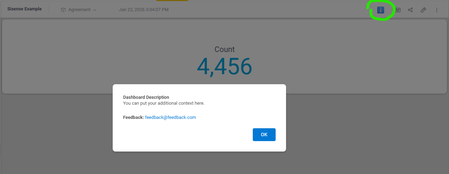
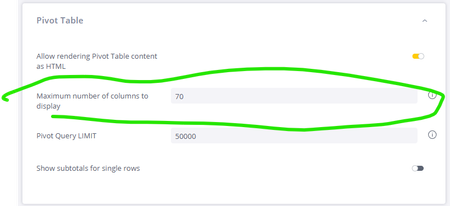
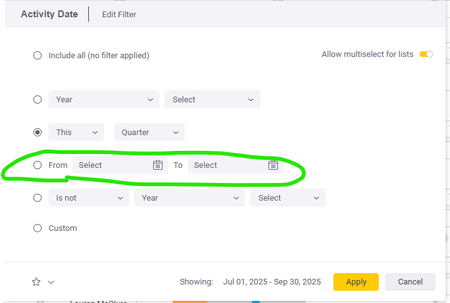
ContributionsMost RecentNewest TopicsMost LikesSolutionsAdding Dashboard Descriptions with a Modal Info Icon Every widget in Sisense supports descriptions, but what about dashboards themselves? Sometimes you need to explain a dashboard's purpose or guide users on how to interact with it effectively. We solved this by adding an info icon to the top toolbar that triggers a modal with the dashboard description. Add this script at the dashboard level and update the CONFIG object at the top with your custom text. We also included a feedback email in the configuration, making it easy for users to reach out with questions or suggestions. If you'd prefer, you could split this into a separate feedback button instead of including it in the description modal. Another nice touch: you can swap the ℹ️ emoji for a different icon to match the style of Sisense's built-in widget info icons. Let me know if this is helpful or if it this feature already exists and I have missed it. // Configuration - update these values for your dashboard const CONFIG = { feedbackEmail: '[email protected]', description: 'You can put your additional context here.' }; $(document).ready(function() { setTimeout(function() { // Clean up any existing instances $('#dashboard-info-icon, #dashboard-info-modal').remove(); // Create info button const infoButton = $('<button id="dashboard-info-icon" title="Dashboard info">ℹ️</button>').css({ cursor: 'pointer', background: 'none', border: 'none', fontSize: '20px', padding: '5px 10px', color: '#666' }); // Add button to toolbar (after Widget button if found, otherwise append to toolbar) const widgetButton = $('button:contains("Widget")').filter(':visible').first(); if (widgetButton.length) { widgetButton.after(infoButton); } else { $('.dashboard-toolbar').append(infoButton); } // Create modal const modal = $(` <div id="dashboard-info-modal" style="display:none; position:fixed; z-index:10000; left:0; top:0; width:100%; height:100%; background:rgba(0,0,0,0.5);"> <div style="background:white; margin:15% auto; padding:30px; border-radius:8px; width:500px; max-width:90%; box-shadow:0 4px 6px rgba(0,0,0,0.1);"> <h2 style="margin-top:0; color:#333;">Dashboard Description</h2> <p style="line-height:1.6; color:#555;">${CONFIG.description}</p> <p style="line-height:1.6; color:#555; margin-top:20px;"> <strong>Feedback:</strong> <a href="mailto:${CONFIG.feedbackEmail}" style="color:#0078d4; text-decoration:none;">${CONFIG.feedbackEmail}</a> </p> <div style="text-align:right; margin-top:20px;"> <button id="close-modal" style="background:#0078d4; color:white; border:none; padding:10px 24px; border-radius:4px; cursor:pointer; font-size:14px; font-weight:500;">OK</button> </div> </div> </div> `); $('body').append(modal); // Event handlers infoButton.click(function() { modal.fadeIn(200); }); $('#close-modal').click(function() { modal.fadeOut(200); }); // Close when clicking outside modal modal.click(function(e) { if (e.target.id === 'dashboard-info-modal') { modal.fadeOut(200); } }); // Close with ESC key $(document).keydown(function(e) { if (e.key === 'Escape' && modal.is(':visible')) { modal.fadeOut(200); } }); }, 1000); }); How to find the dashboard I need? Has anyone found a good solution to help users locate the dashboards they need? Some potential options that come to mind are key-word search or labels. Our reporting suite has grown so large that it’s becoming difficult for users to find what they’re looking for. Aside from streamlining our offerings (which we’re already working on using usage data), what else have you implemented to improve the user experience? Re: Give back the ability to manually key in dates Please please can you fix this to give back the ability to key in dates. Give back the ability to manually key in dates The new filter panel eliminated the ability to manually key in dates. Can we get that back? This is a pretty big regression and I have had many users complain about it. https://community.sisense.com/discussions/help_and_how_to/new-filter-regression/28434 Re: New Filter Regression I think that is a step backwards DRay Anyway we can get that functionality back? Re: New Filter Regression DRay Thanks! That documentation just says select. I am not able to manually key dates in. Are you? Re: How to increase the display more rows in Pivot Table? Yeah you can change this as an admin. Admin -> System Management -> Configuration -> pivot table New Filter Regression Hi! This might be user error, but did we lose the ability to key in dates with the new filter UI? This seems like a major miss if so. SolvedGive developers the ability to explore production without being able to modify right now we can only allow our developers to either edit models in test or read/use. With read/use they aren't able to actually see the cube in the data page. I need my developers to be able to explore connections, schemas and tables in prod without having the ability to actually make any changes. https://community.sisense.com/category/support/discussions/supportportal#case-detail:500Pk00000mKN4vIAG Re: Help with CI/CD Workflow for Sisense + GitHub Integration Hey DRay Dashboards and cubes