Feature Request: Expose build error details via /api/v2/builds endpoint
We're using the /api/v2/builds endpoint to track ElastiCube build outcomes (successes, failures, retries). The endpoint works well for tracking basic build task status, but we are running into severe limitations regarding failure visibility. Currently, when the build fails, the API response only returns a status of [Failed] with no accompanying error message or failure reason. The actual error detail is visible in the Sisense UI under the cube's build history, but there is no way to retrieve it through the REST API. Request: Expose the build error message or error category as fields in the GET /api/v2/builds and GET /api/v2/builds{buildId} response objects. Even a brief top-level error summary would be sufficient to make monitoring and alerting useful. This would benefit any team building operational dashboards and alerting scripts around Sisense build reliability, making automated monitoring truly actionable.45Views0likes0Comments
Adding Dashboard Descriptions with a Modal Info Icon
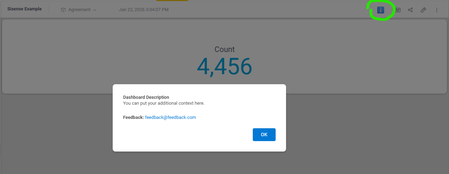
Every widget in Sisense supports descriptions, but what about dashboards themselves? Sometimes you need to explain a dashboard's purpose or guide users on how to interact with it effectively. We solved this by adding an info icon to the top toolbar that triggers a modal with the dashboard description. Add this script at the dashboard level and update the CONFIG object at the top with your custom text. We also included a feedback email in the configuration, making it easy for users to reach out with questions or suggestions. If you'd prefer, you could split this into a separate feedback button instead of including it in the description modal. Another nice touch: you can swap the ℹ️ emoji for a different icon to match the style of Sisense's built-in widget info icons. Let me know if this is helpful or if it this feature already exists and I have missed it. // Configuration - update these values for your dashboard const CONFIG = { feedbackEmail: '[email protected]', description: 'You can put your additional context here.' }; $(document).ready(function() { setTimeout(function() { // Clean up any existing instances $('#dashboard-info-icon, #dashboard-info-modal').remove(); // Create info button const infoButton = $('<button id="dashboard-info-icon" title="Dashboard info">ℹ️</button>').css({ cursor: 'pointer', background: 'none', border: 'none', fontSize: '20px', padding: '5px 10px', color: '#666' }); // Add button to toolbar (after Widget button if found, otherwise append to toolbar) const widgetButton = $('button:contains("Widget")').filter(':visible').first(); if (widgetButton.length) { widgetButton.after(infoButton); } else { $('.dashboard-toolbar').append(infoButton); } // Create modal const modal = $(` <div id="dashboard-info-modal" style="display:none; position:fixed; z-index:10000; left:0; top:0; width:100%; height:100%; background:rgba(0,0,0,0.5);"> <div style="background:white; margin:15% auto; padding:30px; border-radius:8px; width:500px; max-width:90%; box-shadow:0 4px 6px rgba(0,0,0,0.1);"> <h2 style="margin-top:0; color:#333;">Dashboard Description</h2> <p style="line-height:1.6; color:#555;">${CONFIG.description}</p> <p style="line-height:1.6; color:#555; margin-top:20px;"> <strong>Feedback:</strong> <a href="mailto:${CONFIG.feedbackEmail}" style="color:#0078d4; text-decoration:none;">${CONFIG.feedbackEmail}</a> </p> <div style="text-align:right; margin-top:20px;"> <button id="close-modal" style="background:#0078d4; color:white; border:none; padding:10px 24px; border-radius:4px; cursor:pointer; font-size:14px; font-weight:500;">OK</button> </div> </div> </div> `); $('body').append(modal); // Event handlers infoButton.click(function() { modal.fadeIn(200); }); $('#close-modal').click(function() { modal.fadeOut(200); }); // Close when clicking outside modal modal.click(function(e) { if (e.target.id === 'dashboard-info-modal') { modal.fadeOut(200); } }); // Close with ESC key $(document).keydown(function(e) { if (e.key === 'Escape' && modal.is(':visible')) { modal.fadeOut(200); } }); }, 1000); });72Views0likes0Comments
Filter to only show Relevant Dimension Values
Morning Sisense community! I have my Fact Table and a related Dimension Table. My dimension table contains more unique values than are actually present in the fact table. When I use a field from the Dimension Table as a filter, the filter displays all values from the dimension, even those that have no corresponding fact records. I only want the filter to show dimension values that are relevant to the data in the fact table. Example Tables: fact_table dimension_table id dim_id dim_id dim_name 1 1 1 one 2 2 2 two 3 1 3 three 4 2 4 four fact_table and dimension_table have a relationship in the EC based on dim_id Desired Outcome: In the filter based on dim_name, I only want to see "one" and "two", but currently, I see all four: "one," "two," "three," and "four." How do I achieve my desired outcome?209Views1like5Comments