Every Metric Happens Somewhere: Why the “Where” Dimension Is the Missing Layer in Modern Analytics
In our recent QBeeQ webinar, Every Metric Happens Somewhere, we explored why geospatial context is no longer a niche feature for specialized industries. It’s a core analytical dimension and one that can dramatically elevate engagement, insight discovery, and decision-making. You can view the recording, or keep scrolling for the highlights and key takeaways from the webinar. The Problem: Dashboards Without Geography Miss Patterns Traditional dashboards rely heavily on tables, bar charts, and line graphs. They show totals, trends, and rankings well. But they struggle to reveal spatial relationships. Consider common business questions: How many claims do we have? What’s our revenue by region? Which territories are underperforming? These are valuable questions, but they’re incomplete without geographic context. When you introduce the where dimension, new insights emerge: Clusters that only appear spatially Boundary effects between adjacent territories Pockets of unusually high or low performance Regional anomalies masked in aggregated totals From Niche Feature to Core Capability Maps were once considered specialized and useful for specific industries such as logistics, real estate, or field operations. That’s no longer true. Revenue, risk, compliance, performance, claims, customer distribution – these all happen somewhere. Geography cuts across industries. Approximately 80% of enterprise data already contains a spatial component. Most organizations simply aren’t leveraging it. Instead of placing a map as a static, standalone widget, leading teams are making it central to the analytical experience. Research shows interactive dashboards increase engagement and insight discovery. When you layer interactivity (zooming, filtering, panning) on top of geography, users uncover patterns faster and spend more time exploring. But friction often gets in the way. The Friction: Where Native Mapping Falls Short Many teams start with basic mapping tools that allow simple point plotting or polygon mapping. That works until analysis shifts to become more strategic. Common limitations appear quickly: Needing both points and polygons on the same map Wanting density visualizations or clustering Requiring multiple layers Enabling advanced drill behavior Supporting large-scale or time-based data When mapping tools can’t support these needs, one of three things happens: Maps sit unused on dashboards. Designers revert to traditional charts. Spatial thinking never becomes core to analysis. Remove frictions with the QBeeQ mapping solutions SuperMap: Practical Spatial Analytics for Everyday Use The SuperMap is built for operational decision-making, understanding what’s happening right now, and acting on it. This plugin includes a range of flexible, scalable features, delivered as a zero-code solution, designed for both dashboard builders and end users. Multi-Layer Mapping (Points + Polygons) - Overlay geographic territories such as counties or states with individual location points, allowing each layer to have its own KPIs, category breakdowns, and sizing logic for richer comparative analysis. Heatmaps and Radius-Based Points - Color polygons by one performance metric while simultaneously sizing map points by another, delivering multi-dimensional insight within a single, unified view. Clustering with Drill-In Behavior - As users zoom in, clustered points automatically separate to reveal individual locations, with clusters capable of displaying proportional category breakdowns such as hospitals, police stations, and post offices. Advanced Tooltips - Enhance map interactivity with tooltips that go beyond a single value by displaying multiple KPIs, raw metrics, and calculated insights to support deeper exploration. Jump-to-Dashboard Navigation - Enable users to click on a territory to instantly filter the entire dashboard or navigate directly to a more detailed analytical view for focused investigation. Measure Switching - Allow users to toggle between different KPIs on the same map without duplicating visuals, reducing dashboard clutter while increasing analytical flexibility. Geographic Hierarchy - Support seamless geographic drill-down across states, counties, zip codes, and other levels—either directly within the map interface or through a structured dropdown selection. Deck.gl Map: High-Performance, Large-Scale Exploration While the Super Map focuses on operational clarity, Deck.gl is designed for scale and trends over time. For teams working with event streams, logistics data, or large geospatial datasets, Deck.gl provides performance without sacrificing interactivity. This plugin enables: Arc layers Hex bin density visualizations 2D and 3D polygon layers High-volume point plotting Hierarchical spatial analysis The Bigger Picture: Making “Where” a First-Class Dimension Time has long been treated as a foundational analytical dimension. Geography deserves the same status. When you: Align metrics to business geography Enable exploration instead of passive observation Remove friction from advanced spatial analysis Combine interactivity with spatial context You don’t just make dashboards prettier. You make them more useful. Every metric happens somewhere. When you show that somewhere clearly, insights accelerate and decisions improve. At QBeeQ, we believe geography should be a first-class dimension in every analytical experience. Our mapping solutions are designed to remove friction, scale with your data, and make spatial insight accessible to every dashboard builder and decision-maker. Because when every metric happens somewhere, QBeeQ helps you see exactly where it matters most. QBeeQ is data consulting firm and also a Sisense Gold Implementation Partner.41Views1like0CommentsExtending pivot widget panel limits in Sisense using user groups
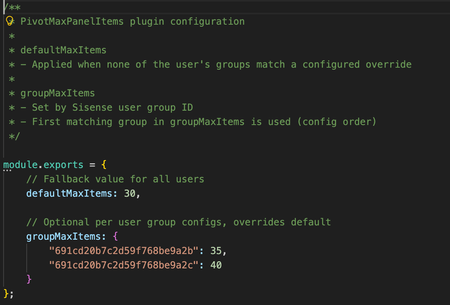
Overview Pivot widgets in Sisense are often used to explore and visualize complex datasets with multiple dimensions and measures. In some scenarios, users need to build very large pivot tables with many rows, columns, values, or filters. However, pivot widgets enforce internal panel item limits that can restrict how many fields and dimensions can be added to each panel. While these limits are useful for protecting performance, load time, and usability in general, they can become a constraint for advanced users working with large datasets or detailed analytical models. At the same time, organizations may want to apply different limits for different groups of users rather than increasing limits globally for everyone. This use case describes a Sisense plugin that automatically increases pivot panel limits as widgets load, with support for both a global default and optional overrides based on user group membership. The challenge By default, pivot widgets in Sisense can reach panel item limits that prevent users from adding additional dimensions or measures. This can affect: Analysts building large exploratory pivot tables Power users working with wide schemas or detailed hierarchies Dashboards that rely on complex pivots with many fields Manually adjusting widget configuration is not scalable, especially when dashboards contain many pivot widgets or when widgets are opened independently outside a dashboard. In addition, organizations often want different limits for different user groups, rather than applying a single global setting. It is important to note that if a very large number of dimensions are used in an individual pivot widget, that widget may have an extended load time. What the solution does The PivotMaxPanelItems plugin automatically sets the panel.metadata.maxitems value for every panel in pivot-type widgets as they load. At a high level, the plugin: Applies only to pivot widgets Updates all pivot panels (rows, columns, values, filters) Works for widgets inside dashboards and for widgets opened directly Supports a configurable default limit for all users Supports optional overrides based on Sisense user group membership The plugin runs on dashboard and widget load events, ensuring that pivot panel limits are applied consistently without requiring manual changes to individual widgets. Role and group-based configuration The plugin can apply different panel limits depending on the user’s Sisense group membership. This allows organizations to: Grant higher limits to advanced users or analysts Keep more conservative limits for general users Control behavior centrally through configuration If a user belongs to multiple configured groups, the plugin applies the first matching group based on the order defined in the configuration file. If no group matches, the default limit is used. This approach provides flexibility while keeping behavior predictable and easy to manage. How it is used Configuration is handled through a simple configuration file included with the plugin. Administrators can define: A default maximum number of items per pivot panel Optional overrides for specific Sisense user groups Once configured and installed, the plugin will likely require minimal ongoing maintenance in most circumstances. It applies automatically whenever pivot widgets are initialized. The full plugin is attached as a Zip file to this article and is available to download. The code is not compressed or obfuscated, and can be modified as needed, or used as example code for similar plugins. The plugin can be installed as a standard plugin by placing the decompressed folder into the plugin folder. The plugin includes a Readme file with further information. Why it’s useful This approach allows organizations to remove artificial constraints on pivot widget design while still maintaining control over performance and usability. Key benefits include: Enabling larger and more flexible pivot tables Reducing manual widget configuration and rework Applying consistent behavior across dashboards and standalone widgets Supporting different usage patterns across user groups Centralized control through a single configuration file The solution is particularly valuable in environments where advanced users need more flexibility without changing defaults for all users. Outcome With the PivotMaxPanelItems plugin in place, pivot widgets can support more dimensions without manually adding widget scripts. Advanced users gain the flexibility they need, while administrators retain control over limits at the group level through simple configuration. By applying limits automatically and consistently at load time, the plugin ensures predictable behavior across dashboards and widgets, supporting scalable group and role-aware analytics and visualization in Sisense. Screenshots Without a plugin, if a panel type includes too many items, the Add Panel Button is hidden With the plugin, the Add Button does not disappear when below the new limit, as many dimensions and fields as needed can be added to the widget.321Views0likes3Comments
Dashboard filter limits the list selection
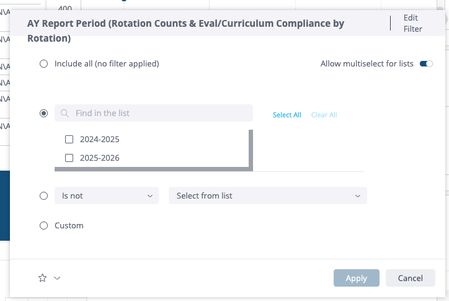
I have a dashboard filter that is used to select specific annual reporting periods. For example: 2025-2026 The field should include all the reporting periods for each data model. Meaning if a data model has reporting periods that range from 2022 to 2026, the selection list should include: 2022 - 2023 2023 - 2024 2024 - 2025 2025 - 2026 However, for one particular field, the listing does not include anything earlier than 2024 - 2025 (See screen capture) However, if I select Include all...My results in the dashboard widget will include data from all 4 report periods. Any suggestions as to why this is happening?Solved409Views0likes2Comments
Can Explanations be Relevant?
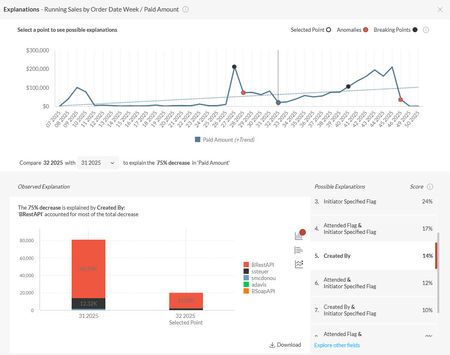
We are interested in rolling out Explanations to our clients, but I've hit a block and need some guidance. I think that the source of the issue may be our use of null replacement values in our data models. We don't allow data to join out of a query and instead ensure that all fact data joins to a null-replacement row in our dimensional tables. For example, given a fact table of product PURCHASES, imagine it was possible to sell those products at a discount in some orders. Assume that the fact table then joins to a dimension table of DISCOUNTS. Most purchases do not have a discount, but some do. Without a null-replacement row in the DISCOUNTS table, adding a field from that dimensional table onto a widget will limit the results in the widget to only fact rows with a discount. In our models, we would replace the null discount key in the fact table with a value that joins to a null-replacement row in the DISCOUNTS table. For example, replace null with -999999 in the fact table and have a row in DISCOUNTS with [id] = -999999 and a [description] = "(none)". The problem we're running into with Explanations is that the feature is presenting only the most useless information as being the most probable explanations. For example, when a single discount exists in the data set, then 99.9% of the PURCHASE rows have a "(none)" DISCOUNT, which is deemed this highest scoring field. More generally it seems that Explanations just reports back the most highly probably explanations as those fields where the member in the field is the commonly present in the data anyway, and it's just reflecting the raw change in fact data. For example, here's an image where the drop in revenue is explained by the drop in revenue from web sales (BRestAPI). But web sales constitute a larger over proportion of sales after the drop (89% up from 82% in the prior period). And another example in which an "Initiator Specified Flag" is whether or not an alternate order "owner" has been specified on a order. Specifying an alternat owner is allowed ("Y"), but not a common practice ("N"). Again, we're just seeing a reflection of sales in the explanation. Is there anything we can do to make the explanations discovered by Sisense relevant? The way it's functioning now, it would be better if Sisense DID NOT recommend possible explanations and just let the user Explore Other Fields immediately without having to wait for Sisense to return the list of completely irrelevant fields. I've tested this across many of our clients' data sets and found the same behavior. Hopefully there are options for us to improve the recommendations or maybe prevent it from recommending.172Views0likes2CommentsViews bookmarking: Use case of a financial technology company
Introduction FlexTrade is a global provider of multi-asset execution and order management systems, supporting trading workflows across asset classes, venues, and strategies. Their platforms generate large volumes of highly detailed data that users rely on for day-to-day analysis and decision-making. Companies like FlexTrade operate in an environment where users need deep, flexible analysis across a wide range of dimensions: asset class, venue, strategy, region, client, trader, time, and more. Pivot tables are a natural fit for this kind of detailed, highly dimensional analysis. However, as the number of dimensions grows, teams quickly hit a trade-off: Putting all dimensions into a single widget becomes expensive to query and difficult to interpret. Creating separate widgets for every dimension (or combination of dimensions) leads to bloated dashboards, slower load times, and a poor user experience. This use case focuses on how BloX was used to solve this problem by introducing view bookmarking, a flexible way for users to switch between different slicing configurations (in this example, a set of four dimensions) within a single widget. It also highlights how BloX can be used not just for custom visualizations, but also for building small, purpose-driven mini apps directly inside a dashboard. What the solution does This solution uses BloX to manage view bookmarks for a pivot table. Instead of permanently adding all dimensions to the widget, BloX acts as a control layer that lets users select dimensions to include in the pivot at a time. Each selected combination can be saved as a view bookmark, representing a specific slicing configuration of the same underlying pivot. With this solution, users can: Select up to four dimensions to apply to the pivot table Save the selected combination as a personal bookmark Load and reuse previously saved bookmarks Delete bookmarks that are no longer needed Up to 20 bookmarks are supported out of the box, and all bookmarks are user-specific, allowing each user to maintain their own set of preferred analytical views. The solution also includes basic validation and error handling, such as preventing empty and duplicate bookmark names. From a technical perspective, BloX dynamically updates the pivot’s metadata. From a user perspective, it feels like switching views within a single widget. This keeps the analysis flexible while the dashboard structure remains simple and performant. Why it’s useful Scales to 10+ dimensions without UI overload Multi-asset trading analysis often requires exploring many dimensions, but not all at the same time. This solution allows FlexTrade users to work with 10+ dimensions while only surfacing the few that matter for the current question, resulting in less visual noise, lower cognitive load, and faster insights. Maintains dashboard performance and keeps dashboards clean and maintainable By avoiding massive pivots with every dimension enabled or dozens of near-duplicate widgets, the solution keeps queries efficient and dashboards responsive, even as analytical depth increases. One widget with dynamic views replaces an entire grid of narrowly focused widgets, resulting in dashboards that are easier to navigate, faster to load, and easier to maintain. Attachments BloX-ViewDimensionBookmarks.dash.txt (example dashboard using the Sample ECommerce cube) BloXActionsForBookmarks.zip (BloX actions' scripts) ViewsBookmarkV2-2025-12-29.json (BloX template for the view bookmark widget, also included in the .dash file above). Note: Remove the .txt extension before importing the dashboard (.dash) file. The BloX widget also includes a script that automatically populates the dropdown menus with the available dimension names and existing bookmarks based on the widget’s metadata. Here is the script: // Dropdown classes used in the BloX code const dropdownClasses = [ "dimensionDropdown", //dropdowns for selecting the four dimensions "bookmarkDropdown" // dropdown for selecting existing bookmarks ]; const valueToDisable = "Select"; // placeholder value to disable widget.on('ready', function() { dimensions = widget.metadata.panels[0].items; dimensionTitles = dimensions .map(i => i.jaql.title); // Add each dimension title to the dimension dropdowns dimensionTitles.forEach(function(title, index) { $('.dimensionDropdown', element).append( '<option value="' + (index + 1) + '">' + title + '</option>' ); }); bookmarks = widget.metadata.panels[1].items; bookmarkTitles = bookmarks .filter(i => !i.disabled) // keep only not disabled .map(i => i.jaql.title); // extract title // Add each existing bookmark title to the bookmark dropdown bookmarkTitles.forEach(function(title) { $('#bookmarkDropdown', element).append( '<option value="' + title + '">' + title + '</option>' ); }); // Disable placeholder values from selection dropdownClasses.forEach(cls => { $(`.${cls}`).each(function () { let $select = $(this); if (!$select.is("select")) { $select = $select.find("select"); } if ($select.length === 0) return; $select.find("option").first().prop("disabled", true); }); }); });272Views3likes1Comment
Last 4 digits formula
I am an ESO user and am trying to create a widget that will show only the final 4 digits of an incident number. The beginning of the incident numbers are not always the same but the last 4 are what I need. In excel I use =right(A2,4). I then use this list in excel with an =if formula (=if(c3-c2=1,"","missing") to show me any incident numbers that were not reported. If there is a way to make this part of the widget also, it would make my job that much easier. Thank you.166Views0likes5Comments
Filtering Orders by Grouped Filter Criteria with Optional Nulls
Afternoon SS community, We need a filtering mechanism in our business where users can apply filter groups to retrieve specific orders. Each filter group consists of three fields: location_id, category_id, and client_id. When a filter value is NULL, it should behave as a wildcard and match all values for that field. The goal is for users to select one or more filter groups at a time and retrieve all matching orders — without returning duplicates, even if the same order matches multiple groups. Currently, I can filter by individual fields, but I’m unsure how to structure things to support grouped filters like this without requiring users to select each field individually. The business requirement is to let users select entire filter groups, not individual filters. Sample Data: order_id location_id category_id client_id 1 1 1 1 2 1 1 2 3 2 2 3 4 2 3 4 5 2 1 4 Filter Group Examples: Group 1 location_id: 1 category_id: 1 client_id: 1 Expected Result: Order 1 only Group 2 location_id: 1 category_id: 1 client_id: NULL Expected Result: Orders 1 and 2 Group 3 location_id: 2 category_id: NULL client_id: NULL Expected Result: Orders 3, 4, and 5 How can I design a filtering logic that: Accepts multiple filter groups (with NULLs acting as wildcards) Returns all matching orders Avoids duplicate orders if they match more than one group Any guidance or sample query structure would be greatly appreciated! Thanks in advance.302Views0likes6CommentsSeeking Best Practice for Live Detail Reporting in Sisense (Replacing SSRS)
Afternoon Sisense community, Our team is looking to replicate the functionality of a crucial SSRS report within Sisense. This report is used by a department to obtain a detailed list of jobs for a specific month. The workflow involves: Running the report for a selected month (typically the current or previous month). Reviewing the output for discrepancies. Updating the source system based on the review. Re-running the report immediately to verify the changes (requiring live data). Current Sisense Implementation & Performance Issue I've attempted to recreate this report's dataset using a Live Model connected to a Redshift SQL View. The view is complex: It contains approximately 50 columns of detailed data. It involves JOINs across 15 different tables to consolidate all necessary dimensions and metrics. The Issue: The performance of this Live Model is unacceptable. Users are accustomed to the SSRS report running a stored procedure and returning the filtered data in under 30 seconds. My Sisense Live Model is timing out. Constraints & Goal Requirement: The data must be live (no ElastiCube, as users need immediate reflection of system changes after updates). Target Performance: Sub-30-second return for monthly filtered data. Request for Guidance Given the high number of columns, multiple joins, and the strict requirement for live data with fast filtering (specifically by month), what would be the recommended best practice for implementing this detailed report in Sisense? Are there specific Sisense configurations, data modeling techniques for live connections that would address this performance bottleneck while meeting the "live" requirement? Thank you for your insights!270Views0likes6CommentsDashboard not auto-refreshing for mobile app performance data
Hi everyone, I’m using Sisense to track performance metrics from my mobile entertainment app — like daily active users, watch duration, and session time. Lately, I’ve noticed that some dashboards don’t refresh automatically, and I have to manually reload them to see updated results. I’ve already checked the data connector and refresh schedule, but everything looks fine there. Could this delay be due to caching, or maybe a dashboard setting I’m missing? Would appreciate any suggestions or settings to look into — thanks in advance!131Views1like4CommentsCASE WHEN Statements
We are using CASE WHEN statements for our customers looking to create their own booleans. We use live connection so these cannot be added to the elasticube. We are looking to complete the following: CASE WHEN [Timeline Type] = "emergency department" AND [Vital Systolic Blood Pressure] < 90 THEN 1 ELSE 0 END Additionally, customers would like to know the percentage of time the above is yes. Can this be completed in the function area or do we need to handle this in our transformation pipeline?804Views0likes1Comment