How to add Scientific Units to a pivot table
Hello Sisense world, Sometimes you are working with scientific units or any units for that matter that are not available in the number formatting within Sisense. i.e. Currency values, number or percentage. With the widget edit script provided below you can add a scientific unit or any type of symbol that lets your audience know what the measure/value is being calculated by. const myTarget = { type: ['value'], values: [ { title: 'Total Quantity' // desired column } ] }; widget.transformPivot(myTarget, function(metadata, cell) { if (cell.value !== null && cell.value !== undefined) { cell.content = cell.value + " J⋅s"; } }); Here at Cause and Effect we provide a lot of useful solutions to enhance your analytics with Sisense, feel free to reach out to us to enhance your Models, Dashboard, Embedded Dashboards, etc. We have helped out hundreds of clients to produce dashboards that are easily digestable to their audience and bring their KPI's to life. Rafael Ferreira Cause + Effect Strategy [email protected] www.causeandeffectstrategy.com31Views2likes0Comments
Show only last few weeks of Running Total that's calculated from beginning of time
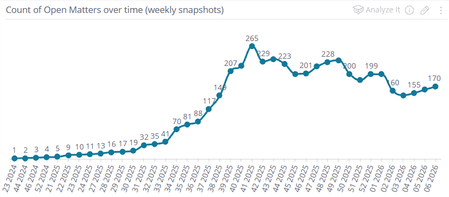
Hello! I've got a Running Total formula that is working as expected, but it only works properly if my widget is showing back to the beginning of time. I'd like to filter it so I only see the running total over the last few weeks, but when I filter, it messes up the running count and it's no longer accurate. I need to somehow calculate the prior running total so the filtered range picks up from the right place and continues calculating correctly afterward. How can I do this? NOTE: I do not have access to the Elasticube setup, so I cannot modify any tables, create any custom columns, run custom SQL, etc. I can only work with what I have available to me in the Sisense UI. Also, we're on an older Windows version of Sisense (v8.2.1.10110), not Linux, so I may not have all of the current features in Sisense :( Anyway, the running total I'm calculating is the number of open matters at any given point in time. Each matter can have an "Open" event and a "Closed" event. This is on a custom table (we had someone create for us) called "Matter Events". Rather than each matter being a single row with open and close date columns, it's structured as just a "Matter Date" and "Matter Event" column, and matters can show on multiple rows, once for each time they were opened or closed. From this, I calculate a running total by treating each Open event as a +1 while each Closed event is considered a -1. If you add up every event from the beginning of time up to a given date, it should equal what the open total was on that date. Generally speaking, if I measure from the beginning of time up through today's date, the total matches the actual current number of open matters. So far so good. Here's the formula I'm using: RSUM( SUM([Matter Number], IF( ([# of unique Matter Event Type],[Matter Event Type (filtered to "Open")])=1, 1, 0 ) ) - SUM([Matter Number], IF( ([# of unique Matter Event Type],[Matter Event Type (filtered to "Closed")])=1, 1, 0 ) ) ) Basically: the inner IF formulas should be evaluating to a "1" if they match the filter (Open/Closed). I calculate the Open and Closed counts separately and subtract one from the other to arrive at some Net total, at the level of each Matter Number. Then the Running Sum formula wraps this entire thing so it properly tracks over time. This seems to work well in a line chart: However: I just want to show the last 4 weeks of open counts. If I just filter the widget based on the Matter Event Date, I get this: This is because the Running Total formula just starts from 0 each time. How can I avoid that? I know one way I can do that is to manually key in a static value into the formula to make it line up correctly. For instance, if I just add a "+160" to the end of the formula, everything lines up correctly: This is essentially what I need. However, the way I got there isn't ideal because the dashboard in question will always be a rolling four week lookback, so I would have to manually update that adjustment in the formula each week. Also, it would be nice if I could just filter to any arbitrary date range and see accurate totals for that period without having to figure out the prior counts manually. Is there a way I can dynamically calculate this pre-filtered-date-range total so the Running Total works correctly? I know there's an "ALL" formula that seems like it might be useful in this regard, but no matter where I try to place it in my existing formula, I can't get it to work without a syntax error of some kind.Solved50Views1like1Comment
Ecube build SQL tagging
Hello, We are working with snowflake data source and have requirement to capture meta for ecube build query from data source. Please suggest how I can set query tagging ? SET QUERY_TAG = "{Team_Name:TEAM, Application:Sisense ecubename}" I did check pre build plugins but did not get option to set data source session settings or initial sql settings in python script. Please suggest.80Views1like2CommentsHow to create a week date range with start and end if the week for each week?
Hi DRay Liliia_DevX , I am looking to create a week range for a line/column/bar chart where lets say it is the 30th week of 2024, then the 31st, 2024 and I want the 30th and 31 st week to shows Sep 24 - Sep 31 2024, etc. Is there a way to achieve this within the model or in the back end of a live data model.Solved182Views1like4Comments
Dashboard not auto-refreshing for mobile app performance data
Hi everyone, I’m using Sisense to track performance metrics from my mobile entertainment app — like daily active users, watch duration, and session time. Lately, I’ve noticed that some dashboards don’t refresh automatically, and I have to manually reload them to see updated results. I’ve already checked the data connector and refresh schedule, but everything looks fine there. Could this delay be due to caching, or maybe a dashboard setting I’m missing? Would appreciate any suggestions or settings to look into — thanks in advance!115Views1like4CommentsQuerying Model in Text Widgets?
Hi DRay Liliia_DevX Is it possible to query your model in a text widget to display a value? For example say I have a text widget that says Total Revenue: {Total Revenue} this part coming from your model? I know this can be achieved in BloX but BloX does not work with Compose SDK so I am trying to see if this works in a text widget.Solved237Views1like5CommentsFilter to only show Relevant Dimension Values
Morning Sisense community! I have my Fact Table and a related Dimension Table. My dimension table contains more unique values than are actually present in the fact table. When I use a field from the Dimension Table as a filter, the filter displays all values from the dimension, even those that have no corresponding fact records. I only want the filter to show dimension values that are relevant to the data in the fact table. Example Tables: fact_table dimension_table id dim_id dim_id dim_name 1 1 1 one 2 2 2 two 3 1 3 three 4 2 4 four fact_table and dimension_table have a relationship in the EC based on dim_id Desired Outcome: In the filter based on dim_name, I only want to see "one" and "two", but currently, I see all four: "one," "two," "three," and "four." How do I achieve my desired outcome?176Views1like5CommentsDashboard Design Guard - A plugin for enforcing dashboard best practices and organizational standards
The Dashboard Design Guard plugin enforces dashboard design best practices and organizational policies by placing configurable guardrails directly into the dashboard creation experience.571Views1like6Comments