Using Native Javascript Date Calculations To Modify Sisense Date Filters
Sisense natively supports various types of date filter functionalities. However, there are instances where a dynamically updating date filter is desired based on dynamically changing conditions such as the current date. Such a filter may not precisely align with the filters provided in the Sisense UI. One approach to achieve this custom behavior of a dynamically updating filter is through the use of dashboard or widget scripting.6.1KViews3likes13CommentsSolutions to commonly found issues when setting up a new Sisense ComposeSDK project during beta
Solutions to commonly found issues when setting up a new Sisense ComposeSDK project during beta The first two solutions involve issues with installing ComposeSDK dependencies during the beta period while the ComposeSDK dependencies are hosted on GitHub, and GitHub is the preferred method for access. When ComposeSDK exits the beta period, the dependencies will be available on other sources that will not require a custom authentication token. Problem - Errors when installing Compose SDK dependencies from GitHub Solution - Make sure a GitHub token is active in your environment configuration, and that your GitHub account is fully active and accessible. If a custom GitHub token is used, ensure the custom token has "Read Repository" permission. Alternatively, you can use a standard full-access GitHub token. Make certain the entire token is included when copied into the terminal. Problem - SSL errors when downloading ComposeSDK dependencies from GitHub Solution - When downloading from a VPN network, you may experience this error. You can resolve this by making the following npm config change with this command: npm config set strict-ssl false In Yarn, the equivalent command is: yarn config set "strict-ssl" false -g Problem - CORS errors in the browser console when connecting to a Sisense server with ComposeSDK Solution - Add the hosting domain to the Admin > Security Settings page. Also, make sure CORS is enabled. A common issue is a trailing slash at the end of the URL when copied from the URL directly; these must be removed when setting CORS exemptions. Include the first part of a domain (the subdomain, such as subdomain.domain.com) as well as the port number if included. Anything in the URL after the first slash is not required and is not part of the domain. Problem - Sisense authentication errors when connecting to a Sisense server with ComposeSDK Solution - Do not include "Bearer" at the beginning of the token parameter; this is not required in ComposeSDK and is added automatically by ComposeSDK. When "Bearer" is present explicitly, it will be repeated twice in the header. Make sure the entire token is copied and test the token using a program such as Postman or Curl and any documented Sisense API if you are unsure if the token is valid.3.6KViews2likes0CommentsConverting an Existing Sisense Widget to a Dynamic ComposeSDK Widget Component
Using either the widget Sisense API's, or the Sisense widget JS API object, it is possible to determine all components and parameters of a widget required to create an equivalent dynamic ComposeSDK widget component. This approach allows the extraction of all components and parameters of a widget, enabling the creation of an equivalent dynamic ComposeSDK widget component without directly referencing or relying on a specific widget or dashboard ID. The metadata of an existing widget contains all the information needed to create a dynamic version of an existing Sisense widget. It is also possible to use an existing widget ID and dashboard ID to render an existing widget in ComposeSDK, but this does not take full advantage of the capabilities of ComposeSDK to generate new widgets directly.2.4KViews2likes0CommentsAnimating Sisense Title Elements and Widgets Using CSS Animations
Animating Sisense widget elements and dashboard and widget titles is a possible way to enhance the visual appeal and user experience of a Sisense dashboard, or highlight a particular part of a dashboard or widget. Sisense widgets and titles are standard HTML elements, making it possible to apply animation using solely standard CSS stylesheets, much like other HTML elements on non-Sisense pages. Animations can include effects like fading widgets in or out and cyclic changes in text color of widgets or titles.1.6KViews1like0CommentsMaximizing Performance Insights: Why Sisense Offers a Complementary Edge for k6 Test Results
In the quest for optimal software performance, thorough testing and insightful analysis are paramount. Performance testing tools like k6 equip developers with the means to simulate various user interactions and stress scenarios, ensuring applications can endure real-world demands.1.5KViews1like0CommentsExpanding on Using Native Javascript Date Calculations To Modify Sisense Date Filters
Sisense offers native support for various types of date filter functionalities, and also allows users to create and modify dynamic filters entirely using dashboard or widget scripting. This article expands upon the code samples discussed in the previous article on this subject, showcasing additional examples. These examples further demonstrate how to leverage JavaScript date objects (which use Unix time) for advanced date filtering in Sisense. Sisense date filters typically utilize dates in standard calendar-based string date formats. To expand on the code samples shared in the previous examples which were based on a filter based on a set time period from today, and based on user comments in the previous article, three additional examples are included in the article.1.5KViews2likes0Comments 1.4KViews0likes1Comment
Demonstrating ComposeSDK Styling Of Sisense Dashboard Widgets
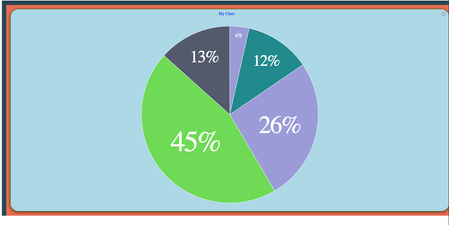
Demonstrating ComposeSDK Styling Of Existing Sisense Dashboard Widgets When developing ComposeSDK embedded applications, there are three principal techniques for embedding or converting an existing Sisense widget. Discussing each method, and some of the benefits associated with them: Direct Rendering existing Sisense Dashboard Widgets with the DashboardWidget Function: The expedited approach involves rendering an existing Sisense widget directly using the DashboardWidget function. While this method ensures swift integration, it does not allow all data options of the widget to be edited within ComposeSDK or defined as variables, one of the features of native ComposeSDK widgets. Nevertheless, customization of other parameters, including styling, remains feasible based on the props used. Mandatory parameters include the dashboard and widget ID, which allow the rendering of an existing Sisense widget. Widget Recreation using ComposeSDK to Create Native ComposeSDK widgets An alternative method, detailed in this article, entails recreating the widget as a native ComposeSDK widget by employing an existing Sisense widget as a template for a new not directly linked ComposeSDK widget. Though potentially more time-intensive, this approach yields a fully customizable native ComposeSDK widget. It stands independent of any specific widget or dashboard on the Sisense server, enabling complete independence to changes made to the original dashboard or widget, or complete deletion of the widget used as the model. Loading Widget Metadata with the useGetWidgetModel function Leveraging the useGetWidgetModel ComposeSDK function provides a middle option, detailed in this article. It allows automating the return of widget metadata from an existing Sisense widget, facilitating dynamic modifications within ComposeSDK. This method balances somewhat the autonomy of entirely recreating a widget as a native ComposeSDK widget and rendering a widget as a Dashboard Widget. In this article, we will demonstrate and discuss the DashboardWidget rendering feature, a powerful capability within ComposeSDK that allows the embedding and rendering of existing widgets. The focus will be on exploring the large number of styling options provided by this feature. Among the properties of a DashboardWidget component, the styleOptions parameter determines the styling. This parameter accepts a DashboardWidgetStyleOptions object, which includes a large number of parameters documented in detail below and in this documentation page. To demonstrate a practical implementation of using these styling options, the following code example showcases a Compose DashboardWidget utilizing all documented parameters within the DashboardWidgetStyleOptions object. import { DashboardWidget } from "@sisense/sdk-ui"; export function ComposeSDKChart(props) { let styleOptions = { "backgroundColor": "lightblue", "border": true, "borderColor": "green", "cornerRadius": "Large", "shadow": "Dark", "spaceAround": "Large", "header": { "hidden": false, "titleAlignment": "Center", "backgroundColor": "lightblue", "titleTextColor": "blue" }, "height": 200, "width": 200 }; return (<DashboardWidget widgetOid={'65ab8958857ff900335db870'} dashboardOid={'65ab8948857ff900335db86e'} styleOptions={styleOptions} title={"My Chart"} />) } The final result in this example is the widget below, showing the effect of this styling in this specific case: Discussing each style option individually, including the type of parameter accepted by each style setting. backgroundColor: Type: string - Specifically a string containing an HTML color Description: This option sets the background color of the widget. In the example, the background color is set to "lightblue," a preset standard HTML color code that is equal to #ADD8E6 as a hex color code. border: Type: boolean Description: This option determines whether the widget container has a border or not. In the example, the border is enabled with the value set to true, adding a defined boundary to the widget that can be styled. borderColor: Type: string - Specifically a string containing an HTML color, Description: Specifies the color of the widget container's border. cornerRadius: Type: "Large" | "Medium" | "Small" - Three specific options set as specific strings Description: Defines the corner radius of the widget container, similar to the CSS property of the same name, allowing for customization of the widget container's shape. header: Type: object- Contains various parameters that control the styling of the header and title. Description: A style object to customize the widget header. It includes options like background color, divider line toggle, divider line color, header visibility toggle, title alignment, and title text color. header.backgroundColor: Type: string - Specifically a string containing an HTML color Description: Sets the background color of the widget header. header.dividerLine: Type: boolean Description: Controls the visibility of the divider line between the widget header and the chart. header.dividerLineColor Type: string - Specifically a string containing an HTML color Description: Specifies the color of the divider line, if visible. header.hidden Type: boolean Description: Toggles the visibility of the header and title. header.titleAlignment Type: "Left" | "Center" - Two specific options set as specific strings Description: Alignment of the title within the header. The example centers the title using the value "Center. header.titleTextColor Type: string- Specifically a string containing an HTML color Description: Specifies the text color of the header title. height: Type: number - Number in pixels Description: Sets the total height of the widget in pixels. If not explicitly set will use the height of the container. width: Type: number - Number in pixels Description: Sets the total width of the widget in pixels. If not explicitly set will use the width of the container. shadow: Type: "Medium" | "Light" | "Dark" - Three specific options set as specific strings Description: Defines the shadow level of the widget container, similar to the CSS style of the same name. Effects styling only when spaceAround is defined. spaceAround: Type: "Large" | "Medium" | "Small" - Three specific options set as specific strings Description: Specifies the space between the widget container edge and the chart. With these styling options, one can modify the visual styling of a ComposeSDK DashboardWidget, enabling a large amount of style customization for an otherwise unchanged existing dashboard widget selected from an existing dashboard on the Sisense server. While ComposeSDK DashboardWidgets may not offer the extensive modification capabilities available to native ComposeSDK widgets, such as the ability to completely modify all of widget data options, they still provide a large degree of extensive visual customization through the use of styling options. Share your experience in the comments!1.4KViews1like1Comment