🚀 Scale your Analytics faster: Unveiling the Sisense "Co-Pilot" Stack for Natural Language Ops (NLOps)
The Agentic Shift in Sisense Environment Management For years, Sisense has excelled at helping users answer the critical "What" of their data—the insights and analytics. However, as environments scale, the "How" of management—governance, migrations, and schema optimization—has remained a technical, manual task The Sisense Field Engineering team is excited to introduce the experimental Sisense "Co-Pilot" Stack to help you manage the mundane tasks in Sisense. Meta-Management: The Operational Distinction It is crucial to differentiate this stack from the official Sisense AI Assistant. While the native product AI focuses on data analysis (e.g., “What was our revenue last quarter?”), the “Co-Pilot” Stack is specifically engineered for Meta-Management. It empowers users to manage their Sisense environment with AI-driven autonomy and "as-code" precision. This agent handles the underlying infrastructure, executing tasks like: Auditing unused fields Migrating dashboards Orchestrating complex workflows across different environments. Shifting the focus from the data in the charts to the operational engine that powers the entire Sisense ecosystem. 🛠️ The Co-Pilot Stack: Three Modular Solutions The "Co-Pilot" Stack is designed for synergy but is comprised of three independent components. Each module can be utilized as a standalone solution to address specific environmental challenges, depending on your technical requirements: 🐍 PySisense SDK: The "As-Code" Co-Pilot This is an independent, high-performance Python SDK. It enables developers to tackle management complexities through direct scripting, moving beyond manual REST API calls to embrace standardized, repeatable "Platform-as-Code" automation. Best for: developers and engineers automating Sisense asset management, programmatic governance, and large-scale environment orchestration via code. Read the Deep Dive: Mastering Programmable Environment Management ➡️ 🌐Sisense Meta-Management MCP Server: The Universal Bridge The Meta-Management MCP Server is a standalone component that sits in front of your Sisense environment. Under the hood, it uses the PySisense SDK to expose environment operations as “AI-ready tools,” so external AI agents like Claude Desktop can run governance, migration, and admin workflows directly—without you having to build a custom user interface. Best for: Teams that use a central AI orchestrator to coordinate Sisense operations alongside other enterprise systems and tools. Read the Deep Dive: Connecting Sisense to the Global AI Ecosystem ➡️ 3. 🤖 FES Assistant: The Agentic Sisense Co-Pilot A full, turnkey AI application that delivers a chatbot-style experience. It brings the SDK and MCP server together into one conversational UI, so you can manage your Sisense environment—build models, migrate assets, and run admin tasks—just by chatting with your AI sidekick. Best for: Admins, Data Designers, and Dashboard Designers who want to move fast and automate workflows without writing code. Read the Deep Dive: Chatting with your Infrastructure ➡️ 👥 Empowering Every Persona The “Co-Pilot” stack is designed for everyone in the Sisense ecosystem, not just administrators: 📈 For Dashboard Designers: Locate assets instantly, validate filters and formulas, and run quick environment checks without clicking through menus. 🏗️ For Data Designers: Audit models by identifying unused fields, validating joins and M2M relationships, and catching issues early using natural language. 🛡️ For Admins: Execute cross-tenant/environment migrations, bulk governance, and ownership/permission changes with built-in safety checks and approval loops. 🤝 Support and Contributing This is an experimental, community-contributed project maintained by Sisense Field Engineering and provided “as-is” (not a GA Sisense feature). Support: Do not open a GSS ticket. This project is not supported through standard Sisense Customer Support. For installation help, usage questions, or issues, contact your Customer Success Manager (CSM). Your CSM will route requests and feedback to the appropriate Field Engineering contact. Community users should report bugs via GitHub Issues and include logs plus clear reproduction steps. Contributing: Feature requests and improvements are welcome. Use GitHub Issues to propose ideas and report gaps. Submit Pull Requests (PRs) for fixes, enhancements, or documentation updates. Share feedback and learnings through the community resources linked above to help guide future iterations. Appendix: Full Disclaimer and Security Notes Community-Contributed Tool from Sisense Field Engineering This project is an experimental tool developed by Sisense Field Engineering to facilitate customer learning and exploration of Sisense capabilities. While maintained by Field Engineering, it is shared "as-is" to encourage feedback and experimentation. Important Disclaimer: This tool is not part of the core Sisense product release lifecycle and does not undergo the same validation, support, or certification processes as generally available (GA) Sisense features. It is intended to complement, not replace, officially supported Sisense features. Technical & Security Considerations Deployment & Execution Control: Local SDK Usage (PySisense): All processing logic runs locally on your machine or server. No data is transmitted to Sisense Field Engineering. Self-hosted Components (FES Assistant / MCP Server): These components are designed for deployment within your own environment (on-prem or VPC). You maintain complete control over infrastructure, security configuration, access controls, and logs. Data & LLM Handling: LLM Feature Status: The FES Assistant summarization feature is disabled by default. Data Transmission: When the summarization feature is enabled, responses retrieved via the Sisense SDK may be sent to your chosen Large Language Model (LLM) provider for processing. Third-Party Clients: When using the MCP Server with third-party clients (e.g., IDE agents or desktop assistants like Claude Desktop), data retrieved from Sisense is passed directly to the client’s LLM. Customer Responsibility: Customers are responsible for selecting an LLM provider that meets their organization’s data privacy and security requirements. Recommended Usage Guidelines To ensure secure and effective use of this experimental tool: Environment: Use the tool primarily in sandbox or non-production environments. Access: Utilize a dedicated Sisense service account with limited privileges. Validation: Thoroughly review and validate the tool's behavior before any broader adoption within your organization.289Views1like0Comments🐍 PySisense: Programmable Sisense Environment Management
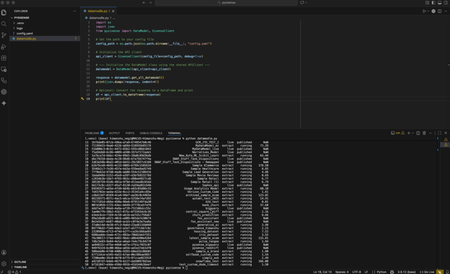
⚠️ Experimental Project Notice PySisense is an experimental, community-contributed Python SDK from Sisense Field Engineering, shared “as-is” for learning and experimentation. It is not a GA Sisense feature and is not supported through standard Sisense Customer Support. PySisense runs locally in your environment. You control where it runs, which credentials it uses, and what permissions it has. Use a sandbox first and validate behavior before broader adoption. PySisense is a Python SDK designed for structured, repeatable interaction with the Sisense API. It turns common “environment work” (governance, migrations, lifecycle management, and audits) into clean Python methods so teams can manage Sisense like a platform, not a set of manual clicks and one-off scripts. GitHub Repository: PySisense PySisense's Purpose As Sisense environments scale, operational work becomes harder to manage in three common areas: Efficient Governance: Reduce repetitive audits across large numbers of assets and folders. Smooth and Reliable Migrations: Promote assets across dev, staging, and production with speed and consistency. Straightforward Workflow Development: Avoid stitching together multiple API calls and handling pagination, retries, and permission edge cases manually. PySisense was created to remove that friction by packaging real-world Sisense admin workflows into a consistent SDK that is easy to automate, debug, and extend. PySisense Capabilities 1) Environment and asset management at scale Use Python to search, inventory, and manage Sisense assets and metadata without writing raw REST calls each time. Examples of the type of work PySisense supports: Finding dashboards and folders quickly by name or metadata patterns Auditing ownership, access, and sharing posture Standardizing repeatable admin workflows across environments 2) Cross-environment migrations (dev to prod and beyond) PySisense supports repeatable migrations where you can move users, dashboards, and models across Sisense environments with predictable behavior and structured outputs. This is particularly useful when teams need: Controlled promotion from dev to prod Tenant-to-tenant migration and consolidation Repeatable rollout patterns across multiple environments 3) Governance and bulk operations with consistent logging Operational actions are only useful if they are traceable. PySisense is built for automation with: Structured logging (debug/info/error) Repeatable method interfaces and return shapes A design that is friendly for CI/CD and scripted execution 4) WellCheck: Visibility into complexity and risk PySisense includes a WellCheck module that helps you evaluate dashboard and model health, focusing on complexity and patterns that create operational risk. This can include checks such as: Dashboard structural complexity (widget density, pivot usage, etc.) Data model patterns (many-to-many relationships, island tables, RLS datatype checks, import query patterns) Unused columns and other common cleanup opportunities Intended Audience for PySisense Sisense platform owners who need repeatable governance and operational control Analytics engineering teams managing multiple environments or tenants Developers automating Sisense workflows through scripts and pipelines Advanced Sisense users who prefer “as-code” control over manual UI-heavy operations Organization of the SDK PySisense follows a class-based structure to keep workflows clear and modular: SisenseClient: Base API wrapper for consistent HTTP operations AccessManagement: Users, groups, roles, and permissions workflows Dashboard: Dashboard lifecycle tasks including shares and ownership patterns DataModel: Dataset/schema/security operations and model-level tasks Migration: Cross-environment workflows (users, dashboards, models) WellCheck: Health checks for dashboards and data models Utils: Helpers for export, formatting, and data operations Contributing and Support This is an experimental, community-contributed project maintained by Sisense Field Engineering and provided “as-is.” Do not open a GSS ticket (this is not a GA Sisense feature). For usage questions or help getting started, contact your Customer Success Manager (CSM), who will route feedback to the Field Engineering team. For bugs and improvements, use GitHub Issues or submit a Pull Request. For feature requests, comment below or open a GitHub Issue with details.217Views1like0Comments
Can Explanations be Relevant?
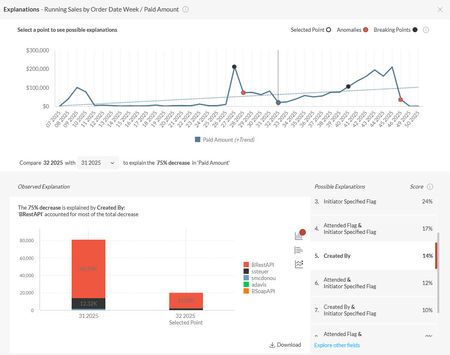
We are interested in rolling out Explanations to our clients, but I've hit a block and need some guidance. I think that the source of the issue may be our use of null replacement values in our data models. We don't allow data to join out of a query and instead ensure that all fact data joins to a null-replacement row in our dimensional tables. For example, given a fact table of product PURCHASES, imagine it was possible to sell those products at a discount in some orders. Assume that the fact table then joins to a dimension table of DISCOUNTS. Most purchases do not have a discount, but some do. Without a null-replacement row in the DISCOUNTS table, adding a field from that dimensional table onto a widget will limit the results in the widget to only fact rows with a discount. In our models, we would replace the null discount key in the fact table with a value that joins to a null-replacement row in the DISCOUNTS table. For example, replace null with -999999 in the fact table and have a row in DISCOUNTS with [id] = -999999 and a [description] = "(none)". The problem we're running into with Explanations is that the feature is presenting only the most useless information as being the most probable explanations. For example, when a single discount exists in the data set, then 99.9% of the PURCHASE rows have a "(none)" DISCOUNT, which is deemed this highest scoring field. More generally it seems that Explanations just reports back the most highly probably explanations as those fields where the member in the field is the commonly present in the data anyway, and it's just reflecting the raw change in fact data. For example, here's an image where the drop in revenue is explained by the drop in revenue from web sales (BRestAPI). But web sales constitute a larger over proportion of sales after the drop (89% up from 82% in the prior period). And another example in which an "Initiator Specified Flag" is whether or not an alternate order "owner" has been specified on a order. Specifying an alternat owner is allowed ("Y"), but not a common practice ("N"). Again, we're just seeing a reflection of sales in the explanation. Is there anything we can do to make the explanations discovered by Sisense relevant? The way it's functioning now, it would be better if Sisense DID NOT recommend possible explanations and just let the user Explore Other Fields immediately without having to wait for Sisense to return the list of completely irrelevant fields. I've tested this across many of our clients' data sets and found the same behavior. Hopefully there are options for us to improve the recommendations or maybe prevent it from recommending.172Views0likes2CommentsFAQ-style chatbot with BloX: use case of AI Assistant
Introduction While Sisense AI features (Simply Ask and the newer Dashboard Assistant) support free-text questions, outcomes can vary depending on factors such as data model quality, business terminology, and user familiarity. In practice, this can result in inconsistent questions, ambiguous phrasing, or less predictable results, especially for less technical users or in environments with less than ideal data models. This use case focuses on how Sisense BloX was used to create a guided FAQ-style interface that triggers the AI chatbot automatically, providing a more controlled, consistent, and user-friendly experience. This solution was implemented for a financial technology company to support users with a wide range of recurring business questions related to multi-asset trading and order management. What the solution does This solution uses BloX to create a guided AI chatbot experience. Instead of typing questions manually, users select a question from a dropdown of predefined FAQs and submit it with a button click. BloX then automatically opens the AI chat window (Simply Ask or Dashboard Assistant), populates the question, and submits it to the chatbot. Questions can be defined directly in the BloX code or sourced dynamically from a data model, which allows the team to manage and update the list of supported questions over time. From the user’s perspective, the experience feels like interacting with an FAQ. Under the hood, the AI chatbot handles the analysis and response. Why it’s useful Lower barrier to entry for AI features By guiding users through predefined, curated questions, the solution reduces ambiguity and removes the need to worry about phrasing, terminology, or syntax. This results in more consistent, predictable, and accurate answers, making AI insights accessible to a broader audience, including users with varying technical backgrounds and less mature or optimized data models. Fewer widgets and dashboards to maintain Not every user needs answers to every possible question. By centralizing common questions into a single guided AI experience, the team avoids creating and maintaining excessive widgets and dashboards for individual analysis, improving performance and reducing long-term maintenance effort. Attachments FAQswithSimplyAskOrAIAssistant.dash.txt (example dashboard using the Sample ECommerce cube) BloXActionsForAI-FAQs.zip (BloX actions' scripts) BloXTemplatesForAI-FAQs.zip (BloX templates for the FAQ widgets, also included in the .dash file above). Note: Remove the .txt extension before importing the dashboard (.dash) file.191Views2likes0CommentsData Prep Essentials for AI-Driven Analytics - Part 2
Learn how AI training and validation shape reliable models. Explore how structured, diverse data helps AI recognize patterns, generalize effectively, and avoid overfitting—ensuring optimal performance in real-world applications.718Views4likes0CommentsData prep essentials for AI-driven analytics - part 3
Discover how to improve data quality for AI and machine learning. In Part 3 of our Data Preparation series, learn how to fix missing values, remove duplicates, correct data types, and standardize formats—with SQL and Python scripts to help you clean your data for accurate, AI-ready analytics.382Views2likes0Comments
Have you heard about Sisense Intelligence?
Sisense Intelligence is a new suite of AI-powered tools that help product managers and developers build smarter, more intuitive analytics experiences. Features like natural language dashboards, automated insights, forecasting, and data explanations accelerate every stage of the analytics journey. Designed for seamless integration, it empowers teams to deliver fast, user-friendly insights at scale.159Views1like0Comments