FAQ-style chatbot with BloX: use case of AI Assistant

This article showcases a guided AI chatbot experience built with Sisense BloX, allowing users to ask predefined questions through a controlled FAQ-style interface instead of free-text input.
Introduction
While Sisense AI features (Simply Ask and the newer Dashboard Assistant) support free-text questions, outcomes can vary depending on factors such as data model quality, business terminology, and user familiarity. In practice, this can result in inconsistent questions, ambiguous phrasing, or less predictable results, especially for less technical users or in environments with less than ideal data models.
This use case focuses on how Sisense BloX was used to create a guided FAQ-style interface that triggers the AI chatbot automatically, providing a more controlled, consistent, and user-friendly experience.
This solution was implemented for a financial technology company to support users with a wide range of recurring business questions related to multi-asset trading and order management.
What the solution does
This solution uses BloX to create a guided AI chatbot experience.
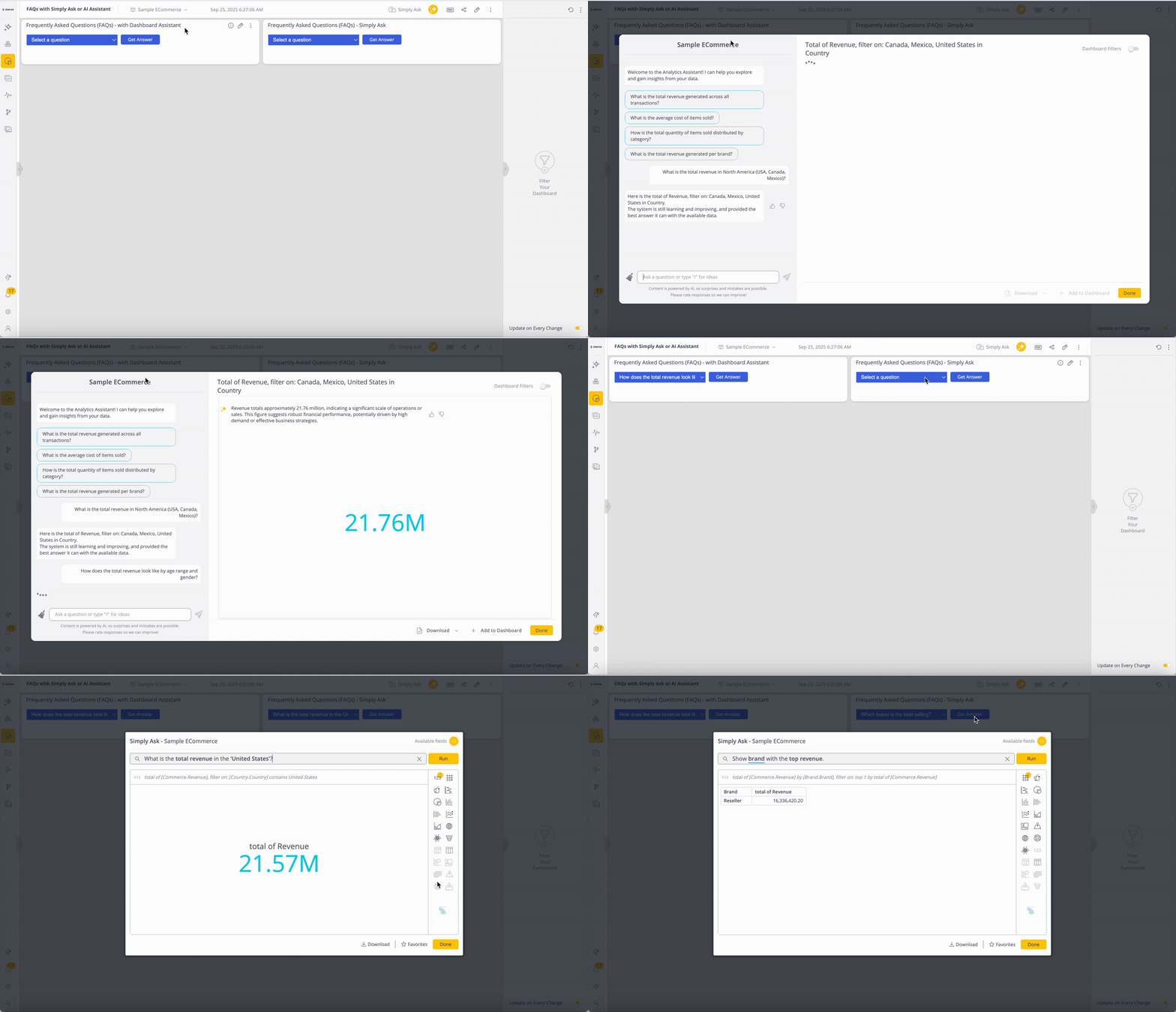
Instead of typing questions manually, users select a question from a dropdown of predefined FAQs and submit it with a button click. BloX then automatically opens the AI chat window (Simply Ask or Dashboard Assistant), populates the question, and submits it to the chatbot.
Questions can be defined directly in the BloX code or sourced dynamically from a data model, which allows the team to manage and update the list of supported questions over time.
From the user’s perspective, the experience feels like interacting with an FAQ. Under the hood, the AI chatbot handles the analysis and response.
Why it’s useful
Lower barrier to entry for AI features
By guiding users through predefined, curated questions, the solution reduces ambiguity and removes the need to worry about phrasing, terminology, or syntax. This results in more consistent, predictable, and accurate answers, making AI insights accessible to a broader audience, including users with varying technical backgrounds and less mature or optimized data models.
Fewer widgets and dashboards to maintain
Not every user needs answers to every possible question. By centralizing common questions into a single guided AI experience, the team avoids creating and maintaining excessive widgets and dashboards for individual analysis, improving performance and reducing long-term maintenance effort.
Attachments
- FAQswithSimplyAskOrAIAssistant.dash.txt (example dashboard using the Sample ECommerce cube)
- BloXActionsForAI-FAQs.zip (BloX actions' scripts)
- BloXTemplatesForAI-FAQs.zip (BloX templates for the FAQ widgets, also included in the .dash file above).
Note: Remove the .txt extension before importing the dashboard (.dash) file.