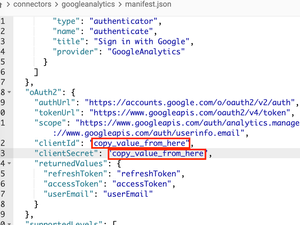
ContributionsMost RecentNewest TopicsMost LikesSolutionsRe: Make user parameters more dynamic Hi Community, The Dynamic Import Query introduced in version 2023.4 can be used to define data models using parameters. This is a huge improvement in User Parameters. Here are some use case examples when using the feature: Using a parameter as a literal in a user-defined function (UDF) or calculation Using a parameter as a reference to an SQL element please find more information in the documentation - https://docs.sisense.com/main/SisenseLinux/personalization-parameters-for-live-data-sources.htm Re: Rest API Connector Hi @zohebakber , If you are familiar with Python and wish to add data to ElasticCube so it can be explored in dashboards, then the best option is to use Sisense Custom Code Transformation as part of the build process - https://docs.sisense.com/main/SisenseLinux/transforming-data-with-custom-code.htm Re: Adding Grand Total in Bar chart Not OOTB. Better add an indicator to visualize the grand total result Re: JDBC connector for live model Hi rahuldhomane \ SusanneK, I would like to clarify a few points mentioned in this thread: Athena native live connector is in the product roadmap to H2 The Sisense R&D team is developing a new generic JDBC connector to replace the current generic JDBC connector for Elasticube models only At the moment, only Sisense R&D creates new dialects for live connectors. There are plans to release a generic JDBC live connector that can be customized to the customer's needs, but this initiative will take longer. Best, Guy | Product Manager Using Google Ads connector for EC models with CDATA Driver The Google Adwords native connector is no longer supported because they use Google APIs that are no longer supported by Google. New installations from 2022.5 and up will no longer contain the Google Adwords native connector. Note: The CDATA table/column structure is different from the native drivers Connect to Google AdWords using the CDATA driver: Download the CDATA driver from https://www.cdata.com/solutions/bi/sisense/#download. Install the driver locally in your environment. Navigate to: /Applications/CData/CData JDBC Driver for Google Ads 2021/lib - for MacOS. C:\Program Files\CData\CData JDBC Driver for Google Ads 2021\lib - for Windows. Using a computer with Java installed, double click on the file cdata.jdbc.googleads.jar to pop up driver UI Add the following parameters in the pop up: /opt/sisense/storage/connectors/GoogleAds/manifest.json C:\Program Files\Sisense\DataConnectors\DotNetContainer\Connectors\GoogleAdwords\manifest.json C:\Program Files\Sisense\DataConnectors\JVMContainer\Connectors\GoogleAdwords\manifest.json InitiateOAuth=GETANDREFRESH DeveloperToken=myDeveloperToken; NOTE: Set this to the developer token of the AdWords account. You can get a developer token by signing up for the AdWords API. To do this, log in to the AdWords site with your MCC account and navigate to Settings -> Account Settings -> AdWords API Center. Apply for API access and wait for Google to contact you via email with further instructions. You should receive a token with a pending status. This token is only for testing purposes and does not allow you to connect to live data. Google should contact you to fill in a questionnaire and, once this has been received and approved by Google, you will receive your active developer token. ClientCustomerId=myClientCustomerId; NOTE: Set this to your Google Ads customer ID. You can find your ClientCustomerId at the bottom of the help menu after clicking the help icon in the top right corner of the Google Ads UI. AuthScheme=OAuth; OAuthClientId=clientId; NOTE: specify the clientId, which can be retrieved from the manifest.json file of the old connector. Possible locations of the file are: Before clicking “Test connection” in the JAR file, navigate to your Google application using Google API Console and add “http://localhost:33333” to Authorized redirect URIs. Click “Test Connection”. You will be redirected to the web browser. Login to your Google AdWords account - Once authenticated, the connection successful message will appear in the JAR. OAuthSettings.txt will be generated in the following location: Windows - %APPDATA%\\CData\\GoogleAds Data Provider\\OAuthSettings.txtd MacOS - ~/Library/Application If you can’t find the file, set the OAuthSettingsLocation in the JAR itself. Copy OAuthSettings.txt to the Sisense server in: C:\OAuthSettings.txt for Windows deployments. /opt/sisense/storage/data/OAuthSettings.txt for Linux deployments. Copy cdata.jdbc.googleads.jar to the Sisense server. See the following documentation for exact instructions. Connect to Google AdWords using Sisense: Connection string: jdbc:googleads:InitiateOAuth=GETANDREFRESH;DeveloperToken=myDeveloperToken;ClientCustomerId=myClientCustomerId;AuthScheme=OAuth;OAuthClientId=clientId;OAuthClientSecret=clientSecret;OAuthSettingsLocation=/opt/sisense/storage/data/OAuthsettings.txt Jar’s folder: /opt/sisense/storage/data/AdWords Driver class name: cdata.jdbc.googleads.GoogleAdsDriver See the following CDATA documentation for data model changes: https://cdn.cdata.com/help/DZG/jdbc/pg_googleadsdatamodel.htm https://cdn.cdata.com/help/DZG/jdbc/pg_retrievingdata.htm https://cdn.cdata.com/help/DZG/jdbc/pg_adwordsdatamodel.htm Re: How to switch off Pivot2 columns? Hi Laris, The script can be found here. The behavior you experience is as follows: As with any dimension, pivot columns can be filtered. By default, if both widgets and dashboards have filters on the same dimension, then only the widget filter is applied. There is one exception to the above rule - multiple filters on the same date dimension can be applied if they are set on a different date level. Dashboard and widget defined with date dimension filters with the same date level will only use widget filter Re: How to grant View only Access on the Elasticubes to Designers Hi, Currently, designers can't access the data tab or see the data model. I will divide my answer by data model type: EC model - designers can use the JAQLine Plugin to visualize the queries widgets preforms. Live model - no information is shared with the dashboard designer regarding the data model, Sisense do have short-term plans to share similar "data model stats" for live as well. Re: The Growth and DiffPastPeriod function with weeks does not work Hi, Few comments: The Analytical Engine will show much better and expected behavior when analyzing Growth and DiffPastPeriod use cases - Sisense MS customers can join Beta from L22.5 The combination of Weeks + Past period functions (for ex: pastyear) is not a trivial one - not all years contain the same number of weeks making it hard to support all use cases - but Sisense do aim to resolve them all (by EOY) The date range is not supported in Growth/Past Period Functions - for example, Growth(February+March) = Growth (February) + Growth(March) - Sisense does not calculate the growth from the beginning of February to the end of March, it calculates each month Growth separately and sums the results. Build Better Data Models and Unlock Next-Level Intelligence In this article, we’ll dig into what data modeling is, provide some best practices for setting up your data model, and walk through a handy way of thinking about data modeling that you can use when building your own. Automate Data Workflows with the New Sisense Data Model APIs Find out what you can do with the new Data Model APIs’ and how you can create and duplicate data models, modify source connections, move data across environments, and schedule data loads, and more.