FES Assistant: The Agentic Sisense Co-Pilot
⚠️ Experimental Project Notice
The FES Assistant is an experimental, "as-is" component developed and shared by Sisense Field Engineering for community learning and testing. It is not an officially supported or Generally Available (GA) Sisense feature, and Sisense Customer Support does not provide coverage for it.
Users are fully responsible for self-hosting the FES Assistant in their chosen environment (on-premise or VPC). This includes managing its execution location, security, and the Sisense credentials and permissions it utilizes. An optional feature allows the FES Assistant to send tool results (obtained via the Sisense SDK) to a user-selected LLM provider when summarization is active. It is strongly advised that users first use a sandbox environment to confirm its behavior before implementing it more broadly.
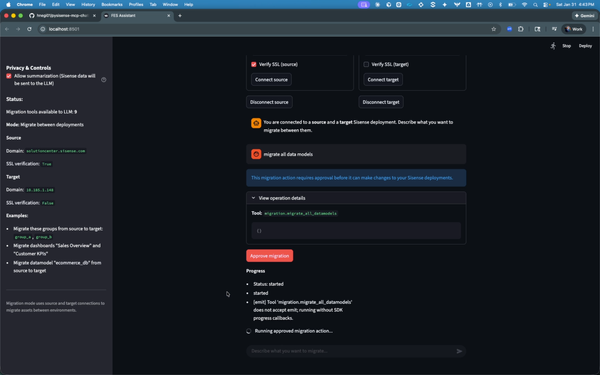
The FES Assistant is a ready-to-use, conversational AI co-pilot designed to simplify and streamline Sisense environment operations. It consolidates the PySisense SDK and the Meta-Management MCP Server into a single chat interface. This powerful unification allows Sisense users to execute complex operational workflows, perform governance checks, and migrate assets across environments using simple, natural language commands, thus eliminating the necessity for manual, one-off scripts or the development of a customized orchestration layer.
GitHub Repository: FES Assistant
The Genesis of FES Assistant
Managing Sisense environments becomes increasingly complex as they scale, leading to operational challenges. Tasks like governance checks, migrations, ownership transfers, and model audits often require repetitive manual effort or depend on hard-to-maintain, custom scripts.
The FES Assistant addresses this friction by serving as a single, conversational interface for executing established Sisense environment workflows securely and reliably. It eliminates the need to manually combine APIs; instead, it orchestrates proven SDK methods, incorporating necessary guardrails, visibility into progress, and consistent results.
FES Assistant: Core Capabilities
FES Assistant is designed to streamline and safeguard common Sisense environment operations through an intelligent, modular architecture.
- Natural Language Operations (NLOps)
Perform complex environment workflows simply by asking in plain English. The system interprets your intent and translates it into structured tool calls for tasks like governance checks, audits, migrations, and lifecycle management.
- Safe, Confirmed Execution for High-Impact Tasks
For critical operations such as creation, updates, deletion, or migrations, FES Assistant incorporates an explicit confirmation loop. Actions are only executed after your direct approval, making agentic execution safe and reliable in real environments by preventing accidental changes.
- Real-Time Visibility for Extended Tasks
Gain immediate insight into long-running operations like bulk migrations. The system utilizes Server-Sent Events (SSE) within the Streamlit UI to stream progress updates, allowing you to monitor the tool's activity as it happens.
- Reusable and Modular Building Blocks
FES Assistant is built on independent components that you can leverage for other purposes:
- PySisense SDK: Facilitates Sisense API workflows.
- Meta-Management MCP Server: Exposes workflows as callable MCP tools.
- Agent Layer: Responsible for planning, invoking tools, and optionally applying privacy controls.
Target Audience for the FES Assistant
FES Assistant is designed for the full Sisense ecosystem, especially teams doing environment work regularly:
- Sisense admins and platform owners who manage users, governance, permissions, and migrations
- Data designers who need model audits, relationship checks (including M2M), and schema hygiene (unused fields, import query patterns, island tables)
- Dashboard designers who want faster asset discovery, structure checks, and operational well-checks without digging through menus
- Analytics engineering or enablement teams that support multiple environments and need repeatable workflows without building custom internal tooling
High-Level Overview of Functionality
FES Assistant is a modular stack designed to keep the “agent” experience separate from execution.
- User interface (Streamlit)
Users interact with a chat UI. The UI can run in:
- Single deployment mode (operate on one Sisense environment)
- Migration mode (operate across source and target environments)
- Agent and backend (FastAPI)
A backend agent layer receives the user request, selects which tool(s) to run, and enforces safety patterns:
- Tool selection and orchestration
- Confirmation loop for mutating operations
- Optional privacy mode that avoids sending tool results back to the LLM
- Tool execution (MCP Server over Streamable HTTP)
The backend calls the MCP server using JSON-RPC over Streamable HTTP. The MCP server:
- Loads tool definitions from a tool registry JSON
- Maps each tool call to the underlying PySisense SDK method
- Supports SSE progress streaming for long-running tools (especially visible in the Streamlit UI)
- Sisense operations (PySisense SDK)
PySisense executes the actual Sisense API calls (reads, audits, changes, migrations) and returns structured results and logs.
Contributing and Support
This is an experimental, community-contributed project maintained by Sisense Field Engineering and provided “as-is.”
- Do not open a GSS ticket (this is not a GA Sisense feature).
- For usage questions or help getting started, contact your Customer Success Manager (CSM), who will route feedback to the Field Engineering team.
- For bugs and improvements, use GitHub Issues or submit a Pull Request.
- For feature requests, open a GitHub Issue with details.
Prerequisite: