Connection Tool - Programmatically Remove Unused Datasource Connections, and List All Connections
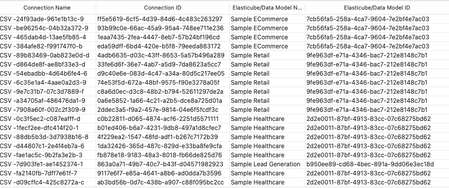
Managing connections within your Sisense environment can become complex over time, if there are a large number of connections, and connections are often added, and replace earlier datasource connections. In some scenarios unused connections can accumulate, potentially cluttering the connection manager UI with no longer relevant connections. Although unused connections typically represent minimal direct security risk, it's considered best practice to maintain a clean, organized list of connections, and in some scenarios it can be desired to remove all unused connections. Sisense prevents the deletion of connections actively used in datasources, safeguarding your dashboards and datasources from disruptions. However, inactive or "orphaned" connections remain after datasources are deleted or a connection is replaced, potentially contributing to unnecessary UI complexity in the connection manager UI. Connections can be of any type Sisense supports, common types include various SQL connections, Excel files, and CSV files, as well as many data providers, such as Big Panda. This tool can also be used to list all connections, with no automatic deletion of unused connections.955Views4likes4CommentsUserReplaceTool - Automating Dashboard Ownership Transfers - Useful for Deleting User Accounts
Managing and deleting user accounts in Sisense can create manual processes when users leave an organization or change roles. A frequent issue is the reassignment of dashboard ownership to prevent losing Sisense dashboards when a given user account is deleted, as deleting a Sisense user will delete all dashboards owned by that user. The UserReplaceTool addresses this task by automating the transfer of dashboard ownership of all dashboards owned by a given user, ensuring continuity and data integrity. UserReplaceTool is a Python-based, API-based Tool solution designed to seamlessly transfer the ownership of dashboards and data models from one user to another in Sisense. This tool simplifies and automates this process, allowing organizations to reassign dashboard ownership without manual processes or the risk of losing dashboards and widgets. All components are accomplished by using Sisense API endpoint requests.1.3KViews3likes3CommentsAdding additional dimensions to the Scatter Map widget tooltip
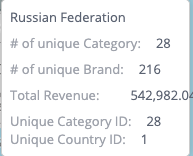
Adding additional dimensions to the Scatter Map widget tooltip Additional dimensions can be added to the hover tooltip of the Scatter Map widget type, beyond the default limit of three, to include more information from other dimensions about a location in a Scatter Map widget. This can be accomplished by using a combination of the widget's before query event to add additional dimension data for the hover tooltips and the before datapoint tooltip event to incorporate these dimensions into the tooltip. This method of modifying the query using the "beforequery" event can also be applied to all other widget types // Add extra parameters to be used in tooltips by modifying query widget.on('beforequery', function (se, ev) { // Initial number of widget metadata panels excluding filter panel widget.initialPanelSizeExcludingFilterPanel = ev.query.metadata.filter((panel) => { return panel.panel !== "scope" }).length; // Extra dimensions to show in tooltip, should return a single result, include as many as needed, just add to array // Jaql Objects can be copied from other widgets from the prism.activeWidget.metadata.panels via the browser console // Modify JAQL as needed, title of JAQL is used in tooltip and can be modified to any string widget.extraDimensionJAQL = [ { "jaql": { "table": "Category", "column": "Category ID", "dim": "[Category.Category ID]", "datatype": "numeric", "merged": true, "agg": "count", "title": "Unique Category ID" } }, { "jaql": { "table": "Country", "column": "Country ID", "dim": "[Country.Country ID]", "datatype": "numeric", "merged": true, "agg": "count", "title": "Unique Country ID" } }, ] // Add to default widget query the extra dimensions to be used in tooltips ev.query.metadata = ev.query.metadata.concat(widget.extraDimensionJAQL) }); // Add extra dimensions added with beforequery object to ScatterMap tooltip widget.on("beforedatapointtooltip", (event, params) => { // Convert query results to include only the additional dimensions, and formatted for tooltip template var onlyAdditionalDimensions = widget.queryResult.$$rows.map((withoutDefaultDimensionOnlyAdditional) => { // Remove the default dimensions, first part of row result array var withoutDefaultDimensionOnlyAdditional = withoutDefaultDimensionOnlyAdditional.slice(widget.initialPanelSizeExcludingFilterPanel) // Format for tooltip template, include title from JAQL var extraDimensionObj = withoutDefaultDimensionOnlyAdditional.map((extraDimensionValue, index) => { // Use extraDimensionJAQL for label in tooltip return { "text": extraDimensionValue.text, "title": widget.extraDimensionJAQL[index].jaql.title } }) return extraDimensionObj }); // Object to store extra dimensions params.context.marker.extraDimension = {}; // Use matching queryIndex for tooltip of additional dimensions params.context.marker.extraDimension.arr = onlyAdditionalDimensions[params.context.marker.queryIndex]; // Template for tooltip, modify as needed params.template = ` <div class='geo-text'>{{ model.marker.name }}</div> <div class='measure-holder' data-ng-if='model.measuresMetadata.sizeTitle'> <div class='measure-title slf-text-secondary'>{{ model.measuresMetadata.sizeTitle }}:</div> <div class='measure-value'>{{ model.marker.sizeObj.text }}</div> </div> <div class='measure-holder' data-ng-if='model.measuresMetadata.colorTitle'> <div class='measure-title slf-text-secondary'>{{ model.measuresMetadata.colorTitle }}:</div> <div class='measure-value'>{{ model.marker.colorObj.text }}</div> </div> <div class='measure-holder details-measure-holder' data-ng-if='model.measuresMetadata.detailsTitle'> <div class='measure-title slf-text-secondary'>{{ model.measuresMetadata.detailsTitle }}:</div> <div class='measure-value' data-ng-if="!model.marker.detailsObj.arr">{{ model.marker.detailsObj.text }}</div> <div class="details-wait" data-ng-if="model.marker.detailsObj.pendingDetails"></div> <div data-ng-if="model.marker.detailsObj.arr"> <div class="details-value" data-ng-repeat="a in model.marker.detailsObj.arr">{{a.text}}</div> <div class="details-counter" data-ng-if="model.marker.detailsObj.hasMore"> <div class="details-counter">...</div> <div class="details-counter"> {{'smap.ttip.firstres'|translate:(args={count:model.marker.detailsObj.arr.length})}}</div> </div> </div> </div> <div data-ng-if="model.marker.extraDimension.arr"> <div data-ng-if='model.measuresMetadata.colorTitle'> <div class='measure-holder' data-ng-repeat="a in model.marker.extraDimension.arr"> <div class='measure-title slf-text-secondary'>{{a.title}}:</div> <div class="measure-value extra-dimension-value">{{a.text}}</div> </div> </div> </div>`; }); The JAQL can be changed to any valid JAQL object, and the tooltip template can also be further modified.1.2KViews2likes3CommentsEnsuring Accurate PDF Export Headers When Programmatically Modifying Dashboard Filters in Sisense
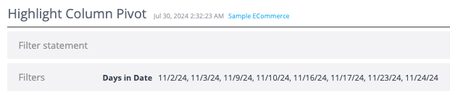
When working with Sisense dashboards, programmatically modifying filters upon dashboard load via dashboard scripts for a specific user or circumstance is possible. However, an issue can sometimes occur when exporting these dashboards to PDF immediately after such modifications: the filter header displayed at the top of the exported PDF displaying the current dashboard filter state may not accurately reflect the current state of the dashboard filters. This article explains the cause of this issue and presents a solution to ensure that PDF exports display the correct filter information in the header.713Views1like0Comments
Report Round Up: Infusing for Internal Teams
Data analytics have become an essential tool for businesses, as the world’s data volume continues to grow exponentially. Every team will improve performance by examining its data, deriving insights from it, and taking actions driven by those insights.1.9KViews0likes0CommentsDoes Your Project Have A Timeline? Planning For And Defining Success
Timelines are a key component of any dashboard implementation. Considering the available time is vital to establishing reasonable goals and how to best prioritize tasks. More importantly, adoption improves when projects show fast results instead of dragging on endlessly. Planning a roadmap for implementation can produce a successful integration for you and your team.1.1KViews1like0Comments