Choosing the Right Replication Strategy: Evaluating ADF + CDC vs. Snowflake Openflow
If you're delivering embedded analytics through Sisense, your dashboard is only as good as the data behind it. But how often do you think about what's happening upstream in the pipelines and ingestion architectures that determine whether that data is fresh, reliable, and cost-efficient before it ever reaches a visualization? QBeeQ is known in the Sisense ecosystem as a plugin and integration provider, but that's only part of what we do. This post is a window into the broader, strategic side of our work: architectural decision-making that happens well upstream of the BI layer but directly impacts the analytics experience your customers see. The client here uses Sisense to deliver embedded dashboards. We built their Snowflake-based data platform from the ground up: integrations, ELT, data modeling, and governance with Sisense sitting at the top of the stack. The next question became: is our data replication approach from MS SQL Server into Snowflake the right one long-term, or should we move to Snowflake Openflow? A Platform Already in Motion Our relationship with our client didn't start with this POC. We previously helped them design and build a Snowflake-based data platform from the ground up, including data integrations, ELT processes, data models, and governance. That work gave them a solid, modern foundation for their analytics and reporting, including the embedded dashboards they deliver to their customers via Sisense. This POC was the next strategic step in that journey. With the platform stable and maturing, the question became: are we using the best possible approach for replicating data from their MS SQL Server into Snowflake? And more specifically, should we continue developing our custom ingestion approach, or move toward a more ready-to-go solution using Snowflake Openflow? Our client’s business depends on near-real-time data availability. Their operational data lives in MS SQL Server and feeds directly into Snowflake, where it powers analytics and reporting for their customers across retail, telecom, banking, and energy. These aren't just technical concerns. They directly affect the quality and reliability of the analytics experience delivered to its end customers. The key business drivers behind this evaluation were: Faster availability of incremental data, especially for large transactional tables Lower operational risk and improved robustness Reduced maintenance effort over time Cost optimization at scale Putting Two Approaches to the Test Rather than making a decision based on vendor documentation or assumptions, we designed a structured POC to test both approaches in parallel, on the same three tables and similar data volumes, across four dimensions: performance cost stability maintainability Option 1: Custom ADF + SQL CDC (Our Existing Solution) The key strength of this approach is control. We define the schema, manage data types, handle transformations during ingestion, and have full visibility into every step of the pipeline. This is the approach we built as part of the initial platform work: CDC (Change Data Capture) - a native SQL Server feature that tracks only changed rows (inserts, updates, and deletes), eliminating the need to reload entire tables on every run Azure Data Factory (ADF) - Microsoft's cloud orchestration service, used here to move delta data from SQL Server to Azure Blob Storage Snowflake - which then loads and transforms the data using Snowpipe and scheduled tasks It's more engineering-intensive to set up, but the result is a robust, predictable, and highly tunable architecture. Option 2: Snowflake Openflow Openflow is Snowflake's newer, more plug-and-play approach to data ingestion. It uses Change Tracking (CT) on the SQL Server side, a lighter-weight mechanism than CDC, and ingests data more directly into Snowflake with less custom orchestration required. On paper, it's appealing: faster to configure, fewer moving parts, and tighter integration within the Snowflake ecosystem. But as with any "managed" solution, there are trade-offs. And that's exactly what we needed to quantify. What We Found Performance Both approaches handled initial loads equally well. The gap appeared with delta loads — Openflow's Change Tracking completed incremental updates in 1–2 minutes versus 5–12 minutes for ADF + CDC. For near-real-time use cases, that's a genuine advantage worth noting. Cost This is where the picture shifts dramatically, and where decision makers should pay close attention: Openflow consumed approximately 12.5 Snowflake credits per day, translating to roughly $50/day or ~$1,500/month for this workload alone. ADF + CDC came in at an estimated $8–15/month That's not a marginal difference. That's a 100x cost gap on a three-table POC. Now consider what that looks like at scale. Most production environments don't replicate three tables; they replicate dozens, sometimes hundreds. If costs scale proportionally, an Openflow-based architecture could run into tens of thousands of dollars per month for a full production workload, compared to what remains a very modest cost with the custom ADF approach. For a data platform that's meant to be a long-term foundation, the compounding effect of that cost difference is enormous. Over a single year, the gap between these two approaches could easily reach $200,000 or more — money that could instead fund additional data products, analytics capabilities, or engineering capacity. For decision makers evaluating build vs. buy, or assessing the true TCO of a "managed" solution, this kind of analysis is exactly what's needed before committing to a direction. Stability & Maturity The Openflow SQL Server connector was still in preview status at the time of the POC. Runtime and canvas updates caused instability during our testing, and the solution requires ongoing infrastructure coordination. Azure Data Factory, by contrast, is a mature and battle-tested technology with a proven track record in production environments. Architecture & Maintainability Openflow introduced meaningful architectural complexity: requires Snowflake Business Critical edition (for PrivateLink connectivity) adds authentication and data sharing overhead offers limited control over target data types, and handles soft deletes only, so hard deletes require additional handling Additional Snowflake-side transformations (PARSE_JSON, CLEAN_JSON_DUPLICATES) were also necessary. Our custom ADF solution, while more involved to build: gives full control over schema and transformations handles deletes cleanly can be extended through a reusable automation procedure that simplifies onboarding new tables over time Open Flow ADF + CDC Architecture Complexity ⚠️ Requires Business Critical + PrivateLink ✅ Simpler, fewer dependencies Stability ⚠️ Preview — instability during POC ✅ Mature, production-proven Cost/month ⚠️ ~$1,500 ✅ ~$8–15 Initial load ✅ Comparable ✅ Comparable Delta load speed ✅ ~1–2 min ⚠️ ~5–12 min Onboarding new tables ✅ Fast and easy ⚠️ More setup, but automatable Schema & type control ⚠️ Limited ✅ Full control Delete Handling ⚠️ Soft deletes only ✅ Full delete support Our Recommendation The POC gave our client something genuinely valuable: a data-driven basis for a strategic architectural decision, rather than a choice made on assumption or vendor marketing. Our recommendation leaned toward continuing with the custom ADF + CDC approach as the long-term foundation. Not because Openflow lacks merit, but because the cost differential is substantial, the stability risks are real at this stage of the product's maturity, and the architectural overhead introduces complexity that isn't justified by the performance gain alone. That said, the delta load performance advantage of Openflow is meaningful. As the connector matures and if near-real-time requirements intensify, it remains a viable path to revisit. The POC ensures that if and when that moment comes, the decision will be informed, not reactive. What This Kind of Work Looks Like in Practice In the Sisense ecosystem, you may know us through our plugins and integrations. But this post reflects something equally important: our ability to act as a full-stack data platform partner. What your users see in Sisense is a function of decisions made far upstream. When those decisions lack rigor, the effects show up as latency, data gaps, and rising costs. Running a structured POC like this is often underestimated, but is one of the most valuable things we do for our clients. It's not just about finding the faster or cheaper option. It's about understanding the full picture: performance under realistic conditions, true cost at scale, architectural implications, and long-term maintainability. Every organization's situation is different. The right ingestion architecture depends on your data volumes, latency requirements, existing tooling, team capabilities, and cost constraints. If you're thinking about your broader data strategy, not just what Sisense can do, but whether everything underneath it is built right, that's a conversation we're well-positioned to have. Thinking about your data platform strategy? Let's talk. QBeeQ is data strategy consulting firm made up of former Sisense employees and customers. We are a Sisense Gold Implementation Partner and Snowflake Select Partner14Views1like0CommentsConnection Tool - Programmatically Remove Unused Datasource Connections, and List All Connections
Managing connections within your Sisense environment can become complex over time, if there are a large number of connections, and connections are often added, and replace earlier datasource connections. In some scenarios unused connections can accumulate, potentially cluttering the connection manager UI with no longer relevant connections. Although unused connections typically represent minimal direct security risk, it's considered best practice to maintain a clean, organized list of connections, and in some scenarios it can be desired to remove all unused connections. Sisense prevents the deletion of connections actively used in datasources, safeguarding your dashboards and datasources from disruptions. However, inactive or "orphaned" connections remain after datasources are deleted or a connection is replaced, potentially contributing to unnecessary UI complexity in the connection manager UI. Connections can be of any type Sisense supports, common types include various SQL connections, Excel files, and CSV files, as well as many data providers, such as Big Panda. This tool can also be used to list all connections, with no automatic deletion of unused connections.1KViews4likes4CommentsUserReplaceTool - Automating Dashboard Ownership Transfers - Useful for Deleting User Accounts
Managing and deleting user accounts in Sisense can create manual processes when users leave an organization or change roles. A frequent issue is the reassignment of dashboard ownership to prevent losing Sisense dashboards when a given user account is deleted, as deleting a Sisense user will delete all dashboards owned by that user. The UserReplaceTool addresses this task by automating the transfer of dashboard ownership of all dashboards owned by a given user, ensuring continuity and data integrity. UserReplaceTool is a Python-based, API-based Tool solution designed to seamlessly transfer the ownership of dashboards and data models from one user to another in Sisense. This tool simplifies and automates this process, allowing organizations to reassign dashboard ownership without manual processes or the risk of losing dashboards and widgets. All components are accomplished by using Sisense API endpoint requests.1.4KViews3likes3CommentsAdding additional dimensions to the Scatter Map widget tooltip
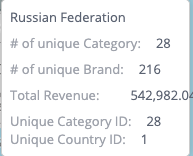
Adding additional dimensions to the Scatter Map widget tooltip Additional dimensions can be added to the hover tooltip of the Scatter Map widget type, beyond the default limit of three, to include more information from other dimensions about a location in a Scatter Map widget. This can be accomplished by using a combination of the widget's before query event to add additional dimension data for the hover tooltips and the before datapoint tooltip event to incorporate these dimensions into the tooltip. This method of modifying the query using the "beforequery" event can also be applied to all other widget types // Add extra parameters to be used in tooltips by modifying query widget.on('beforequery', function (se, ev) { // Initial number of widget metadata panels excluding filter panel widget.initialPanelSizeExcludingFilterPanel = ev.query.metadata.filter((panel) => { return panel.panel !== "scope" }).length; // Extra dimensions to show in tooltip, should return a single result, include as many as needed, just add to array // Jaql Objects can be copied from other widgets from the prism.activeWidget.metadata.panels via the browser console // Modify JAQL as needed, title of JAQL is used in tooltip and can be modified to any string widget.extraDimensionJAQL = [ { "jaql": { "table": "Category", "column": "Category ID", "dim": "[Category.Category ID]", "datatype": "numeric", "merged": true, "agg": "count", "title": "Unique Category ID" } }, { "jaql": { "table": "Country", "column": "Country ID", "dim": "[Country.Country ID]", "datatype": "numeric", "merged": true, "agg": "count", "title": "Unique Country ID" } }, ] // Add to default widget query the extra dimensions to be used in tooltips ev.query.metadata = ev.query.metadata.concat(widget.extraDimensionJAQL) }); // Add extra dimensions added with beforequery object to ScatterMap tooltip widget.on("beforedatapointtooltip", (event, params) => { // Convert query results to include only the additional dimensions, and formatted for tooltip template var onlyAdditionalDimensions = widget.queryResult.$$rows.map((withoutDefaultDimensionOnlyAdditional) => { // Remove the default dimensions, first part of row result array var withoutDefaultDimensionOnlyAdditional = withoutDefaultDimensionOnlyAdditional.slice(widget.initialPanelSizeExcludingFilterPanel) // Format for tooltip template, include title from JAQL var extraDimensionObj = withoutDefaultDimensionOnlyAdditional.map((extraDimensionValue, index) => { // Use extraDimensionJAQL for label in tooltip return { "text": extraDimensionValue.text, "title": widget.extraDimensionJAQL[index].jaql.title } }) return extraDimensionObj }); // Object to store extra dimensions params.context.marker.extraDimension = {}; // Use matching queryIndex for tooltip of additional dimensions params.context.marker.extraDimension.arr = onlyAdditionalDimensions[params.context.marker.queryIndex]; // Template for tooltip, modify as needed params.template = ` <div class='geo-text'>{{ model.marker.name }}</div> <div class='measure-holder' data-ng-if='model.measuresMetadata.sizeTitle'> <div class='measure-title slf-text-secondary'>{{ model.measuresMetadata.sizeTitle }}:</div> <div class='measure-value'>{{ model.marker.sizeObj.text }}</div> </div> <div class='measure-holder' data-ng-if='model.measuresMetadata.colorTitle'> <div class='measure-title slf-text-secondary'>{{ model.measuresMetadata.colorTitle }}:</div> <div class='measure-value'>{{ model.marker.colorObj.text }}</div> </div> <div class='measure-holder details-measure-holder' data-ng-if='model.measuresMetadata.detailsTitle'> <div class='measure-title slf-text-secondary'>{{ model.measuresMetadata.detailsTitle }}:</div> <div class='measure-value' data-ng-if="!model.marker.detailsObj.arr">{{ model.marker.detailsObj.text }}</div> <div class="details-wait" data-ng-if="model.marker.detailsObj.pendingDetails"></div> <div data-ng-if="model.marker.detailsObj.arr"> <div class="details-value" data-ng-repeat="a in model.marker.detailsObj.arr">{{a.text}}</div> <div class="details-counter" data-ng-if="model.marker.detailsObj.hasMore"> <div class="details-counter">...</div> <div class="details-counter"> {{'smap.ttip.firstres'|translate:(args={count:model.marker.detailsObj.arr.length})}}</div> </div> </div> </div> <div data-ng-if="model.marker.extraDimension.arr"> <div data-ng-if='model.measuresMetadata.colorTitle'> <div class='measure-holder' data-ng-repeat="a in model.marker.extraDimension.arr"> <div class='measure-title slf-text-secondary'>{{a.title}}:</div> <div class="measure-value extra-dimension-value">{{a.text}}</div> </div> </div> </div>`; }); The JAQL can be changed to any valid JAQL object, and the tooltip template can also be further modified.1.2KViews2likes3CommentsEnsuring Accurate PDF Export Headers When Programmatically Modifying Dashboard Filters in Sisense
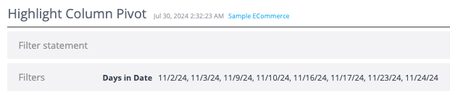
When working with Sisense dashboards, programmatically modifying filters upon dashboard load via dashboard scripts for a specific user or circumstance is possible. However, an issue can sometimes occur when exporting these dashboards to PDF immediately after such modifications: the filter header displayed at the top of the exported PDF displaying the current dashboard filter state may not accurately reflect the current state of the dashboard filters. This article explains the cause of this issue and presents a solution to ensure that PDF exports display the correct filter information in the header.738Views1like0Comments
Report Round Up: Infusing for Internal Teams
Data analytics have become an essential tool for businesses, as the world’s data volume continues to grow exponentially. Every team will improve performance by examining its data, deriving insights from it, and taking actions driven by those insights.2KViews0likes0Comments