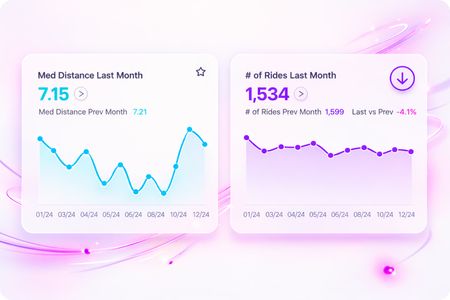
Tired of stacking indicator widgets? There's a better way.
If you've ever found yourself stacking indicator widget after indicator widget just to show a handful of KPIs, you're not alone. It's a common dashboard design (and performance) frustration, and it's exactly what the KPI Card from QBeeQ was built to solve. What is the KPI Card? The KPI Card is a free, partner-supported plugin from QBeeQ that provides an alternative to the native indicator widget, but with a lot more flexibility. Where Sisense's built-in indicator is limited to one primary and one secondary metric, the KPI Card lets you consolidate multiple metrics, trend indicators, and time-series sparklines into a single compact widget. The result is cleaner dashboards, less cognitive overload, and more context for your end users without adding more widgets. What it can do Feature Description Multiple Metrics Display primary and secondary values together in one widget Trend Indicators Up/down icons with conditional color formatting to show direction at a glance Sparklines Embed mini line, area, or bar charts directly in the widget — no separate chart needed Tooltips Hover over any sparkline point to surface deeper data instantly Click-to-Filter Click a data point or drag a range to filter your entire dashboard Jump-to-Dashboard Link directly to a related dashboard from a primary value or sparkline data point Full Color Customization Match your dashboard's branding with per-value color control and conditional formatting A few use cases where it shines Sales & revenue tracking — Show revenue, growth %, and a monthly trend sparkline in one card Operations dashboards — Monitor multiple performance metrics side-by-side without the clutter Finance reporting — Surface current period values alongside prior period comparisons and directional trends Embedded analytics — Give end users more context in less space, especially in tighter dashboard layouts Before and after The top row uses the native Sisense indicator chart and displays the primary and secondary metrics. The bottom row uses the KPI Card to show the same metrics, plus additional context using sparklines, trend metrics, trend icons, and Jump to Dashboard It's free — part of the QBeeQ Starter PowerUp The KPI Card is included in QBeeQ's Starter PowerUp, a free bundle of 10 plugins built specifically for Sisense. It's available at no cost and is actively maintained and supported by the QBeeQ team. 👉 Get the free Starter PowerUp 🔗 KPI Card Marketplace Listing 📄 KPI Card Documentation Have questions or want to share how you're using it? Drop a comment below!4Views0likes0Comments