Using Git to transfer datasources between Sisense servers when connections differ
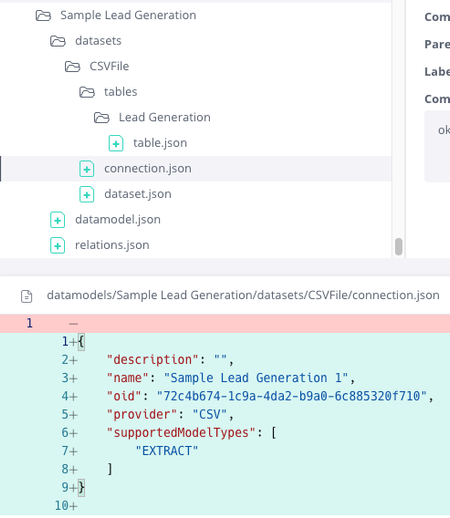
Overview Many companies and organizations use Sisense Git Integration to transfer data models between Sisense servers or to promote data models from development or staging environments into production. This approach helps teams manage changes, track history, and deploy data model updates in a controlled, repeatable way. A common challenge arises when different servers or environments, such as development, staging, and production, must connect to different data sources or data warehouse connections. While the underlying schema, tables, and joins may be identical, connection credentials, hosts, or database names can be environment-specific. By default, promoting a data model through Git includes connection configuration, which can unintentionally overwrite production connections during deployment. This use case describes a practical Sisense Git Integration workflow that allows teams to promote data model changes between Sisense environments while preserving environment-specific connection configurations. Terminology To keep the workflow clear, this article uses the following terms: Development environment: The Sisense server used for building and testing data model changes. This can also be any Sisense server where data model schema changes are applied first. Staging environment: An optional intermediate Sisense server used for validation before production. Production environment: The Sisense server is used in production and by most users. This can be any server where data model schema changes are deployed only after being tested in other environments Schema changes: Updates to tables, joins, columns, and relationships within a data model. Connection configuration: Data source connection details stored in connection.json. The challenge A typical setup includes separate Sisense environments for development or staging and production, each potentially connected to a slightly different data source connection, such as differing parameters. Organizations and businesses want to: Promote schema changes such as tables, joins, and column updates from development to production. Use Sisense Git Integration to track, manage, and deploy these changes across servers. Avoid overwriting environment-specific connection details or parameters with development settings. Without a defined Git promotion process, teams often resort to manually fixing connections in production after each import. This manual step takes time, introduces the risk of errors, and becomes increasingly difficult if the number of data models or environments grows. Key insight Sisense stores connection configuration in a single file named connection.json, which is separate from other data model files tracked in Git. As long as this file remains unchanged during a Git pull or merge, each Sisense environment retains its existing data source connection configuration. Sisense Git Integration treats all data model assets as plain text JSON files, so only files that change are applied during a pull or merge operation. This behavior makes it possible to promote schema changes independently of connection settings by carefully controlling how connection.json is handled in Git. What the solution does The solution uses standard Git workflows to promote data model schema changes while excluding connection changes from deployment. At a high level, the approach: Preserves environment-specific connections on each Sisense server. Uses Git branches to separate development data model changes from production-ready data models. Ensures that only schema-related files are promoted between environments. This allows teams to safely deploy updates without risking accidental connection overwrites. Recommended Git strategy A simple and effective approach is to maintain two primary branches in the external Git repository: Development branch: Used for ongoing development and testing, typically connected to the development or staging environment. Production branch: Represents production-ready data models and contains the production connection configuration. Initial setup When a data model is first committed to Git, connection.json is included by design and cannot be excluded. For this reason, the initial commit should be made carefully so that each environment captures the correct baseline connection. In practice, this means ensuring the production branch contains the production connection configuration. Ongoing development workflow Developers make schema changes in the development environment. Before committing, any changes to connection.json are discarded or confined to the development branch. The production branch retains its own connection.json, which may differ from the development connection. During merges, the production connection configuration is never overwritten Only schema-related files are committed to the development branch. When changes are ready for promotion, they are merged or cherry-picked into the production branch, again excluding connection.json. The production environment pulls only from the production branch, ensuring that schema changes are applied while the production connection remains unchanged. On the production server, always perform Git pulls from the production branch only. The production branch contains the production connection.json, ensuring that production connections are never replaced by development settings Why this works Sisense Git Integration applies updates based on file differences. If connection.json is unchanged during a Git pull, Sisense does not modify the existing connection in the target environment. By using Git to control which files are modified in each branch (development and production), teams can cleanly separate schema evolution in a data model from connection configuration. This makes deployments predictable and avoids unintended side effects. Best practices Always verify that connection.json remains unchanged in the production branch before committing schema updates. Use external Git tools for merges or cherry-picks when finer control over files is required. Avoid editing connections in development after the initial baseline unless intentionally changing the connection configuration. Document the workflow clearly so all team members follow the same process. Limitations and notes connection.json cannot be excluded from the initial commit of a data model. Each environment must already have the correct connection configured. In some cases, each environment may maintain its own branch containing its specific connection.json. This approach applies only to data models and does not affect dashboards or other Sisense assets. Outcome By adopting this workflow, teams can safely promote data model schema changes between Sisense environments without overwriting environment-specific data source connections. Production connections remain stable, manual post-import fixes are eliminated, and Git-based promotion becomes a reliable and repeatable process across environments. This approach strengthens governance, reduces deployment risk, and allows teams to scale their Sisense development workflows with confidence. Screenshots: Connection.json in Sisense Git UI Diagram of Example Git Flow Development Environment (Sisense Server) | | 1. Schema changes | - tables | - joins | - columns | (connection.json may differ) | v Development Branch (Git Repository) | | 2. Commit schema files only | - Exclude or discard connection.json changes | v Production Branch (Git Repository) | | 3. Merge or cherry-pick | - Schema changes only | - connection.json unchanged | v Production Environment (Sisense Server) | | 4. Git pull | - Schema updated | - Production connection preserved Discard all unintended changes to connection.json When in the Production Environment, only pull from the Production Git Branch, with the Production connection.json74Views1like0CommentsCreating widgets via the Sisense API
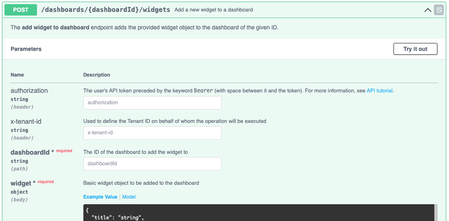
Overview Many companies and organizations use Sisense’s REST API to automate dashboard and widget creation. This can help integrate Sisense with existing automations, dynamically generate dashboards for different users, or manage large scale dashboard and widget deployments programmatically. Sisense provides an API endpoint for creating widgets directly on a dashboard. This allows developers to define widget configurations in JSON and publish them without using the Sisense UI for each new widget. Each widget’s behavior, layout, and data structure are defined in its metadata, mirroring the structure found inside Sisense dashboard export files (.dash files). This use case describes how to create widgets programmatically using the Sisense API and explains how to work with widget metadata and JAQL structures when doing so. What the solution does The Sisense Widget Creation API endpoint allows you to programmatically create widgets on an existing dashboard using a POST request: POST /api/v1/dashboards/{dashboardID}/widgets The request body is a widget metadata object defining the widget’s structure, data query, style, and layout. This metadata format is identical to what Sisense stores within a .dash file. The type property specifies the visualization type (for example, chart/pie, chart/bar, or pivot2), and the metadata section uses the JAQL query format to describe dimensions, measures, and filters. Developers can build widgets dynamically by: Defining visualization type and subtype (e.g., pie chart, bar chart, pivot table) Referencing the correct data source Configuring dimensions and measures within the metadata.panels structure Applying filters or plugin (such as JTD) behaviors Posting the configuration to the API endpoint API Reference: Full documentation for this endpoint and payload structure is available in the Sisense REST API documentation. Understanding widget Metadata Each Sisense widget contains a metadata object that defines the data query (via JAQL), chart style, and layout. A practical way to understand this format is to export a dashboard and inspect the widgets inside the resulting .dash file. Each widget entry includes: type – The widget type (for example, chart/pie, chart/bar, pivot2) datasource – Data model used metadata – A JAQL definition of dimensions, measures, and filters and any other dimensions, equivalent to the left hand panel in widget editor, plus filters style – Visual configuration options such as labels, legends, and axis settings options – Additional behaviors such as filter synchronization or drill options The JAQL format underpins the widget’s data model. It describes how dimensions, measures, and filters are applied when the widget queries the Elasticube or Live data source. References: Sisense JAQL documentation Metadata Item Widget Class Widget Metadata Example payloads Pie Chart Example (Basic Configuration) { "title": "", "type": "chart/pie", "tags": [], "datasource": { "fullname": "localhost/CopyOfECommerce", "id": "localhost_aCopyOfECommerce", "address": "LocalHost", "database": "aCopyOfECommerce", "live": false, "title": "CopyOfECommerce" }, "subtype": "pie/classic", "style": { "legend": { "enabled": false, "position": "left" }, "labels": { "enabled": true, "categories": true, "value": false, "percent": true, "decimals": false, "fontFamily": "Open Sans", "color": "red" }, "convolution": { "enabled": true, "selectedConvolutionType": "byPercentage", "minimalIndependentSlicePercentage": 3, "independentSlicesCount": 7 }, "dataLimits": { "seriesCapacity": 100000 } }, "instanceid": "5466B-AEAE-4D", "drillToDashboardConfig": { "drilledDashboardPrefix": "_drill", "drilledDashboardsFolderPrefix": "", "displayFilterPane": true, "displayDashboardsPane": true, "displayToolbarRow": true, "displayHeaderRow": true, "volatile": false, "hideDrilledDashboards": true, "hideSharedDashboardsForNonOwner": true, "drillToDashboardMenuCaption": "Jump to dashboard", "drillToDashboardRightMenuCaption": "Jump to ", "drillToDashboardNavigateType": 1, "drillToDashboardNavigateTypePivot": 2, "drillToDashboardNavigateTypeCharts": 1, "drillToDashboardNavigateTypeOthers": 3, "excludeFilterDims": [], "includeFilterDims": [], "drilledDashboardDisplayType": 2, "dashboardIds": [], "modalWindowResize": false, "showFolderNameOnMenuSelection": false, "resetDashFiltersAfterJTD": false, "sameCubeRestriction": true, "showJTDIcon": true, "sendPieChartMeasureFiltersOnClick": true, "forceZeroInsteadNull": false, "mergeTargetDashboardFilters": false, "drillToDashboardByName": false }, "realTimeRefreshing": false, "metadata": { "ignore": { "dimensions": [], "ids": [], "all": false }, "panels": [ { "name": "categories", "items": [ { "jaql": { "table": "Brand", "column": "Brand", "dim": "[Brand.Brand]", "datatype": "text", "columnTitle": "Brand", "tableTitle": "Brand", "merged": true, "title": "Brand" }, "instanceid": "749C8-B7DE-7A", "field": { "id": "[Brand.Brand]", "index": 0 }, "format": { "members": {} } } ] }, { "name": "values", "items": [] }, { "name": "filters", "items": [] } ] }, "options": { "dashboardFiltersMode": "select", "selector": true, "triggersDomready": true, "autoUpdateOnEveryChange": true, "drillToAnywhere": true } } This payload demonstrates a simple pie chart with one category (dimension) and a single measure, along with styling options for labels and legends. Bar Chart Example (With Filters and Multiple Dimensions) { "title": "", "type": "chart/bar", "tags": [], "datasource": { "fullname": "localhost/CopyOfECommerce", "id": "localhost_aCopyOfECommerce", "address": "LocalHost", "database": "aCopyOfECommerce", "live": false, "title": "CopyOfECommerce" }, "subtype": "bar/classic", "style": { "legend": { "enabled": true, "position": "bottom" }, "seriesLabels": { "enabled": false, "rotation": 0, "labels": { "enabled": false, "types": { "count": false, "percentage": false, "relative": false, "totals": false }, "stacked": false, "stackedPercentage": false } }, "xAxis": { "enabled": true, "ticks": true, "labels": { "enabled": true, "rotation": 0 }, "title": { "enabled": false }, "x2Title": { "enabled": false }, "gridLines": true, "isIntervalEnabled": false }, "yAxis": { "inactive": false, "enabled": true, "ticks": true, "labels": { "enabled": true, "rotation": 0 }, "title": { "enabled": false }, "gridLines": true, "logarithmic": false, "isIntervalEnabled": true, "hideMinMax": false }, "y2Axis": { "inactive": true, "enabled": true, "ticks": true, "labels": { "enabled": true, "rotation": 0 }, "title": { "enabled": false }, "gridLines": false, "logarithmic": false, "isIntervalEnabled": true, "hideMinMax": false }, "dataLimits": { "seriesCapacity": 50, "categoriesCapacity": 100000 }, "navigator": { "enabled": true }, "narration": { "display": "above", "verbosity": "low", "labels": [ { "id": "category", "title": "Category", "singular": "Category", "plural": "Category" }, { "id": "brand", "title": "Brand", "singular": "Brand", "plural": "Brand" } ] } }, "instanceid": "FF03B-0D74-36", "drillToDashboardConfig": { "drilledDashboardPrefix": "_drill", "drilledDashboardsFolderPrefix": "", "displayFilterPane": true, "displayDashboardsPane": true, "displayToolbarRow": true, "displayHeaderRow": true, "volatile": false, "hideDrilledDashboards": true, "hideSharedDashboardsForNonOwner": true, "drillToDashboardMenuCaption": "Jump to dashboard", "drillToDashboardRightMenuCaption": "Jump to ", "drillToDashboardNavigateType": 1, "drillToDashboardNavigateTypePivot": 2, "drillToDashboardNavigateTypeCharts": 1, "drillToDashboardNavigateTypeOthers": 3, "excludeFilterDims": [], "includeFilterDims": [], "drilledDashboardDisplayType": 2, "dashboardIds": [], "modalWindowResize": false, "showFolderNameOnMenuSelection": false, "resetDashFiltersAfterJTD": false, "sameCubeRestriction": true, "showJTDIcon": true, "sendPieChartMeasureFiltersOnClick": true, "forceZeroInsteadNull": false, "mergeTargetDashboardFilters": false, "drillToDashboardByName": false }, "realTimeRefreshing": false, "metadata": { "ignore": { "dimensions": [], "ids": [], "all": false }, "panels": [ { "name": "categories", "items": [ { "jaql": { "table": "Brand_Category_with_NULLS", "column": "Category", "dim": "[Brand_Category_with_NULLS.Category]", "datatype": "text", "columnTitle": "Category", "tableTitle": "Brand_Category_with_NULLS", "merged": true, "title": "Category" }, "instanceid": "635B0-67BA-AF", "field": { "id": "[Brand_Category_with_NULLS.Category]", "index": 0 }, "format": {}, "panel": "rows" } ] }, { "name": "values", "items": [ { "jaql": { "table": "Brand_Category_with_NULLS", "column": "Brand", "dim": "[Brand_Category_with_NULLS.Brand]", "datatype": "text", "columnTitle": "Brand", "tableTitle": "Brand_Category_with_NULLS", "merged": true, "title": "# of unique Brand", "agg": "count" }, "instanceid": "DDE5F-0407-39", "panel": "measures", "field": { "id": "[Brand_Category_with_NULLS.Brand]", "index": 2 }, "format": { "mask": { "type": "number", "abbreviations": { "t": true, "b": true, "m": true, "k": true }, "separated": true, "decimals": "auto", "abbreviateAll": false, "isdefault": true } } } ] }, { "name": "break by", "items": [ { "jaql": { "table": "Brand_Category_with_NULLS", "column": "Category", "dim": "[Brand_Category_with_NULLS.Category]", "datatype": "text", "columnTitle": "Category", "tableTitle": "Brand_Category_with_NULLS", "merged": true, "title": "Category" }, "instanceid": "C1963-AE15-BF", "panel": "columns", "field": { "id": "[Brand_Category_with_NULLS.Category]", "index": 1 }, "format": { "members": {} } } ] }, { "name": "filters", "items": [ { "jaql": { "table": "Brand", "column": "Brand", "dim": "[Brand.Brand]", "datatype": "text", "columnTitle": "Brand", "tableTitle": "Brand", "merged": true, "isPrimary": false, "isDashboardFilter": false, "datasource": { "fullname": "localhost/CopyOfECommerce", "id": "localhost_aCopyOfECommerce", "address": "LocalHost", "database": "aCopyOfECommerce", "live": false, "title": "CopyOfECommerce" }, "locale": "en-us", "title": "Brand", "collapsed": true, "filter": { "explicit": true, "multiSelection": true, "members": [ "Adbananor WorldWide " ] } }, "instanceid": "7B315-30EC-C0", "panel": "scope" } ] } ] }, "options": { "dashboardFiltersMode": "filter", "selector": true, "triggersDomready": true, "autoUpdateOnEveryChange": true, "drillToAnywhere": true, "previousScrollerLocation": { "min": null, "max": null } } } This example includes multiple JAQL panels (categories, measures, and breakby dimensions), along with explicit filters and advanced style options. It also shows how to define navigation and plugin (such as JTD) configurations. Working with dashboard files Existing dashboard files (.dash) can serve as valuable templates for widget creation. Each widget definition inside a dashboard export can be used as a direct payload for the API. To do this: Export a dashboard from Sisense. Open the .dash file in a text editor. Locate the widget definition under the "widgets" array. Use that widget object as the body of your POST request to the API. This approach allows developers to automate dashboard replication or dynamically add widgets that follow consistent design patterns. Full Dashboard File Example { "title": "TestExport", "oid": "68f924f4b7958b87a83905c3", "desc": "", "source": null, "type": "dashboard", "style": { "palette": { "name": "Vivid", "colors": [ "#00cee6", "#9b9bd7", "#6EDA55", "#fc7570", "#fbb755", "#218A8C" ] } }, "layout": { "instanceid": "87457-1EB6-EA", "type": "columnar", "columns": [ { "width": 100, "cells": [ { "subcells": [ { "elements": [ { "minHeight": 128, "maxHeight": 2048, "minWidth": 128, "maxWidth": 2048, "height": "756px", "defaultWidth": 512, "widgetid": "68f92503b7958b87a83905c5", "autoHeight": "756px" } ], "width": 100, "stretchable": false, "pxlWidth": 647, "index": 0 } ] }, { "subcells": [ { "elements": [ { "minHeight": 96, "maxHeight": 2048, "minWidth": 128, "maxWidth": 2048, "height": 384, "defaultWidth": 512, "widgetid": "68f925dbb7958b87a83905c9" } ], "width": 100, "stretchable": false, "pxlWidth": 647, "index": 0 } ] }, { "subcells": [ { "elements": [ { "minHeight": 96, "maxHeight": 2048, "minWidth": 128, "maxWidth": 2048, "height": 384, "defaultWidth": 512, "widgetid": "68f9269db7958b87a83905cc" } ] } ] } ], "pxlWidth": 647, "index": 0 } ] }, "original": null, "dataExploration": false, "lastOpened": null, "previewLayout": [], "datasource": { "address": "LocalHost", "title": "CopyOfECommerce", "id": "localhost_aCopyOfECommerce", "database": "aCopyOfECommerce", "fullname": "localhost/CopyOfECommerce", "live": false }, "filters": [], "editing": true, "settings": { "autoUpdateOnFiltersChange": true }, "widgets": [ { "title": "", "type": "pivot2", "subtype": "pivot2", "oid": "68f92503b7958b87a83905c5", "desc": null, "source": null, "datasource": { "address": "LocalHost", "title": "CopyOfECommerce", "id": "localhost_aCopyOfECommerce", "database": "aCopyOfECommerce", "fullname": "localhost/CopyOfECommerce", "live": false }, "selection": null, "metadata": { "ignore": { "dimensions": [], "ids": [], "all": false }, "panels": [ { "name": "rows", "items": [ { "jaql": { "table": "Brand", "column": "Brand", "dim": "[Brand.Brand]", "datatype": "text", "columnTitle": "Brand", "tableTitle": "Brand", "merged": true, "title": "Brand" }, "instanceid": "D2FFC-C3EB-81", "panel": "rows", "field": { "id": "[Brand.Brand]", "index": 0 } } ] }, { "name": "values", "items": [] }, { "name": "columns", "items": [] }, { "name": "filters", "items": [] } ], "usedFormulasMapping": {} }, "style": { "scroll": false, "pageSize": 25, "automaticHeight": true, "colors": { "rows": true, "columns": false, "headers": false, "members": false, "totals": false } }, "instanceid": "012C6-D97F-BF", "realTimeRefreshing": false, "options": { "dashboardFiltersMode": "filter", "selector": false, "triggersDomready": true, "drillToAnywhere": true }, "dashboardid": "68f924f4b7958b87a83905c3", "query": { "datasource": { "fullname": "localhost/CopyOfECommerce", "id": "localhost_aCopyOfECommerce", "address": "LocalHost", "database": "aCopyOfECommerce", "live": false, "title": "CopyOfECommerce" }, "format": "pivot", "grandTotals": { "title": "Grand Total" }, "metadata": [ { "jaql": { "table": "Brand", "column": "Brand", "dim": "[Brand.Brand]", "datatype": "text", "columnTitle": "Brand", "tableTitle": "Brand", "merged": true, "title": "Brand" }, "instanceid": "D2FFC-C3EB-81", "panel": "rows", "field": { "id": "[Brand.Brand]", "index": 0 }, "handlers": [] } ], "m2mThresholdFlag": 0 } }, { "title": "", "type": "chart/pie", "subtype": "pie/classic", "oid": "68f925dbb7958b87a83905c9", "desc": null, "source": null, "datasource": { "address": "LocalHost", "title": "CopyOfECommerce", "id": "localhost_aCopyOfECommerce", "database": "aCopyOfECommerce", "fullname": "localhost/CopyOfECommerce", "live": false }, "selection": null, "metadata": { "ignore": { "dimensions": [], "ids": [], "all": false }, "panels": [ { "name": "categories", "items": [ { "jaql": { "table": "Brand", "column": "Brand", "dim": "[Brand.Brand]", "datatype": "text", "columnTitle": "Brand", "tableTitle": "Brand", "merged": true, "title": "Brand" }, "instanceid": "749C8-B7DE-7A", "field": { "id": "[Brand.Brand]", "index": 0 }, "format": { "members": {} } } ] }, { "name": "values", "items": [] }, { "name": "filters", "items": [] } ], "usedFormulasMapping": {} }, "style": { "legend": { "enabled": false, "position": "left" }, "labels": { "enabled": true, "categories": true, "value": false, "percent": true, "decimals": false, "fontFamily": "Open Sans", "color": "red" }, "convolution": { "enabled": true, "selectedConvolutionType": "byPercentage", "minimalIndependentSlicePercentage": 3, "independentSlicesCount": 7 }, "dataLimits": { "seriesCapacity": 100000 } }, "instanceid": "5466B-AEAE-4D", "drillToDashboardConfig": { "drilledDashboardPrefix": "_drill", "drilledDashboardsFolderPrefix": "", "displayFilterPane": true, "displayDashboardsPane": true, "displayToolbarRow": true, "displayHeaderRow": true, "volatile": false, "hideDrilledDashboards": true, "hideSharedDashboardsForNonOwner": true, "drillToDashboardMenuCaption": "Jump to dashboard", "drillToDashboardRightMenuCaption": "Jump to ", "drillToDashboardNavigateType": 1, "drillToDashboardNavigateTypePivot": 2, "drillToDashboardNavigateTypeCharts": 1, "drillToDashboardNavigateTypeOthers": 3, "excludeFilterDims": [], "includeFilterDims": [], "drilledDashboardDisplayType": 2, "dashboardIds": [], "modalWindowResize": false, "showFolderNameOnMenuSelection": false, "resetDashFiltersAfterJTD": false, "sameCubeRestriction": true, "showJTDIcon": true, "sendPieChartMeasureFiltersOnClick": true, "forceZeroInsteadNull": false, "mergeTargetDashboardFilters": false, "drillToDashboardByName": false }, "realTimeRefreshing": false, "options": { "dashboardFiltersMode": "select", "selector": true, "triggersDomready": true, "autoUpdateOnEveryChange": true, "drillToAnywhere": true }, "dashboardid": "68f924f4b7958b87a83905c3" }, { "title": "", "type": "chart/bar", "subtype": "bar/classic", "oid": "68f9269db7958b87a83905cc", "desc": null, "source": null, "datasource": { "address": "LocalHost", "title": "CopyOfECommerce", "id": "localhost_aCopyOfECommerce", "database": "aCopyOfECommerce", "fullname": "localhost/CopyOfECommerce", "live": false }, "selection": null, "metadata": { "ignore": { "dimensions": [], "ids": [], "all": false }, "panels": [ { "name": "categories", "items": [ { "jaql": { "table": "Brand_Category_with_NULLS", "column": "Category", "dim": "[Brand_Category_with_NULLS.Category]", "datatype": "text", "columnTitle": "Category", "tableTitle": "Brand_Category_with_NULLS", "merged": true, "title": "Category" }, "instanceid": "635B0-67BA-AF", "field": { "id": "[Brand_Category_with_NULLS.Category]", "index": 0 }, "format": {}, "panel": "rows" } ] }, { "name": "values", "items": [ { "jaql": { "table": "Brand_Category_with_NULLS", "column": "Brand", "dim": "[Brand_Category_with_NULLS.Brand]", "datatype": "text", "columnTitle": "Brand", "tableTitle": "Brand_Category_with_NULLS", "merged": true, "title": "# of unique Brand", "agg": "count" }, "instanceid": "DDE5F-0407-39", "panel": "measures", "field": { "id": "[Brand_Category_with_NULLS.Brand]", "index": 2 }, "format": { "mask": { "type": "number", "abbreviations": { "t": true, "b": true, "m": true, "k": true }, "separated": true, "decimals": "auto", "abbreviateAll": false, "isdefault": true } } } ] }, { "name": "break by", "items": [ { "jaql": { "table": "Brand_Category_with_NULLS", "column": "Category", "dim": "[Brand_Category_with_NULLS.Category]", "datatype": "text", "columnTitle": "Category", "tableTitle": "Brand_Category_with_NULLS", "merged": true, "title": "Category" }, "instanceid": "C1963-AE15-BF", "panel": "columns", "field": { "id": "[Brand_Category_with_NULLS.Category]", "index": 1 }, "format": { "members": {} } } ] }, { "name": "filters", "items": [ { "jaql": { "table": "Brand", "column": "Brand", "dim": "[Brand.Brand]", "datatype": "text", "columnTitle": "Brand", "tableTitle": "Brand", "merged": true, "isPrimary": false, "isDashboardFilter": false, "datasource": { "fullname": "localhost/CopyOfECommerce", "id": "localhost_aCopyOfECommerce", "address": "LocalHost", "database": "aCopyOfECommerce", "live": false, "title": "CopyOfECommerce" }, "locale": "en-us", "title": "Brand", "collapsed": true, "filter": { "explicit": true, "multiSelection": true, "members": [ "Adbananor WorldWide " ] } }, "instanceid": "7B315-30EC-C0", "panel": "scope" } ] } ], "usedFormulasMapping": {} }, "style": { "legend": { "enabled": true, "position": "bottom" }, "seriesLabels": { "enabled": false, "rotation": 0, "labels": { "enabled": false, "types": { "count": false, "percentage": false, "relative": false, "totals": false }, "stacked": false, "stackedPercentage": false } }, "xAxis": { "enabled": true, "ticks": true, "labels": { "enabled": true, "rotation": 0 }, "title": { "enabled": false }, "x2Title": { "enabled": false }, "gridLines": true, "isIntervalEnabled": false }, "yAxis": { "inactive": false, "enabled": true, "ticks": true, "labels": { "enabled": true, "rotation": 0 }, "title": { "enabled": false }, "gridLines": true, "logarithmic": false, "isIntervalEnabled": true, "hideMinMax": false }, "y2Axis": { "inactive": true, "enabled": true, "ticks": true, "labels": { "enabled": true, "rotation": 0 }, "title": { "enabled": false }, "gridLines": false, "logarithmic": false, "isIntervalEnabled": true, "hideMinMax": false }, "dataLimits": { "seriesCapacity": 50, "categoriesCapacity": 100000 }, "navigator": { "enabled": true }, "narration": { "display": "above", "verbosity": "low", "labels": [ { "id": "category", "title": "Category", "singular": "Category", "plural": "Category" }, { "id": "brand", "title": "Brand", "singular": "Brand", "plural": "Brand" } ] } }, "instanceid": "FF03B-0D74-36", "drillToDashboardConfig": { "drilledDashboardPrefix": "_drill", "drilledDashboardsFolderPrefix": "", "displayFilterPane": true, "displayDashboardsPane": true, "displayToolbarRow": true, "displayHeaderRow": true, "volatile": false, "hideDrilledDashboards": true, "hideSharedDashboardsForNonOwner": true, "drillToDashboardMenuCaption": "Jump to dashboard", "drillToDashboardRightMenuCaption": "Jump to ", "drillToDashboardNavigateType": 1, "drillToDashboardNavigateTypePivot": 2, "drillToDashboardNavigateTypeCharts": 1, "drillToDashboardNavigateTypeOthers": 3, "excludeFilterDims": [], "includeFilterDims": [], "drilledDashboardDisplayType": 2, "dashboardIds": [], "modalWindowResize": false, "showFolderNameOnMenuSelection": false, "resetDashFiltersAfterJTD": false, "sameCubeRestriction": true, "showJTDIcon": true, "sendPieChartMeasureFiltersOnClick": true, "forceZeroInsteadNull": false, "mergeTargetDashboardFilters": false, "drillToDashboardByName": false }, "realTimeRefreshing": false, "options": { "dashboardFiltersMode": "filter", "selector": true, "triggersDomready": true, "autoUpdateOnEveryChange": true, "drillToAnywhere": true, "previousScrollerLocation": { "min": null, "max": null } }, "dashboardid": "68f924f4b7958b87a83905c3" } ], "hierarchies": [] } Why it’s useful Creating widgets through the Sisense API offers significant benefits for developers and system administrators: Automation: Supports large scale or dynamic creation of dashboards and widgets without manual effort. Consistency: Enables teams to apply standardized widget templates across multiple dashboards or environments. Integration: Makes it easy to connect Sisense with external systems or automated workflows. Scalability: Allows for the creation of thousands of widgets or dashboards using consistent metadata. Flexibility: By editing the JAQL and style properties, teams can tailor each widget to specific data or design requirements. Programmatic widget creation is particularly valuable for embedding Sisense into larger analytics workflows, for multi-tenant deployments, or for any scenario where dashboards must be created and maintained dynamically. Outcome Using the Widget Creation API endpoint, organizations can generate Sisense dashboards and visualizations in a consistent, repeatable way. Developers can define complex widgets, including data dimensions, filtering, and styling such as color schemes, entirely through JSON payloads, enabling uniform design and reusable frameworks across a large number of programmatically created widgets. By combining automation with Sisense’s flexible JAQL and metadata structure, teams can scale dashboard and widget deployment while maintaining full control over layout, behavior, and visual standards.90Views0likes0CommentsWeek over week analysis with custom fiscal year: Use case of a fuel and convenience retail operator
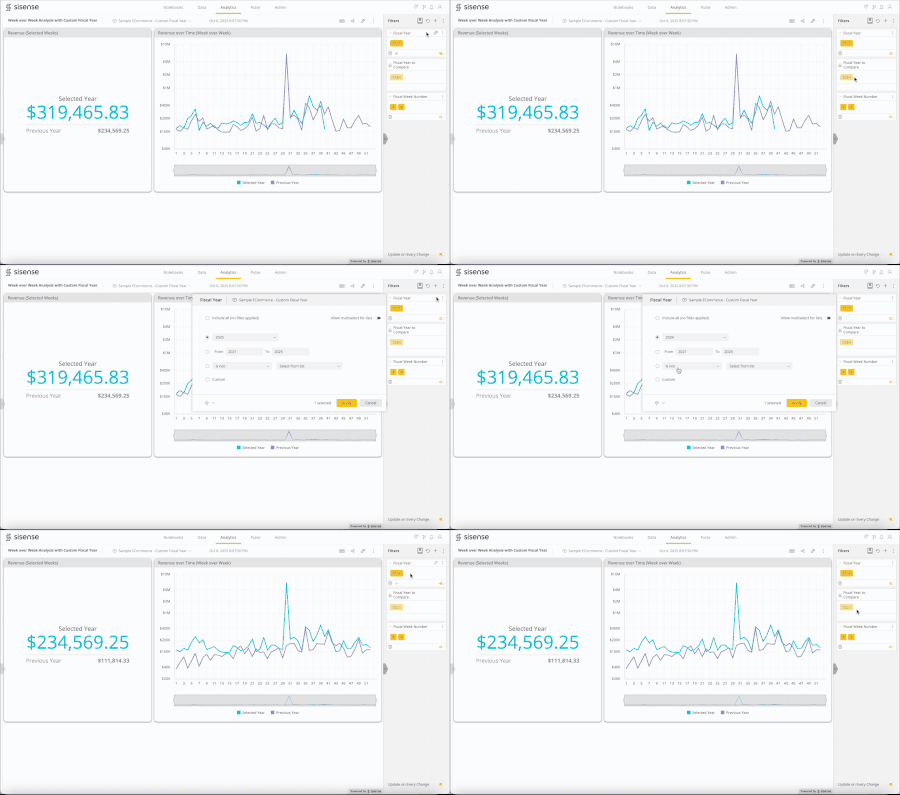
Introduction Week-over-week (WoW) analysis is a key part of performance tracking for fast-moving, high-traffic businesses such as convenience stores, gas stations, and car washes. For these organizations, aligning the fiscal calendar with operational cycles rather than the standard calendar year makes reporting more meaningful. In this use case, the fiscal year begins on the closest Sunday to January 1st, ensuring each year starts with a full week. This structure simplifies weekly reporting and keeps week-to-week comparisons consistent across years, which is important for tracking trends like fuel sales, store traffic, and service volumes. While nonstandard, this setup is commonly used in practice. What the Solution Does For standard, fixed calendar or fiscal years, week-over-week analysis can be achieved using the “First Month of Fiscal Calendar” and “First Day of Week” settings, along with the PASTYEAR function. However, for dynamic fiscal years that begin on a weekday closest to January 1st, these features don’t provide a usable solution, since the start date can fall in the previous or following calendar year. The solution uses the Filtered Measure certified add-on and a custom dashboard script to handle the custom fiscal year. Two year filters are added to the dashboard: one represents the selected fiscal year (user-selectable), and the other represents the prior year for comparison (locked and optionally hidden), which is automatically set with a dashboard script. The Filtered Measure plugin applies the selected-year filter to the measure for the chosen period, while the prior-year filter applies to the measure for the corresponding period in the previous year. This approach ensures that week-over-week calculations respect the custom fiscal calendar, providing accurate comparisons across equivalent weeks. Note: In this particular implementation, the fiscal years and week numbers are pre-calculated in the database and stored as numeric columns. To create a Date dimension table in your Elasticube with fiscal years starting on the first Sunday closest to January 1st, refer to the SQL example below. Why It’s Useful This solution addresses the native functional limitation by respecting the custom fiscal calendar, ensuring weekly trends are comparable across years. As a result, teams can reliably track key metrics, such as fuel sales, store traffic, and service volumes, on a true week-by-week basis, supporting better operational planning and more informed decision-making. Attachments WeekoverWeekAnalysiswithCustomFiscalYear.dash.txt (dashboard) Sample ECommerce - Custom Fiscal Year.smodel.txt (elasticube) JS Script - Automatic Update for Second Year Filter.txt (dashboard script) SQL Query - Dim Date with Custom Fiscal Year.txt (custom table SQL query) For the script to hide the second filter, refer to this BINextLevel article: Hide dashboard filters. Note: remove the .txt extension before importing the dashboard (.dash) and the Elasticube (.smodel) files.158Views1like0Comments