Using Git to transfer datasources between Sisense servers when connections differ

Overview
Many companies and organizations use Sisense Git Integration to transfer data models between Sisense servers or to promote data models from development or staging environments into production. This approach helps teams manage changes, track history, and deploy data model updates in a controlled, repeatable way.
A common challenge arises when different servers or environments, such as development, staging, and production, must connect to different data sources or data warehouse connections. While the underlying schema, tables, and joins may be identical, connection credentials, hosts, or database names can be environment-specific. By default, promoting a data model through Git includes connection configuration, which can unintentionally overwrite production connections during deployment.
This use case describes a practical Sisense Git Integration workflow that allows teams to promote data model changes between Sisense environments while preserving environment-specific connection configurations.
Terminology
To keep the workflow clear, this article uses the following terms:
- Development environment: The Sisense server used for building and testing data model changes. This can also be any Sisense server where data model schema changes are applied first.
- Staging environment: An optional intermediate Sisense server used for validation before production.
- Production environment: The Sisense server is used in production and by most users. This can be any server where data model schema changes are deployed only after being tested in other environments
- Schema changes: Updates to tables, joins, columns, and relationships within a data model.
- Connection configuration: Data source connection details stored in connection.json.
The challenge
A typical setup includes separate Sisense environments for development or staging and production, each potentially connected to a slightly different data source connection, such as differing parameters.
Organizations and businesses want to:
- Promote schema changes such as tables, joins, and column updates from development to production.
- Use Sisense Git Integration to track, manage, and deploy these changes across servers.
- Avoid overwriting environment-specific connection details or parameters with development settings.
Without a defined Git promotion process, teams often resort to manually fixing connections in production after each import. This manual step takes time, introduces the risk of errors, and becomes increasingly difficult if the number of data models or environments grows.
Key insight
Sisense stores connection configuration in a single file named connection.json, which is separate from other data model files tracked in Git.
As long as this file remains unchanged during a Git pull or merge, each Sisense environment retains its existing data source connection configuration. Sisense Git Integration treats all data model assets as plain text JSON files, so only files that change are applied during a pull or merge operation.
This behavior makes it possible to promote schema changes independently of connection settings by carefully controlling how connection.json is handled in Git.
What the solution does
The solution uses standard Git workflows to promote data model schema changes while excluding connection changes from deployment.
At a high level, the approach:
- Preserves environment-specific connections on each Sisense server.
- Uses Git branches to separate development data model changes from production-ready data models.
- Ensures that only schema-related files are promoted between environments.
This allows teams to safely deploy updates without risking accidental connection overwrites.
Recommended Git strategy
A simple and effective approach is to maintain two primary branches in the external Git repository:
- Development branch: Used for ongoing development and testing, typically connected to the development or staging environment.
- Production branch: Represents production-ready data models and contains the production connection configuration.
Initial setup
When a data model is first committed to Git, connection.json is included by design and cannot be excluded. For this reason, the initial commit should be made carefully so that each environment captures the correct baseline connection. In practice, this means ensuring the production branch contains the production connection configuration.
Ongoing development workflow
- Developers make schema changes in the development environment.
- Before committing, any changes to connection.json are discarded or confined to the development branch.
- The production branch retains its own connection.json, which may differ from the development connection. During merges, the production connection configuration is never overwritten
- Only schema-related files are committed to the development branch.
- When changes are ready for promotion, they are merged or cherry-picked into the production branch, again excluding connection.json.
- The production environment pulls only from the production branch, ensuring that schema changes are applied while the production connection remains unchanged.
- On the production server, always perform Git pulls from the production branch only. The production branch contains the production connection.json, ensuring that production connections are never replaced by development settings
Why this works
Sisense Git Integration applies updates based on file differences. If connection.json is unchanged during a Git pull, Sisense does not modify the existing connection in the target environment.
By using Git to control which files are modified in each branch (development and production), teams can cleanly separate schema evolution in a data model from connection configuration. This makes deployments predictable and avoids unintended side effects.
Best practices
- Always verify that connection.json remains unchanged in the production branch before committing schema updates.
- Use external Git tools for merges or cherry-picks when finer control over files is required.
- Avoid editing connections in development after the initial baseline unless intentionally changing the connection configuration.
- Document the workflow clearly so all team members follow the same process.
Limitations and notes
- connection.json cannot be excluded from the initial commit of a data model.
- Each environment must already have the correct connection configured. In some cases, each environment may maintain its own branch containing its specific connection.json.
- This approach applies only to data models and does not affect dashboards or other Sisense assets.
Outcome
By adopting this workflow, teams can safely promote data model schema changes between Sisense environments without overwriting environment-specific data source connections. Production connections remain stable, manual post-import fixes are eliminated, and Git-based promotion becomes a reliable and repeatable process across environments.
This approach strengthens governance, reduces deployment risk, and allows teams to scale their Sisense development workflows with confidence.
Screenshots:
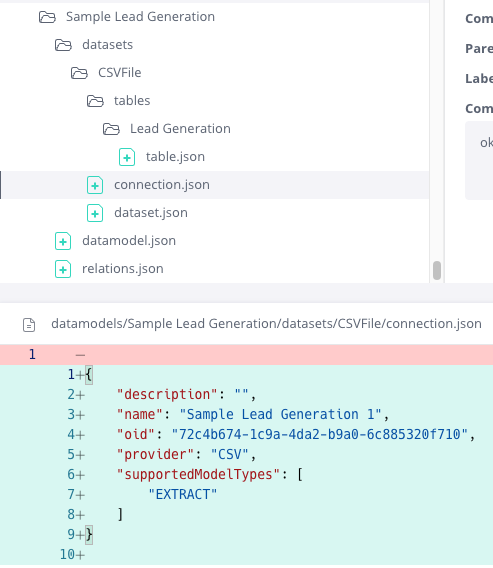
Connection.json in Sisense Git UI
Diagram of Example Git Flow
Development Environment
(Sisense Server)
  |
  |  1. Schema changes
  |     - tables
  |     - joins
  |     - columns
  |     (connection.json may differ)
  |
  v
Development Branch
(Git Repository)
  |
  |  2. Commit schema files only
  |     - Exclude or discard connection.json changes
  |
  v
Production Branch
(Git Repository)
  |
  |  3. Merge or cherry-pick
  |     - Schema changes only
  |     - connection.json unchanged
  |
  v
Production Environment
(Sisense Server)
  |
  |  4. Git pull
  |     - Schema updated
  |     - Production connection preserved
Discard all unintended changes to connection.json
When in the Production Environment, only pull from the Production Git Branch, with the Production connection.json