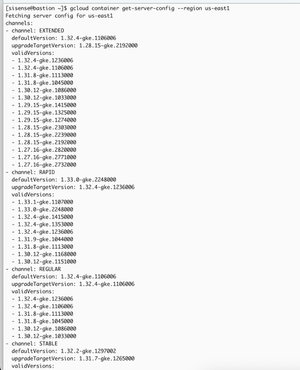
ContributionsMost RecentNewest TopicsMost LikesSolutionsTroubleshooting Sisense helm provisioner [Linux] The Helm Provisioner is an essential tool designed to simplify and automate the deployment of Sisense using Helm charts. When issues occur during installation or upgrades, the following troubleshooting steps can help pinpoint and resolve the problem (On-prem). AWS ALB tagging issue during the Sisense installation [Linux] While deploying Sisense on EKS with ALB (https://docs.sisense.com/main/SisenseLinux/using-an-aws-load-balancer-controller-with-sisense-on-amazon-eks.htm), you may notice that the installation has passed smoothly, but a load balancer is missing in the AWS console. Usually, it happens when a cluster doesn’t create new subnets but uses existing ones (e.g., this case: https://community.sisense.com/kb/cloud_managed_service/creating-and-deleting-eks-cluster-in-the-existing-vpc/26443). (On-prem) How to use SI CLI commands without a Linux host [Linux] Step-by-Step Guide: 1. Get the management pod name by running the following command: kubectl -n sisense get pods -l app=management -o name 2. Connect to this pod using the name from the previous output (underlined), e.g. kubectl -n sisense exec -it pod/management-764c66fbc4-td4db -- bash 3. Import the sisense.sh script: source /etc/sisense.sh 4. Log in to your Sisense instance with the following command (please keep in mind that the URL will be resolved via DNS, so it must be resolved correctly from this particular environment): login_sisense https://YOUR_URL (or http://YOUR_URL:port) 5. Provide your Sys.Admin credentials on the prompt 6. As soon as you get the ‘Login succeeded’ message, you are able to run SI CLI commands Conclusion: Despite the fact that we are not aware of any issues while running SI commands from the management pod, we still recommend using a dedicated Linux host as a bastion for such purpose. References/Related Content https://docs.sisense.com/main/SisenseLinux/using-sisense-cli-commands.htm Disclaimer: This post outlines a potential custom workaround for a specific use case or provides instructions regarding a specific task. The solution may not work in all scenarios or Sisense versions, so we strongly recommend testing it in your environment before deployment. If you need further assistance with this, please let us know. Re: Clean cached RAM Hi, MikeGre Dropping cache is not a best practice but a very edge case. The memory marked as cached still available for applications. You should have a particular reason to drop a cache manually. However, AFAIK this command still works on latest Linux distros and is not related to the Sisense itself. GKE cluster upgrade guide [Linux] (On-premise) Upgrading Kubernetes for Google Kubernetes Engine (GKE) is essential for maintaining optimal performance and security. Regular updates ensure access to the latest features, enhancements, and critical security patches. Each Sisense version supports the exact list of Kubernetes versions so it’s crucial to be on a supported Kubernetes version before the Sisense upgrade or installation. Re: Configure Sisense for multiple domains I assume you have a nginx-ingress installed on the Sisense instance but it should be just a generic HTTP in this case with the default 30845 port Creating and deleting EKS cluster in the existing VPC This guide demonstrates how to create an Amazon EKS (Elastic Kubernetes Service) cluster within existing VPCs and subnets, and how to remove it using the same configuration file with a single command. It’s not a recommendation but just an example of the working solution and you have to adjust it according to your needs. Error on installation "cp: cannot create regular file '/usr/local/bin/kubectl': Text file busy" The error "cp: cannot create regular file '/usr/local/bin/kubectl': Text file busy" typically occurs when multiple upgrade processes are running simultaneously, causing a conflict when trying to update the kubectl binary. [2024-10-30 12:33:34] Getting binaries kubectl (v1.30.3) and helm (v3.12.3) [2024-10-30 12:33:34] Downloading them from the internet % Total % Received % Xferd Average Speed Time Time Time Current Dload Upload Total Spent Left Speed 100 138 100 138 0 0 1367 0 --:--:-- --:--:-- --:--:-- 1380 100 49.0M 100 49.0M 0 0 3478k 0 0:00:14 0:00:14 --:--:-- 3525k % Total % Received % Xferd Average Speed Time Time Time Current Dload Upload Total Spent Left Speed 100 15.2M 100 15.2M 0 0 3730k 0 0:00:04 0:00:04 --:--:-- 3731k linux-amd64/helm cp: cannot create regular file '/usr/local/bin/kubectl': Text file busy [2024-10-30 12:33:53] ** Error occurred during command sudo cp installer/05_post_infra/files/kubectl installer/05_post_infra/files/helm /usr/local/bin section ** [2024-10-30 12:33:53] ** Exiting Installation ... ** For example, in one case, the error occurred because multiple upgrades were happening on the same environment simultaneously (the same bastion for several cloud environments), which led to the Kubectl binary being in use by another upgrade process. The recommended solution is to check if any process is using Kubectl or Helm before proceeding with the upgrade. Watching an upgrade with "kubectl ... -w" command can cause this issue also. To prevent this error, it is advisable to: Ensure that no other upgrade or deployment processes are running in parallel. Use commands like lsof -t $(which kubectl) and lsof -t $(which helm) to check if these binaries are in use. If any command returns a PID, print out the process details using ps -ef | grep <pid number> and fail the pipeline if necessary. By following these steps, you can avoid the "Text file busy" error and ensure a smooth upgrade process. Related Content: https://academy.sisense.com/sisense-administration https://docs.sisense.com/main/SisenseLinux/upgrading-sisense.htm Re: Error querying data model and X509 certificate has expired or is not yet valid The certificate has been expired on Kubespray. The manual on its renewal is here https://docs.sisense.com/main/SisenseLinux/renewing-your-kubernetes-certificate.htm but the Kubespray is outdated so it's really worth updating Sisense with RKE https://docs.sisense.com/main/SisenseLinux/upgrading-from-kubespray-to-rke.htm Overriding Helm values during the installation How to override Helm values during the installation (replicas, resource limits, etc.)