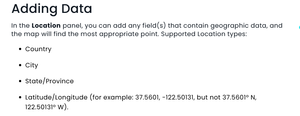
ContributionsMost RecentNewest TopicsMost LikesSolutionsRe: Map Help Hi everyone, the reason I did it as the method described above is because that is how the documentation on the website tells me how to do it. (See screenshot below). The solution did work, but it was confusing. As always, thanks for the help! Map Help Hi everyone, I am trying to create a heatmap style visual using latitude and longitude. I have a column called location that has data that looks like this -26.27389, 28.127951. Is there something I am misunderstanding when trying to input this as location data? Thanks. SolvedRe: Formula Help Hi DRay, It was actually a much simpler solution than i thought. I just added a custom column that put a 1 or a 0 in depedning if the condition I was looking for was met using. And then summing that divided by the total number of rows. CASE WHEN [{condition}] = '{condition met}' THEN 1 ELSE 0 END and then (sum([Column_name])/[# of rows]) Re: Formula Help Problem has been solved. Formula Help Hi Everyone, I need to create a formula for an indicator widget which will count all rows in a certain column that meets a condition divided by all rows in that column. For clarity, I want to count all Hardware Types where the power condition is on, divided by count of all hardware types. I am sure this is a really easy formula to put in, but I just cant seem to get it to work. Thanks! SolvedRe: Formula for % of Day Driven Within Shift Thank you, Ido! Re: Formula for % of Day Driven Within Shift Hi Ido, Thanks so much for getting back to me. This works perfectly. But how can I make it to filter just the top 10 values on that formula? Formula for % of Day Driven Within Shift Hi everyone, I'm working on a widget in Sisense that analyzes driver activity, and I'm trying to calculate the percentage of each driver's total trip time that occurred during their scheduled shift. I have the following fields: shift_alignment – categorizes each trip as "Before Shift", "During Shift", "After Shift", or "No Schedule Found" Total trip_duration_minutes – the duration of each trip in minutes I want to build a custom formula that calculates: (Total trip time during shift) ÷ (Total trip time) × 100 Initially, I tried something like this: ( SUM(CASE WHEN [shift_alignment] = "During Shift" THEN [Total trip_duration_minutes] ELSE 0 END) / SUM([Total trip_duration_minutes]) ) * 100 But I received a syntax error in the Sisense widget editor. Eventually, I found the correct approach using IF() instead of CASE: ( SUM(IF([shift_alignment] = "During Shift", [Total trip_duration_minutes], 0)) / SUM([Total trip_duration_minutes]) ) * 100 I'd appreciate any feedback or suggestions—especially if there's a more efficient or dynamic way to do this in Sisense. Thanks in advance! SolvedAppend Data for Dim Table Hi Everyone, I have a few fact tables that all share the column "registration". In my original build, I created a dim table by just saying: Select Distinct [registration ]from Table1 etc Now that I have other fact tables, is it possible to append all of those registration columns and then select distinct from the full list? Thanks SolvedDimension Table Hi Everyone, I am very used to using PowerBI, where one way to create a dimension table, you would duplicate the table you were looking for, choose the column you wanted and then removed duplicates. This was all done in power query. I am now wondering if there is an easy way to do this in Sisense? obviously I could just input the data manually, but that seems inefficient and not dynamic. Solved