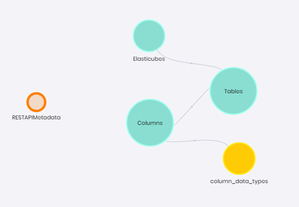
ContributionsMost RecentNewest TopicsMost LikesSolutionsRe: Two-factor authentication Regarding to the comment: The majority of our customers use a SSO provider to log in to Sisense It's not true in our case. Almost all customers don't use SSO because they are using the tool for internal purposes only. Best. Get ElastiCubes Metadata: list of Elasticubes, tables and columns Data Model Hi, We often need to have the metadata report about all Elasticubes and their contents. To cover this gap, we have developed an ElastiCube that is based on the REST API v2.0, which creates a data model for this purpose: There is a custom code algorithm that is based on calls to Datamodel REST API and gets all the metadata about the data models you have in your environment. The column data types info is based on the official documentation https://sisense.dev/guides/restApi/v2/data-types.html (it contains a table available for L2021.9 and higher). This is a CSV file (semicolon separated) that should be located in the Sisense server under /data/metadata folder (/opt/sisense/storage/data/metadata) . In this post, you can get the Python code, where you only have to change the hostname of your instance and the bearer token for an Admin user to be able to execute the REST API calls. When you have all of this deployed, you can build your reports about the contents of your data deployment. I hope it helps. Contact me or our company (https://parapentex.com/) if you need anything related. We are #SisenseInSpanish #SomosSisenseEnEspañol Re: Welcome to Week 1! Hi, I have written something but I was unable to upload... or I don't understand the process to proceed. Let me share it: TASKS AUTOMATIZATION IN THE DATA CYCLE We are working with clients from all over the world, focusing on those who speak Spanish. In all the approaches we have had with our clients, the primary needs were to solve different business analytical needs. The themes and cases may vary, but basically, all clients started with an analytics guideline focused on the analytics objects they should get. Depending on the degree of maturity, migrate from an Excel-based way of working to apply predictive analytics to your models in your cloud data warehouses. Data processes generally do not appear anywhere on the initial roadmap. However, the automation of data processes, the integration with business processes, and as a more ambitious case, turning Sisense into the core of decision making by applying actionable analytics, are usually not in the first phase. However, these automation processes are, ultimately, the core of the analytical solution. From being able to build cubes dynamically based on data needs, being able to communicate information obtained from Sisense to other processes, or invoking business processes from a dashboard, after all, it is what we call Maslow's pyramid of data, which ultimately makes the analytical solution a determining factor in decision making. To achieve this, the intensive use of the REST API in conjunction with components based on BloX, has been shown to make a reality that, being an open platform, I can integrate it into the data governance of organizations, and, in many cases, boost it. In the case of OnPrem clients, the use of Linux shell scripts together with crontabs is vital, but it is not exclusive, since we take advantage of the Jupyter Notebooks environment to be able to perform processing logic within the cubes, giving the power, not only to generate new data sets, but also to orchestrate and generate calls to business processes through Python. Think of Custom Code for what it is, code to enrich the data. From being able to manage security by registering or deregistering users, to generating PDFs based on existing dashboards and, once generated, connecting with a messaging service for distribution throughout the company. In many cases, they can also fill certain gaps in standard SQL. If you have worked with Oracle databases, for example, to obtain differences in data, you are used to using the MINUS statement above NOT IN. This is not available in standard SQL, but you can fill that gap through Python by calculating the differences of data sets optimally. Re: Kickoff Bullet Drafts - Give customers best practices in Data Modeling inside their Data ecosystem - Real infuse analytics their everyday work - Give power to users to use their data - Show people how they can achieve their needs with the tool easily Re: Two-factor authentication Hi Andrew, Many customers has no SSO, and I think that just SSO does not fit the two-factor authentication thing. The definitition of two-factor authentication: "2FA is an extra layer of security used to make sure that people trying to gain access to an online account are who they say they are. First, a user will enter their username and a password. Then, instead of immediately gaining access, they will be required to provide another piece of information." Two-factor authentication Hi, Many customers are asking to enable two-factor authentication. It will be a very important security enhancement. Thanks Error when trying to connect Notebooks to local MySQL Server Instance Hi, When trying to connect our instance to our local MySQL Server instance, we have a generic error (Unable to connect). We have checked that we are able to connect with those credentials and host data from any server and terminal, but we are getting this error in Notebooks. We are not able to locate the logs or pod related to the error. Just an entry in combined.log with no detailed information (just unable to make a connection) Any of you was able to connect to a local instance or have an idea about how to solve it? BR SolvedRe: Cronjob to copy files from local to K8 Hi, You just need to create a bash script in order to make the copy. First of all, get the management pod name: #!/bin/bash localFolder=/path/to/local/files management=$(kubectl -n sisense get pods -l app="management" -o custom-columns=":.metadata.name") for fileName in `find $localFolder -name '*.csv' -exec basename {} \;` ; do kubectl -n sisense cp /home/ftpifx sisense/$fileName $management:/opt/sisense/storage/data/informix/$fileName done Then, you can add this script to the corntab (make this .sh script executable) Best Re: Preserving YTD after date filter applied I have thought about this solution, but I cannot indentify the YTD function in Elasticube, how did you achieve that? Preserving YTD after date filter applied Hi, We are facing this. We have a pivot table with shows the total amount of a metric and the running sum form the begining of the year (YTD). This is working fine: Then, we want to apply a filter based on the date column, to show just a couple of months. If we do taht, we are loosing the YTDSUM calculation, and it applies only in this couple of months We are expecting 16M and 17M in the third column, but we are getting just the running sum of the couple of months. We have tried with ALL but the results are not the expected. Thanks