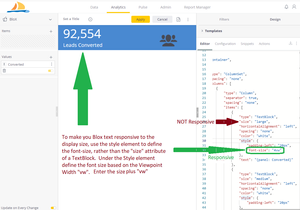
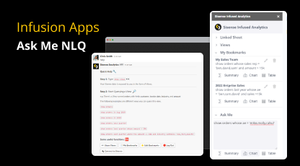
ContributionsMost RecentNewest TopicsMost LikesSolutionsRe: Infusion Apps: Ask Me NLQ Quick clarification: Bookmarks aren't shared with others by name, but you can copy the Query, and share that as text with others. When they run the query, Infused Apps will execute the data security for other users. Thx Infusion Apps: Ask Me NLQ 'Ask Me' is the easy way to talk to your data, especially when using Slack or Teams in a meeting. It’s great to have answers in real-time or provide a productive way to offer governed data to users in their existing workflows. Re: How to configure GitHub from Sisense? Hi Wojtek, Git integration was recently released for Sisense Fusion as mentioned above, but is supported in CDT, too. The Git documentation is here for Fusion: https://docs.sisense.com/main/SisenseLinux/introduction-to-sisense-git-integration.htm. The Git documentation for Sisense for Cloud Data Teams (CDT) is here: https://dtdocs.sisense.com/article/git-configuration. In Fusion, v2022.10 and later, you still need to enable the feature in Configuration settings, which is covered in the documentation. Re: How to configure GitHub from Sisense? Hi, Git Integration was released in version L2022.10, and you can find documentation here: https://documentation.sisense.com/l2022-11/docs/introduction-to-sisense-git-integration Re: Same column as two different dashboard filter conditions. It's straight forward to duplicate a column with another name, and so have the same data appear in two separate filters, but it's not very helpful. I'm not sure from your description of the logic in your filter combinations. Please confirm... Drop down 1 shows a list of Names, where each Name points to 1 or more IDs, or always the same individual ID? Is it that you want to show Names (Labels) to select from that will assert the ID (Value) in the filter? Thanks, Chris Re: Dynamic Font Size When Using BloX Hi gwolfe, It's simple to make the number in your Blox KPI widget responsive. Don't use the "size" attribute in the TextBlock. Instead, add a "style" attribute, and underneath, define the font-size as an integer percent of the Viewpoint Width, "vw". The entry looks like this: "font-size": "4vw". See the example below. Regards, Chris Re: Table Header Row hover / mouse over format Hi TweiN, Actually, it's the Pivot Table that has changed. You now see Pivot v2.0 with a robust API in Sisense, where the Sorting control is the newer pyramidal shape, slightly different. There are several other changes that accompany the change in look. They include being able to sort each measure column independently, and more in the documentation links below https://documentation.sisense.com/docs/pivot https://sisense.dev/reference/js/widget/pivot2.html The Pivot 2.0 API will provide the greatest level of control over the function and styling of the pivot. Regards, Chris Re: Conditional Color gradient in Pivot table Hi SaiKumar, There is an alternative to the limited color styling options in the Pivot widget editor. There is a robust Pivot2 API for handling many more customizations that you can define in the widget editor. https://sisense.dev/reference/js/widget/pivot2.html Using the API or the API + CSS you should be able to define a color gradient using the linear-gradient() CSS function. https://developer.mozilla.org/en-US/docs/Web/CSS/gradient/linear-gradient e.g. background: linear-gradient(#e66465, #9198e5); Regards, Chris Re: BloX widget height Hi Vlad, There isn't an issue with the Blox JSON code. The height issue arises when we transpose the inline block via script. For some reason, editing the widget reverts the widget height to the height of the Edit Widget window. If you were to reduce the height of the edit window to say 200px, it would save properly. It's easier to resize it after saving as work around until it's addressed. I'm submitting this as a problem associated with the inline-block script. Regards, Chris Re: BloX widget height Hi Vlad, The issue of only ten transposed Blox-Slides (Columns) seems to result from the way lazy loading the next block of data gets triggered. There isn't a control exposed for this. You can see the trigger in the calls that applies to the overflow management: class="scroll has-scrollbar" data-listener="{direction: 'down', percent: 75, callback: loadMore}"> This will need to be addressed by Engineering, either in the design or the trigger. Regards, Chris