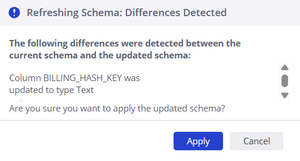
ContributionsMost RecentNewest TopicsMost LikesSolutionsAbility to Specify Provider in Pulse Alerts -------------------------------------------------------------------Problem Statement: Inability to Scope System Alerts by Data Provider Currently, Pulse System Alerts for build failures are binary—either enabled for everything or disabled. In complex enterprise environments, we often run hybrid deployments where ElastiCubes are powered by vastly different backend providers (e.g., legacy MSSQL/Oracle vs. modern Snowflake/Redshift/BigQuery). When a legacy database goes down for maintenance, or when we have non-critical local CSV cubes failing, our administrators are flooded with Pulse notifications. This noise often causes us to miss critical failures in our primary Snowflake cloud data warehouse, which has direct cost and SLA implications. Proposed Feature: Provider-Based Alert Routing We need the ability to configure Pulse System Alert rules based on the underlying Provider or Connectivity Type of the ElastiCube. Specifically, in the Pulse > System Alerts > Build Failed configuration, please add a condition logic or filter that allows us to include/exclude specific providers. Configuration Example: Alert Rule 1: Send to CloudOps Team IF Build Fails AND Provider = Snowflake, Redshift. Alert Rule 2: Send to DBA Team IF Build Fails AND Provider = MSSQL, Oracle. Alert Rule 3: Do NOT send alert IF Provider = CSV, Excel. Business Impact Noise Reduction: Eliminates "alert fatigue" by filtering out expected failures from dev/test environments or legacy systems. Targeted Incident Response: Ensures the right team (Cloud Ops vs. Legacy DBAs) receives the alert immediately, reducing Mean Time to Resolution (MTTR). Cost Management: Helps prioritize failures that impact billable cloud compute consumption. Re: Refresh schema for all tables poppyplaytime - could you elaborate on using the Sisense REST API to automate schema refreshes for all tables programmatically? I've been trying to do this via /api/v2 endpoints but still getting the "Refreshing Schema: Differences Detected" popup: Re: How to create a filter within a widget? zach_myt - although not the same article OP posted, found this article from same source that's related: https://www.binextlevel.com/post/adding-a-dropdown-to-change-date-granularity-in-charts Hope that helps! cc: Astroraf Re: Add functionality for updating the Elasticube a Pulse Alert is associated with Hi DRay - OP raises a great point about no prompt from the UI for redirecting/reconfiguring ElastiCube Pulse dependencies, as this pain point involves manually reconfiguring Pulses and serves as an inconvenience to users who benefit from Pulse Alerts for a set of ElastiCube(s). Similar to viewing all ElastiCube dependencies before editing/deleting a Connection, I think a similar approach can be used for viewing all Pulse dependencies before editing/deleting an ElastiCube. TL;DR - a quick win for Sisense to better bridge the gap between insights and action for their users (like me 🙂). Re: Connection Tool - Programmatically Remove Unused Datasource Connections, and List All Connections JeremyFriedel - thank you so much for the code + walkthrough of the Connection tool you created! With a bit of tweaking for our company purposes, added the ability for the script to pull: More Sisense Connection fields Connection strings Provider name And more! Base tables (think: Snowflake views) Base table fields You're an absolute legend man 💪