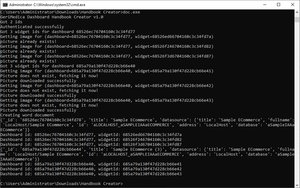
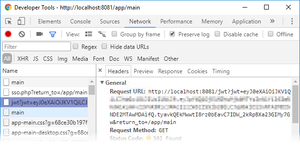
ContributionsMost RecentNewest TopicsMost LikesSolutionsOverride the hidden left panel behavior in widget edit mode in Embed SDK [Linux] When embedding Sisense dashboards using the Embed SDK, the left panel will automatically hide when switching to widget edit mode if the showLeftPane is set to true for the dashboard. This article explains how to override this default SDK behavior and ensure that the left panel remains visible in widget edit mode. Applicable to all Sisense deployments (Cloud and On-Prem) using the Embed SDK. Create a dashboard handbook from dashboard IDs [Windows] This guide explains how to use the Dashboard Handbook Creator script for Sisense on Windows (tested version: 20.25.3.10026) to automatically generate a Word document containing dashboard names, widget names, descriptions, and images. Ideal for documentation or knowledge sharing. Re: Dynamically Updating Widget Titles Based on Filter Selections in Sisense (Linux) Hi Liliia_DevX MikeGre , please cehck the following script with added logic to detect cascading filters and read members from level.filter.members to cover the cascading filters scenario: widget.on("render", function () { let title = "name(s) selected"; let columnName = "Full Name"; // your reference column // Find the filter matching the columnName (direct or inside cascading) let filterUsed = dashboard.filters.$$items.find((filter) => { if (filter.jaql?.column === columnName) return true; if (filter.isCascading && filter.levels?.some((lvl) => lvl.column === columnName)) return true; return false; }); // Get selected values or default text let filterText = "No"; if (filterUsed) { if (filterUsed.isCascading) { let level = filterUsed.levels.find((lvl) => lvl.column === columnName); if (level?.filter?.members?.length) { filterText = level.filter.members.join(", "); } } else if (filterUsed.jaql?.filter?.members?.length) { filterText = filterUsed.jaql.filter.members.join(", "); } } let isModified = false; if (!isModified) { widget.title = filterText + " " + title; isModified = true; } }); I use the "Full Name" column in this example, and the default value is "No name(s) selected", where No is replaced with the actual value(s) if they are selected. Feel free to adjust it according to your needs. JWT token not working after upgrade - [Linux] and [Windows] If you are using JWT-based SSO in Sisense, upgrading to version 6.7 or later may cause authentication failures. This issue could be linked to a missing "typ": "JWT" attribute in the JWT token header. This guide shows how to detect and fix this issue for both cloud and on-prem deployments. Typ header is still required as of Sisense Version L2025.4 Re: Indicator With Dates, Time And Duration download link: https://data.sisense.com/sisense-shares/formattedTime-2018-01-19.zip Re: Hide dashboard filter based on filter title Hi kgupta_egencia , As we confirmed today, the extra +2 comes from the filterRelationsEnabled feature flag, which adds an additional <div> to the ew-panel that needs to be accounted for when constructing the selector. If this feature is disabled, then +1 should be applied instead. Below is an updated script example that should work in both scenarios, whether filter relationships are enabled or disabled: const filterToHide = 'Month' dashboard.on('initialized', (d, args) => { let depFilterPos, filterPos, k const feature = prism.features.find( (item) => item.key === "filterRelationsEnabled"); for (let i = 0; i < d.filters.$$items.length; i++) { let filter = d.filters.$$items[i] if (!defined(filter.levels)) { continue } for (let j = 0; j < filter.levels.length; j++) { let level = filter.levels[j] if (level.title === filterToHide) { depFilterPos = 0 depFilterPos += feature && feature.active ? i + 2 : i + 1 filterPos = j + 1 } } } console.log(depFilterPos, filterPos) var styles = ` .ew-panel > .f-wrapper:nth-child(${depFilterPos}) > .ew-item > .f-group > .f-mini-host:nth-child(${filterPos}) { display: none; } ` var styleSheet = document.createElement("style") styleSheet.innerText = styles document.head.appendChild(styleSheet) }) Blox action initiating the elasticube build for Sisense on Linux This article explains how to create a Blox action to programmatically initiate an Elasticube build on Sisense running on Linux. The action uses Sisense’s REST API and can be triggered from dashboards via a button. Applicable for Sisense version 2024.x and above, on both cloud and on-premises environments. Re: 🌌 May the 4th Be With You, Sisense Community! 🚀 Hello there. Re: Exploring the Potential of Sisense Jump to Dashboard Filter Configurations Hi jacobd , If I understood you correctly, this should be achievable using the BloX Jump to Dashboard (JTD) action. You can include panel:columnName dynamically or pass specific hardcoded values as needed using the panelsToInclude array. To ensure the filter applies down to the row level in the drilled dashboard, make sure that: The source dashboard correctly passes the tableName.columnName filter. Dashboard filters must be enabled for the BloX widget to ensure that the filtered values are correctly passed when jumping to the target dashboard. The target dashboard has a matching filter structure that accepts and applies the value accordingly. You can find more details in the documentation here (search for Jump to Dashboard and expand the relevant section): https://docs.sisense.com/main/SisenseLinux/sisense-blox-reference.htm Let me know if this works for your use case! Re: Blox Dropdown Placeholder Hi duc_resolvevn , thanks for the update. I verified the latest script I provided, and it works as expected when I manually or programmatically reset the filter (Sisense Version: L2025.1.0.179). You can compare your Clear button logic with the following Reset Filters implementation to see if it works better for you: https://community.sisense.com/t5/knowledge-base/reset-to-default-filters-button-using-blox/ta-p/786 If the issue still persists, feel free to raise a support ticket so we can investigate it further.