
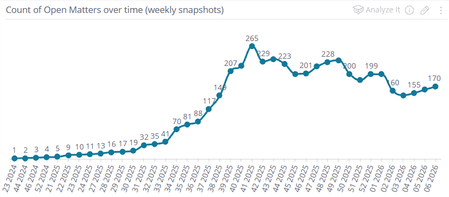
Show only last few weeks of Running Total that's calculated from beginning of time
 02-03-2026
Okay, figured it out on my own after messing with it enough. Essentially, you need to split the formula in two: a Running Total that calculates over the period in question, plus a secondary formula that is NOT a running total but explicitly calculates for the prior period.
In my case I set up a "Matter Event Date" filter at the widget level, filtered to the last 4 weeks (rolling). Then, I used this formula:
RSUM(
SUM([Matter Number],
IF(
([# of unique Matter Event Type],[Matter Event Type (filtered to "Open")])=1,1,0
)
)
-
SUM([Matter Number],
IF(
([# of unique Matter Event Type],[Matter Event Type (filtered to "Closed")])=1,1,0
)
)
)
+
(
(COUNT([Matter Number]),[Matter Event Type (filtered to "Open")],[Weeks in Matter Event Date (filtered to all weeks PRIOR to the last 4 weeks)])
-
(COUNT([Matter Number]),[Matter Event Type (filtered to "Closed")],[Weeks in Matter Event Date (filtered to all weeks PRIOR to the last 4 weeks)])
)Basically, for the second part, I switched from SUM to COUNT, which allows easier filtering. I added a Matter Event Date filter and used the "Advanced" tab to specify all weeks prior to the last 4. To do this:
- In the formula editor, click on the element in question ("Weeks in Matter Event Date") and select Filter
- In the filter pop-up, click the "Time Frame" tab
- In the dropdown at the top, select "Weeks" (or whatever time period you're using)
- Select "This & Last Week" (important, this sets up the advanced filter in the next step)
- Click the "Advanced" tab. There should already be some code in there showing a count of "2" and an offset of "0" (if you skipped step 4 then it won't say this).
- Change the count to "9999" and the offset to "4", then click OK. This will filter on all months (up to 9999) EXCEPT the last 4 (the offset).
This worked for me! The only minor irritation is that if you decide to filter for a different date range (e.g. the last SIX weeks, instead of 4) then you have to update both the widget filter and the filters inside the formula so they match, otherwise your totals will get all wonky again.


