Check if the same date across different records is in the same month or not
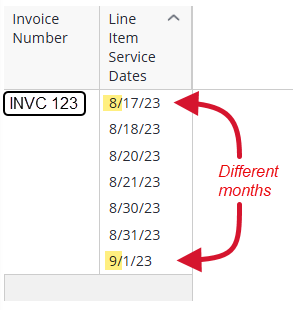
Hi! In our system we have Invoice data. There's an Invoice table with various details about the invoice, and each invoice also has multiple line items, tracked on a separate Line Item table. On the Line Item table is a field called "Service Date". I want to find Invoices that contain Line Item Service Dates that are in different months. This is against our billing guidelines, which say that invoices must only contain line items that are within the same calendar month as each other. I know how to do this in Excel using MAXIF and MINIF formulas to compare the earliest and latest Service Dates within a given Invoice. However, I can't figure out how to do this in Sisense. Please note: we're on an older Windows-based version of Sisense, v8.2.1.10110. I also do not have access to the ElastiCube configuration, so I cannot create new fields or modify the existing tables. Ideally I'd like to be able to do this within the existing UI in the Sisense front-end with formulas, if possible. I tried using this formula to render the difference in months as a number, with the idea that I could filter for anything greater than zero: MDIFF(MIN([Months in Invoice Line Item Service Date]),MAX([Months in Invoice Line Item Service Date])) . However, the formula window in Sisense displayed an error and says "Error in function definition (MDiff): Expecting parameter of type 'Dimension Expression' but found 'Numeric Expression'." If I remove the MIN/MAX functions, so it's just MDIFF([Months in Invoice Line Item Service Date],[Months in Invoice Line Item Service Date]) , the error message goes away, but then the formula doesn't work properly: it'll just display a "0" for all invoices, even ones that I know should show a 1 or more due to their service dates spanning across multiple months. (Presumably this is because, without the MIN & MAX, it doesn't know which particular Service Dates to compare.) If I try just subtracting the MIN from the MAX without using the MDIFF function, like MAX([Months in Invoice Line Item Service Date])-MIN([Months in Invoice Line Item Service Date1]) , the formula window lets me submit the formula, but then the whole widget displays a yellow exclamation point error, and the error message says "Query number 0: types tinyint(8,0) and timestamp(7,0) are not equal". If I try just a MIN or MAX by itself, like MAX([Months in Invoice Line Item Service Date]) , then I get a slightly different error: "Invalid cast from 'DateTime' to 'Double'. Couldn't store <date> in <bunch of numbers> Column. Expected type is Double." Is it truly not possible to calculate this? It seems like there should be at least some way to accomplish this, but I still can't figure it out. (I tried also asking various AI chatbots but none of them were helpful...)39Views0likes0Comments
How to calculate a 60‑Day Resolution Deadline (Record Date + 60 Days)?
I have a stakeholder who needs to create a custom date that's 60 days on from the Record Date that's in the data model. In this scenario an event happens on March 6th and the Incident Record is created. My stakeholder needs to dynamically create a field that displays the date 60 days in the future (May 5th) by which time the Incident must be resolved. I've tried several approaches, none of which worked. Any help or advice would be much appreciated!Solved143Views0likes2CommentsShow only last few weeks of Running Total that's calculated from beginning of time
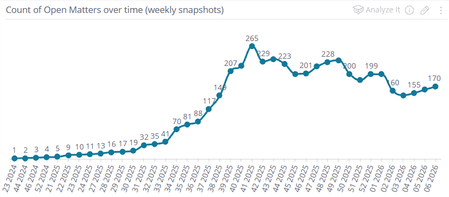
Hello! I've got a Running Total formula that is working as expected, but it only works properly if my widget is showing back to the beginning of time. I'd like to filter it so I only see the running total over the last few weeks, but when I filter, it messes up the running count and it's no longer accurate. I need to somehow calculate the prior running total so the filtered range picks up from the right place and continues calculating correctly afterward. How can I do this? NOTE: I do not have access to the Elasticube setup, so I cannot modify any tables, create any custom columns, run custom SQL, etc. I can only work with what I have available to me in the Sisense UI. Also, we're on an older Windows version of Sisense (v8.2.1.10110), not Linux, so I may not have all of the current features in Sisense :( Anyway, the running total I'm calculating is the number of open matters at any given point in time. Each matter can have an "Open" event and a "Closed" event. This is on a custom table (we had someone create for us) called "Matter Events". Rather than each matter being a single row with open and close date columns, it's structured as just a "Matter Date" and "Matter Event" column, and matters can show on multiple rows, once for each time they were opened or closed. From this, I calculate a running total by treating each Open event as a +1 while each Closed event is considered a -1. If you add up every event from the beginning of time up to a given date, it should equal what the open total was on that date. Generally speaking, if I measure from the beginning of time up through today's date, the total matches the actual current number of open matters. So far so good. Here's the formula I'm using: RSUM( SUM([Matter Number], IF( ([# of unique Matter Event Type],[Matter Event Type (filtered to "Open")])=1, 1, 0 ) ) - SUM([Matter Number], IF( ([# of unique Matter Event Type],[Matter Event Type (filtered to "Closed")])=1, 1, 0 ) ) ) Basically: the inner IF formulas should be evaluating to a "1" if they match the filter (Open/Closed). I calculate the Open and Closed counts separately and subtract one from the other to arrive at some Net total, at the level of each Matter Number. Then the Running Sum formula wraps this entire thing so it properly tracks over time. This seems to work well in a line chart: However: I just want to show the last 4 weeks of open counts. If I just filter the widget based on the Matter Event Date, I get this: This is because the Running Total formula just starts from 0 each time. How can I avoid that? I know one way I can do that is to manually key in a static value into the formula to make it line up correctly. For instance, if I just add a "+160" to the end of the formula, everything lines up correctly: This is essentially what I need. However, the way I got there isn't ideal because the dashboard in question will always be a rolling four week lookback, so I would have to manually update that adjustment in the formula each week. Also, it would be nice if I could just filter to any arbitrary date range and see accurate totals for that period without having to figure out the prior counts manually. Is there a way I can dynamically calculate this pre-filtered-date-range total so the Running Total works correctly? I know there's an "ALL" formula that seems like it might be useful in this regard, but no matter where I try to place it in my existing formula, I can't get it to work without a syntax error of some kind.Solved127Views1like1CommentHow to Filter Dates for a date that is greater than another date?
Hi DRay , intapiuser , JeremyFriedel I am trying to see the count of a column where the date from one field is greater than the date from another date. Here is my example: Table: Program_Plan_of_care_goal Field: Count (Goal_code) and Goal_actual_completion_date > Goal_target_completion_date I would assume I could achieve this with a CASE WHEN formula but this does not seem to get what I am looking for.Solved290Views0likes4Comments
Sort 'sdiff' results
I'm trying to figure out how to calculate the elapsed time between two data points in a record and then sort the results into different buckets. We use an embedded version of Sisense so I can't edit anything via the 'Elasticube'. I'm trying to take all the records created by a person and calculate the time from when the record was created to the time it was completed. Then display how many records were completed within different time frames. Either by using a column chart or pivot table. The problem is that the 'sdiff' function requires an aggregation. I don't want to find the median or average, I want to calculate the time for every record. I tried slapping an 'ALL' in front of the 'sdiff' function but that gave me an error. I also tried (COUNT(RECORDS),(SDIFF(ENDTIME, STARTTIME))) in the hopes that I could then filter the results but get an unexpected token error. I also tried CASE WHEN (SDIFF(ENDTIME,STARTTIME) < 7200 THEN 1 ELSE 0 END but ran into the same problem of 'sdiff' requiring an aggregator. What do?141Views0likes3CommentsHow to have dashboard filters affect a formula filer?
Hi DRay , I have this formula in Sisense Bar Chart: (((([Total CLAIM_CNT]) )/([Total CLAIM_CNT],Prev([@Months in DATE], 12),([@Network Name])))-1) Where I have the Category being Network Name, I also have the Network Name in the Dashboard filter but when I select a Network Name in the Dashboard filter the widget does not filter for my selected Network Name. The Network Name being in the Denominator is to get the Total Claim Count. I also know that the hierarchy for filtering in Sisense is Formula Filter > Widget fitler > then Dashboard filter. Is there anyway to override this behavior? I still need to the overall claim counts to get the percentage by individual network names but still want to filter for the specific network name.Solved298Views0likes6Comments
Replacing values with text: Pivot 2 script
👋 Hello, I have clients doing this in Windows... Replace Values with Text - Pivot Table Widget | Sisense Align A Single Column In Pivot They might end up with a script like this: widget.on('ready', () => { $('td.p-value[val="1"][fidx="2"]').text("First-Time Donor") $('td.p-value[val="0"][fidx="2"]').text("Recurring Donor") }) widget.on('ready', function(sender, ev){ $('td[fidx=2]',element).css('text-align','left') $('td[fidx=2]',element).css('padding-left','5px') $('td[fidx=2]',element).css('vertical-align','middle') }); Can you help me convert this to Pivot 2?Solved132Views0likes1Comment