Extending pivot widget panel limits in Sisense using user groups

Overview
Pivot widgets in Sisense are often used to explore and visualize complex datasets with multiple dimensions and measures. In some scenarios, users need to build very large pivot tables with many rows, columns, values, or filters. However, pivot widgets enforce internal panel item limits that can restrict how many fields and dimensions can be added to each panel.
While these limits are useful for protecting performance, load time, and usability in general, they can become a constraint for advanced users working with large datasets or detailed analytical models. At the same time, organizations may want to apply different limits for different groups of users rather than increasing limits globally for everyone.
This use case describes a Sisense plugin that automatically increases pivot panel limits as widgets load, with support for both a global default and optional overrides based on user group membership.
The challenge
By default, pivot widgets in Sisense can reach panel item limits that prevent users from adding additional dimensions or measures. This can affect:
- Analysts building large exploratory pivot tables
- Power users working with wide schemas or detailed hierarchies
- Dashboards that rely on complex pivots with many fields
Manually adjusting widget configuration is not scalable, especially when dashboards contain many pivot widgets or when widgets are opened independently outside a dashboard. In addition, organizations often want different limits for different user groups, rather than applying a single global setting.
It is important to note that if a very large number of dimensions are used in an individual pivot widget, that widget may have an extended load time.
What the solution does
The PivotMaxPanelItems plugin automatically sets the panel.metadata.maxitems value for every panel in pivot-type widgets as they load.
At a high level, the plugin:
- Applies only to pivot widgets
- Updates all pivot panels (rows, columns, values, filters)
- Works for widgets inside dashboards and for widgets opened directly
- Supports a configurable default limit for all users
- Supports optional overrides based on Sisense user group membership
The plugin runs on dashboard and widget load events, ensuring that pivot panel limits are applied consistently without requiring manual changes to individual widgets.
Role and group-based configuration
The plugin can apply different panel limits depending on the user’s Sisense group membership. This allows organizations to:
- Grant higher limits to advanced users or analysts
- Keep more conservative limits for general users
- Control behavior centrally through configuration
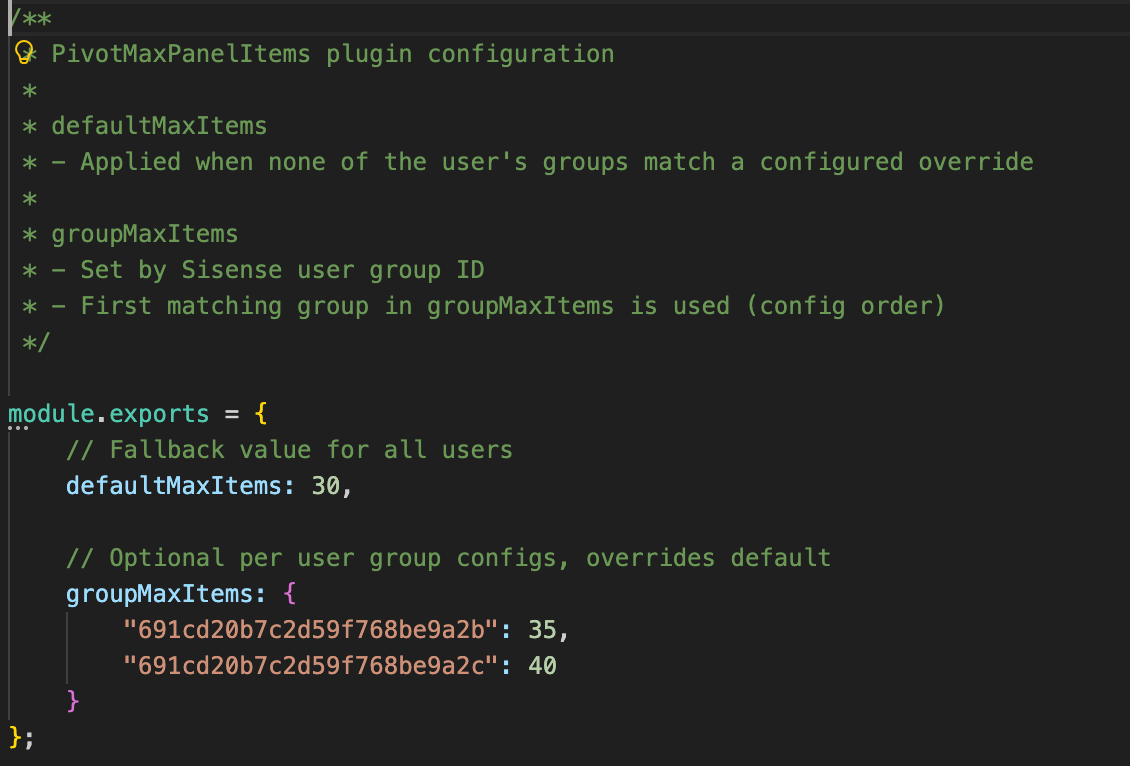
If a user belongs to multiple configured groups, the plugin applies the first matching group based on the order defined in the configuration file. If no group matches, the default limit is used.
This approach provides flexibility while keeping behavior predictable and easy to manage.
How it is used
Configuration is handled through a simple configuration file included with the plugin. Administrators can define:
- A default maximum number of items per pivot panel
- Optional overrides for specific Sisense user groups
Once configured and installed, the plugin will likely require minimal ongoing maintenance in most circumstances. It applies automatically whenever pivot widgets are initialized.
The full plugin is attached as a Zip file to this article and is available to download. The code is not compressed or obfuscated, and can be modified as needed, or used as example code for similar plugins.
The plugin can be installed as a standard plugin by placing the decompressed folder into the plugin folder.
The plugin includes a Readme file with further information.
Why it’s useful
This approach allows organizations to remove artificial constraints on pivot widget design while still maintaining control over performance and usability. Key benefits include:
- Enabling larger and more flexible pivot tables
- Reducing manual widget configuration and rework
- Applying consistent behavior across dashboards and standalone widgets
- Supporting different usage patterns across user groups
- Centralized control through a single configuration file
The solution is particularly valuable in environments where advanced users need more flexibility without changing defaults for all users.
Outcome
With the PivotMaxPanelItems plugin in place, pivot widgets can support more dimensions without manually adding widget scripts. Advanced users gain the flexibility they need, while administrators retain control over limits at the group level through simple configuration.
By applying limits automatically and consistently at load time, the plugin ensures predictable behavior across dashboards and widgets, supporting scalable group and role-aware analytics and visualization in Sisense.
Screenshots
Without a plugin, if a panel type includes too many items, the Add Panel Button is hidden
With the plugin, the Add Button does not disappear when below the new limit, as many dimensions and fields as needed can be added to the widget.
