Dashboard script: automatically reset filters to default when a dashboard is opened
Hey everyone 👋 Here's one that comes up more than you'd think. You've got a dashboard with filters. A user applies a bunch of selections, and the next time they (or someone else) opens it, those filters are still there from the last session. Depending on your use case, that might be exactly what you want... but sometimes it isn't. If you'd rather your dashboard always open in a clean, predictable state, with filters resetting to the defaults you set at design time, this dashboard script does exactly that. Every time the dashboard is activated, it removes whatever filters are currently applied and restores the defaults automatically. Here's the full script: dashboard.on("activated", (e, args) => { const dashFilters = args.dashboard.filters; dashFilters.$$items = dashFilters.$$items.splice(0, dashFilters.$$items.length); let filters = args.dashboard.defaultFilters; var options = { save: true, refresh: true, unionIfSameDimensionAndSameType: false, }; if (!Array.isArray(filters)) { filters = [filters]; } dashFilters.update(filters, options); }); Here's what each part is doing: Trigger This fires whenever the dashboard becomes active (when a user opens it or navigates to it). That's the moment everything below kicks off. dashboard.on("activated", (e, args) => { ... }) Step 1: Clear the current filters This grabs the live filter collection and empties it out completely — whatever the user had applied before is gone. const dashFilters = args.dashboard.filters; dashFilters.$$items = dashFilters.$$items.splice(0, dashFilters.$$items.length); Step 2: Grab the default filters defaultFilters is the filter state saved at design time. Whatever you configured as the intended starting point when you built the dashboard. const filters = args.dashboard.defaultFilters; Step 3: Apply the defaults This normalizes the filters into an array, then applies them back with save: true so the reset persists, and refresh: true so the data reloads immediately. The unionIfSameDimensionAndSameType: false setting makes sure it replaces rather than tries to merge with anything. var options = { save: true, refresh: true, unionIfSameDimensionAndSameType: false, }; if (!Array.isArray(filters)) { filters = [filters]; } dashFilters.update(filters, options); When would you actually use this? Shared dashboards where you don't want one user's filter selections to carry over for the next person who opens it Executive or presentation dashboards where the default view is intentional and should always be what people land on Dashboards embedded in portals or apps where a consistent starting state matters Anywhere you've had someone complain that the dashboard "looks different than it usually does" — often it's just leftover filters from a previous session One thing worth knowing The $$items approach in Step 1 is manipulating an internal Sisense array directly. The $$ prefix is a convention for internal Angular properties. It works well, but it's worth keeping in mind that if Sisense changes the internal structure down the road, that line could break without much warning. Something to keep an eye on if you're on this script after an upgrade. Hope this is useful for someone, and happy to answer questions if you run into anything! Mia from QBeeQ, a Sisense Gold Implementation Partner www.qbeeq.io5Views0likes0CommentsWidget script: hide value labels and empty legend items on native bar and column charts
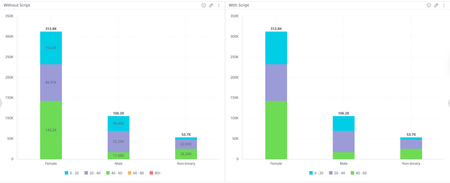
Hey everyone 👋 Ever built a stacked bar or column chart and found yourself wishing you could just... turn the labels off? Maybe you've got a lot of segments, and they're all squishing together, or the chart just doesn't have quite enough room to breathe in your dashboard layout, and the labels end up overlapping and making things harder to read rather than easier. Or, does it bother you that your legend still shows entries for categories that have no data at all for certain dimension values? So you've got these ghost entries sitting in the legend that don't correspond to anything visible in the chart. Sisense doesn't have a native toggle for either of these, so here's a widget script that handles both. It works on bar and column charts (stacked or single value) and does two things: Hides the value labels from displaying on the bars or columns Removes any series from the legend if all of its values are null or zero widget.on("beforeviewloaded", function(w, args){ var allEmpty = arr => arr.every(v => v.y === null || v.y === 0); for (e in args.options.series) { var serie = args.options.series[e]; if (allEmpty(serie.data)) { serie.showInLegend = false; } } }); A few situations where this comes in handy: You have a stacked chart with a lot of segments where the labels are colliding with each other Your dashboard is on the tighter side, and there just isn't room to make the chart large enough for labels to display cleanly Your legend is cluttered with entries for categories that have no data for certain dimension values, which can confuse users into thinking something is missing The chart is more of a visual overview and the exact values aren't the point, users can always hover for tooltips anyway You just prefer a cleaner, less noisy look overall Nothing groundbreaking, just a handy little script if you've ever hit this wall. Mia from QBeeQ, a Sisense Gold Implementation Partner www.qbeeq.io14Views1like0Comments