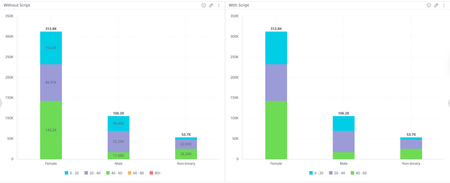
Widget script: hide value labels and empty legend items on native bar and column charts
Hey everyone 👋 Ever built a stacked bar or column chart and found yourself wishing you could just... turn the labels off? Maybe you've got a lot of segments, and they're all squishing together, or the chart just doesn't have quite enough room to breathe in your dashboard layout, and the labels end up overlapping and making things harder to read rather than easier. Or, does it bother you that your legend still shows entries for categories that have no data at all for certain dimension values? So you've got these ghost entries sitting in the legend that don't correspond to anything visible in the chart. Sisense doesn't have a native toggle for either of these, so here's a widget script that handles both. It works on bar and column charts (stacked or single value) and does two things: Hides the value labels from displaying on the bars or columns Removes any series from the legend if all of its values are null or zero widget.on("beforeviewloaded", function(w, args){ var allEmpty = arr => arr.every(v => v.y === null || v.y === 0); for (e in args.options.series) { var serie = args.options.series[e]; if (allEmpty(serie.data)) { serie.showInLegend = false; } } }); A few situations where this comes in handy: You have a stacked chart with a lot of segments where the labels are colliding with each other Your dashboard is on the tighter side, and there just isn't room to make the chart large enough for labels to display cleanly Your legend is cluttered with entries for categories that have no data for certain dimension values, which can confuse users into thinking something is missing The chart is more of a visual overview and the exact values aren't the point, users can always hover for tooltips anyway You just prefer a cleaner, less noisy look overall Nothing groundbreaking, just a handy little script if you've ever hit this wall. Mia from QBeeQ, a Sisense Gold Implementation Partner www.qbeeq.io11Views1like0Comments
Dynamically changing colours on value labels
Does anyone know if this if possible either at a widget level AND/OR at a dashboard level? I've tried a bunch of scripts from ChatGPT but none that work as intended. They either amend the colours but dont respect and changes being mad to rendering such as cell size changes and filters applied etc, or the reverse where it respects the rendering but not the colours changing..Solved137Views0likes5Comments
Blox Search Field usage for multiple columns
Hi, I'm creating a dashboard with a table with multiple columns containing text. I've created individual filters for the columns. I tried adding the Blox Search Field widget but it is only allowing me to search one column. I created multiple buttons to search and clear each column. Is it possible to create one button that searches all buttons? Here is an image of the Search Field widget with my current implementation:Solved2.3KViews0likes8Comments
imply Ask Save Function Not Working in Embed SDK Implementation
Hi, I'm working with Sisense's Embed SDK (not iFrame or SisenseJS) implementation and I've encountered a specific issue with the Simply Ask feature. The Simply Ask button is visible and functional in my embedded dashboard, but I'm unable to save any queries created through it. Here's my current implementation: typescriptCopyconst sisenseFrame = new SisenseFrame({ url: 'https://dvunified1.sisense.com/', dashboard: { id: '65118b631a4ea600334e0e7e', settings: { toolbarEnabled: true, toolbarShowDashboards: true, navigation: true } }, settings: { showHeader: true, showLeftPane: true, showRightPane: true, showToolbar: true }, element: document.getElementById('sisense-iframe') }); The interesting part is that: The Simply Ask button appears and works correctly I can create queries and see results However, when trying to save a query, nothing happens I've verified that: I'm using the latest version of Embed SDK The JWT token includes necessary permissions Simply Ask is enabled in the Sisense admin panel The implementation follows the SDK documentation guidelines Is there any specific configuration or permission needed for the save functionality in Simply Ask when using Embed SDK? Or could this be related to the 'volatile' mode setting? Any guidance would be greatly appreciated.Solved632Views0likes2CommentsBreaking changes in 'dashboardLoader' API after upgrade from 2022.8 to 2024.3
Hi, we use Sisense dashboard in embedded Iframe (JS plugin). After upgrading from 2022.8 to 2024.3 our add-on stopped working. From what I see, the API has changed so there are no 'EVENTS' and '$rootScope' objects in the 'dashboard-base.services.dashboardLoader'. I cannot find those changes mentioned in any release notes. The code is following: prism.run([ () => { let dashboardLoader = prism.$injector.get('dashboard-base.services.dashboardLoader'); let origGetDashboardMetadata = dashboardLoader.getDashboardMetadata; // Need to overwrite dashboardLoader.getDashboardMetadata() method in order // to include custom function to run before dashboard load dashboardLoader.getDashboardMetadata = function (...args) { let dashboardLoaderSelf = this; let orig = origGetDashboardMetadata.apply(dashboardLoaderSelf, args); let getWidgetFilterMetadata = new Promise((resolve) => { // Problem here, no 'EVENTS', no '$rootScope' dashboardLoaderSelf.$rootScope.$on(dashboardLoader.EVENTS.FILTERS_LOADED, (e, dashboardOid) => { resolve($$get(dashboardOid)); }); }); ... Can somebody guide me how to achive the same using new API?Solved882Views0likes3CommentsHow to login Sisense with admin ID after onboarded to Azure?
During the installation and minimal 2 IDs will be created under Administrator group. However, after onboarded to Azure and Admin has no way to login using the 2 IDs since these 2 IDs are not exist in Azure. Any dedicated login page available in Sisense to enable Admin login?2.4KViews0likes10Comments