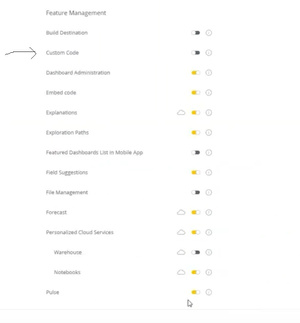
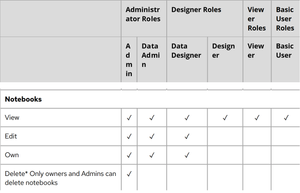
ContributionsMost RecentNewest TopicsMost LikesSolutionsRe: Discord for Sisense Thank You DRay much appreciated! Re: Discord for Sisense Hello DRay how are you? Help with Escaping Underscores in LIKE Clause in Sisense SQL Editor Hello Sisense Community, I've encountered an issue with using the LIKE clause in the Sisense SQL editor, specifically when trying to escape underscores (_) in my search pattern. I'm attempting to filter project names that start with "E_" from a table named [Workspace_data]. However, the standard SQL ESCAPE keyword seems not to be recognized, leading to an error. Here's the query I initially tried: SELECT a.[workspc_nm] FROM [Workspace_data] a WHERE a.[workspc_nm] LIKE 'E\_%' ESCAPE '\' The error message returned by Sisense is as follows: 1 out of 1 errors Line 3 Column 33 Found 'ESCAPE' but expected '<End of Expression>'. Based on the SQL cheat sheet provided by Sisense, there's guidance on various operators and comparisons, but I couldn't find specific mention of handling escape characters within the LIKE clause, especially for escaping underscores. I've attempted to adjust the query by omitting the ESCAPE clause select a.[workspc_nm] from [Workspace_data] a where a.[workspc_nm] LIKE 'E\_%' This does not throw any error, however it gives me only partial results. In my attempt to filter project names that start with "E_" the above query filters all projects, even project names like 'Eagle', or 'Elephant'. I want only names that follow the pattern 'E_Team ABC' 'E_Team XYZ' etc Could anyone provide insights or guidance on the correct way to escape special characters like underscores in Sisense's SQL editor? Is there an alternative approach or syntax that Sisense supports for this kind of pattern matching? Any advice or examples from your own experiences would be greatly appreciated. Thank you in advance for your help! Best regards, Re: Lowest Sisense role needed to 'CREATE' new notebooks. Hi DRay The admin enabled Custom Code in Advanced Analytics and assigned me as a 'Data Designer'. But I still can't see the 'Create your own notebook' option, needed for Creating Manifest Files (details here: https://docs.sisense.com/main/SisenseLinux/transforming-data-with-custom-code.htm). Can you please suggest how to troubleshoot this? We need to resolve this to manage our notebook functionality effectively. Re: Lowest Sisense role needed to 'CREATE' new notebooks. Thank you DRay ! Re: Lowest Sisense role needed to 'CREATE' new notebooks. Hi DRay Thanks for your reply. I'm a 'Data Designer' but can't create a Jupyter Notebook in E1. We use the on prem version L2023.6.0.260. Does this version allow 'Data Designers' to create new Notebooks? How can I fix this? Thoughts? To clarify, I'm talking about using Jupyter Notebook for Python code in ElastiCube builds, as explained here: https://docs.sisense.com/main/SisenseLinux/transforming-data-with-custom-code.htm. The page says admins need to enable this feature. So, is the process: 1) Admin enables Custom Code, 2) Assigns 'Data Designer' role to a user, 3) Then 'Data Designer' role can create new 'Notebook' and work with Jupyter Notebooks in ElastiCube builds? Lowest Sisense role needed to 'CREATE' new notebooks. Hello, I need clarity on the lowest Sisense role needed to 'CREATE' new notebooks. Not just view, edit and own. The user guide (https://docs.sisense.com/main/SisenseLinux/sisense-user-roles.htm) says 'Data Designers' can, but someone has a hunch that it's 'Data Admins'. This confusion is affecting our ability to use notebooks. Separately, 1. Can regular 'Designers' edit and run notebooks shared by 'Data Admins'? 2. Also, are there any limitations on the 'Data Designer' role regarding access to certain data cubes only? We need to resolve this to manage our notebook functionality effectively. I am sharing the user role access table below.Help in explicitly answering these questions is greatly appreciated. The need is urgent. Seeking Advice: Importing Data from Elasticube to Pandas DataFrame in Sisense Jupyter Notebook I'm looking for help with using Sisense and Jupyter Notebook. Here's what I need to do: Load CSV data into a Sisense Elasticube table (Table A). (this I know how to do) Transfer data from Table A into a pandas dataframe for processing. How? I found a resource (link below) with good information but it doesn't explain these steps. Has anyone managed to import data from a Sisense Elasticube table into a Jupyter Notebook dataframe? Or are there other ways to load data into Sisense Jupyter Notebook? Any advice would be much appreciated! https://docs.sisense.com/main/SisenseLinux/transforming-data-with-custom-code.htm SolvedDiscord for Sisense Hi, Does anyone know if Discord community exists for greater collaboration across Sisense users, developers etc? I searched online and could not find any leads. Thx SolvedHow to create a new column with percentiles? In Sisense, I'm looking for a way to create a new column in a table, with percentile values of a different column. I am open to design suggestions/approach. What the best way to accomplish this. Such that: 1. Have a filter created on percentile values of the column X. 2. Filter out outliers when plotting or graphing the data. (e.g. I am interested in 0.99 percentile data only), If I have a percentile column I can easily filter out top 0.1 values. Anyone came across any examples of how best to implement this in Sisense (cube level?) or UI dashboard level?