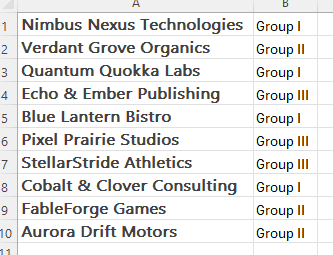
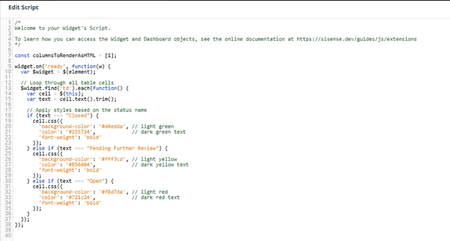
ContributionsMost RecentNewest TopicsMost LikesSolutionsRe: How to calculate a 60‑Day Resolution Deadline (Record Date + 60 Days)? Thank you for your time to respond to this - it's very much appreciated. I don't have access to the data model, so I'm not able to implement this solution, but at least it gives me direction. Much appreciated! TLB How to calculate a 60‑Day Resolution Deadline (Record Date + 60 Days)? I have a stakeholder who needs to create a custom date that's 60 days on from the Record Date that's in the data model. In this scenario an event happens on March 6th and the Incident Record is created. My stakeholder needs to dynamically create a field that displays the date 60 days in the future (May 5th) by which time the Incident must be resolved. I've tried several approaches, none of which worked. Any help or advice would be much appreciated! SolvedGrouping based on text field values I have a list of companies in my data model (fake company names used in this example). In our industry these are grouped in certain ways. Unfortunately this data in not in our data model. I've been given it in a spreadsheet. Even more unfortunately, there's no way to add this data to the data model in the timeframe available. To create bar charts, I've been using a formula to create each bar independently. Something like: (Count ([Profit]), Company Name) and then using the filter within the formula to filter on the companies in each Group. It's cumbersome, slow, & prone to error, so I'm wondering if there is a better way to go about this? Essentially, I'm looking to create bar charts & pivot tables that look like the examples below where I can easily use 'Group' as a field. Thank you in advance for any help or assistance you can offer. Scripting Issue - second script prevents first script from working A colleague is having a scripting issue where one appears to stop the first from working. The first one (const columnsToRenderAsHTML = [1];) renders the field as HTML while the second one changes the cell color depending on the text. Each works fine on its own, but when the two are together only the second one functions. Excuse my ignorance if this has a simple answer, but I'd genuinely appreciate the Community's assistance here. Filtering on a specific range of hours I have a colleague who needs to filter a dashboard on a very specific time period - from 08:00 yesterday morning to 08:00 this morning. They don't need/want all of yesterday before 08:00 or any of today after 08:00. I've tried playing about with the custom code functionality, but haven't been able to make it work & would be very grateful for any help that might be offered. Re: Comparing String Values Across fields DRay - I really appreciate the response. I'll bring this back to my colleague. Thank you. Re: Selectively change Markers on a Line Graph Just to follow up & confirm that this works perfectly - thank you so much! Re: Selectively change Markers on a Line Graph harikm007 - Thank you so much! I genuinely appreciate your time on this. Selectively change Markers on a Line Graph I have a stakeholder who would like to selectively turn off the markers on line graphs for certain lines. As in the attached image, they want to remove the markers on the dashed lines, but keep them for the solid line. I can't find anything in the documentation that addresses this & the Markers slider only allows an all or none approach. Thanks for any advice that may be offered! SolvedComparing String Values Across fields I have a colleague who needs the ability to compare string values across two fields to assess whether or not they're identical (simple example in excel below). I've not been able to find any documentation on this & would be grateful for assistance. Solved