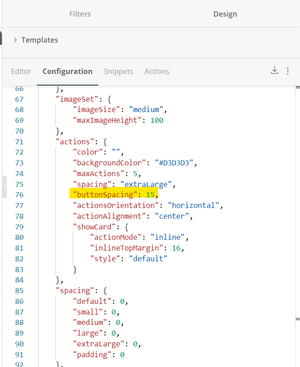
ContributionsMost RecentNewest TopicsMost LikesSolutionsRe: How to avoid scrolling in blox element for all resolution Hello, If you have actions control in your Blox (JTD of ActionSet). Try to adjust the button spacing to a smaller number so they can all fit in your dashboard. This works for me so far. Open to a better solution Re: Show Last Updated Date on Dashboard This is awesome. Thank you! Re: Last build time of a live data model You can try to call API with URL as /api/v1/elasticubes/live Data return have lastUpdated and lastPublishTime Dynamic filter with input parameter I have this parameter from QbeeQ plugin called [@Days_Ago]. It should be used as a filter in formulas For example: Calculate total sales with [Days Ago] < = [@Days_Ago] The formula would look like ([Total Sales] , [Days Ago]) while [Days Ago] column should filtered by [@Days_Ago] instead of a fixed value: Please let me know how to achieve this. Much appreciated! SolvedRe: Customizing a Pivot 1.0 Widget Ophir_Buchman, thank you so much for a very good reference! Wonder if we have a way to customize Grand Total column cells (the most right column) - for example for Layout 6? (Or I missed it) Re: Table Header Row hover / mouse over format Hey Chris, While Pivot config is good to us now, is it anyway to change the hover effect on Table / Table with Agg column name? Thanks! Table Header Row hover / mouse over format Table and Table with Aggregation widget has a different behavior when we hover the mouse over the column name -header cells . I want to disable this change or change its format to be similar with how Pivot header cells behave. Is it possible? TIA!