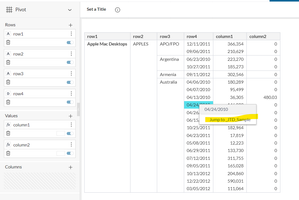
ContributionsMost RecentNewest TopicsMost LikesSolutionsRe: Pivot - JTD - Enable JTD for specific row Hello AssafHanina I have edited the post attaching the screenshot, please give a look. The issue is not about passing filters to the JTD. It is about the linking JTD to a specific dimension (rows). After using drillToDashboardNavigateTypePivot: 1, when we right click on any dimensions (rows), we are seeing the pop-up to drill to JTD as shown in the images. But I don't want to see that pop up on all the dimensions. Want to get the JTD drilling ability to only row2 and further only this row's value should pass as filter. Thanks & Regards Pivot - JTD - Enable JTD for specific row After using the following property in customize JTD widget script for Pivot widget, JTD is enabled for all rows. drillToDashboardNavigateTypePivot: 1 It would be great if we have an option of enabling JTD for specific rows. For example, we are having 4 rows and 2 value columns in the pivot but want to have JTD linked to only "row2" and have that "row2" data passing to JTD as filter (as shown in the picture). NOTE: Customize JTD widget script referenced from Official Sisense documentation: https://www.sisense.com/marketplace/jump-to-dashboard/