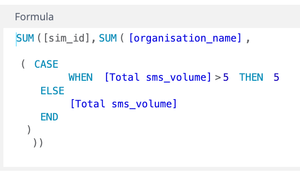
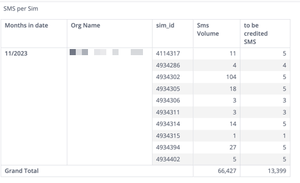
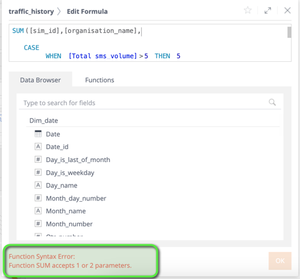
ContributionsMost RecentNewest TopicsMost LikesSolutionsRe: Multipass Aggregation Failing Hi Ido_QBeeQ , I really appreciate your help, but both "options" (adding parenthesis, using it in a formular) don't work still. Not sure what it is. Let's give up on it. Thanks again, i really appreciate you are working it with me. Re: Multipass Aggregation Failing HI Ido_QBeeQ , sorry for bugging you, but I am not figuring it out. Can you have another look. This is what I tried: a) --> Works as a formular but throws an error while calculating it --> b) Doesn't allow me to "save" the formular with the same error as above "Function SUM accepts 1 or 2 parameters". Thanks all... Re: Multipass Aggregation Failing Hi Ido, thanks for offering to help. It seems i can't just add another dimension. Sisense spids the error as shown in the screenshot? Thanks, Mathias Multipass Aggregation Failing Hi community, I have a multipass function which isn't doing what I expect from it. In an widget I want to report how many SMS have been send, and if the number is above 5 per "sim_id", the to-be-credited SMS shall be 5. If the number of SMS sent is below 5, the actual amount of SMS shall be credited. I report on the "to-be-credited SMS" field with the following multipass expression: Sum([sim_id], CASE WHEN [Total sms_volume]>5 THEN 5 ELSE [Total sms_volume] END ) When I keep "sim_id" in the rows, the formular does in the total field what it should. The to-be-credited SMS number of 13,399 is correct. (Certainly there are much more rows and pages). The challenge is, i want the "sms_id" row not to appear, and still see the correct 13,399 value. However, when i remove the "sms_id" row, i get the number 5 as result. As per below screenshot. What am I doing wrong? Thanks, MaMueWue Re: Dynamic Value-Names in Pivot Table OMG, this is incredible. It works exactly as requested. Thanks so much for guidance, and explanation. Dynamic Value-Names in Pivot Table Hi folks, I am trying to name the "value" columns in a pivot table in a dynamic way. I have a table that compares the last month data, with the data the month before. Right now, on the 6th of November, i would compare "October MRR" with the "September MRR". In the table I apply a filter which gives me the right results, all good here. However, on the naming, rather than calling it "last month MRR", and "month before last" i would prefer to write "October MRR" and "September MRR". So, the "value description" would need to change dynamically based on the month we are in right now. Is there any easy way to do this? See also screenshot for clarity. Thanks, MaMueWue SolvedRe: Weighted Average Challenge OMG, wonderful. You Angelina_QBeeQ are my rockstar! Re: Weighted Average Challenge Hi Angelina, this is very helpful as a first step. I can can compute the number now in the table where I have all customers listed (picture marker 2). However, is there also any way to make the formular "Weighted Average" in the above pivot (picture marker 1), where no customers are listed (and just the sum)? Weighted Average Challenge Hi Community, I'm trying to resolve a weighted average challenge, but i can't get to it. Hoping there is help out there. My table has data as follows: In a pivot a present the two months side-by-side in the following way: Additionally to the side-by-side data, I want to calculate how much revenue I potentially could have gotten. Number of devices typically increase, but the MRC (Monthly Recurring Revenue) doesn't necessarily increase in the same scale. Usually price discounts are given with more devices added. So I want to calculate the "Expected_new_Revenue". I do this by multiplying the ARPU (Average Revenue Per Unit) of the previous month (January) with the Devices of the current month (Feb). From this "Expected_new_Revenue" I now want to derive my "Delta" missing revenue; aka: "This month revenue" - "Expected_new_Revenue". To make this more clear, here is an excel example. Sisense today presents me the 1,305.68 result; but what I need is the 592.71 as result. My formular for the "Expected_new_Revenue" is: (( ([Total MRC], PREV([Months in Revenue_Date],1)) / ([Total Devices], PREV([Months in Revenue_Date],1)) ) * [Total Devices] ) And the formular for the "Delta" (missing revenue): [Total MRC] - (( ([Total MRC], PREV([Months in Revenue_Date],1)) / ([Total Devices], PREV([Months in Revenue_Date],1)) ) * [Total Devices] ) Even if I add the "Customer" in the pivot table, and it shows the right "subvalues" per row, the Grand Total still is the wrong compute. Thanks for your support. Solved