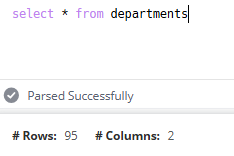
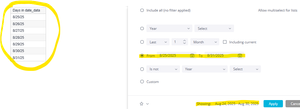
ContributionsMost RecentNewest TopicsMost LikesSolutionsRe: CommunityFest day 7: Like a carnival booth, every setup is unique! My workspace offers a minimalist aesthetic while still allowing for on-the-go development when needed. 🤣 Re: CommunityFest 2025 Day 4: How has Sisense made your day-to-day work easier or more impactful? The ability to create ad-hoc widgets quickly for leadership requests have been very beneficial rather than just compiling a spreadsheet to share. I like that we can slice the data many ways with difference visualizations, this helps paint the picture needed. Re: 👋 Welcome! Let’s Get to Know Each Other! Hi, I'm Zach, located in South Alabama. I'm the Sisense admin at Mytonomy, a patient education software company. I enjoy going to the beach and spending time with my family. I'm looking forward to engaging with the community, benefiting from the feedback, and continuing to grow my Sisense skills. Re: 🎢 CommunityFest Day 1: What’s the most unexpected insight you’ve uncovered after changing one thing in Sisense? My insight might be an obvious one for others but when I first started using Sisense I wasn't aware I could use formula level filtering. So I could count something like communications sent by counting user_id's then using a filter in the formula to only look at email types. The formula would look like: (DUPCOUNT([user_id]), [Email_filter]) Where I am counting the user_id's but I have a filter in the formula where I am only counting communication types of email. The row count should remain when using order by in the query builder Currently when you run a Select statement the number of rows and columns are shown at the top of the result set. However, when I add an order by clause to the query the row count is removed but the column count remains. Can the "# Rows" value remain once an order by clause is added? Re: Thank you for joining our Use Case gallery event Thank you! Re: How to create a filter within a widget? Hi Astroraf the link you provided seems to be broken. Can you post again or provide the solution here? Re: Applying Conditional Formatting to Specific Columns in Sisense Pivot2 I have something similar where I am using 1 and 0 to make Yes and No in the values rows then I color as needed. However when I export to Excel or PDF I lose all formatting since the formatting is done in the widget script. In the PDF preview the formatting is still there but when I download the PDF it is removed. Is there a way to maintain the values and formatting of the widget on export? Re: Update the Date Filter to Show Consistent Dates FYI, I opened a ticket with support for this and they were able to reproduce the issue and are now working with R&D on investigating which they stated could take some time. Re: Update the Date Filter to Show Consistent Dates It seems the filter is filtering correctly but the "Showing:" description section at the bottom does not match what is actually being filtered.