AssafHaninaSisense EmployeeJoined 01-30-2023103 Posts90 LikesLikes received25 SolutionsView All Badges
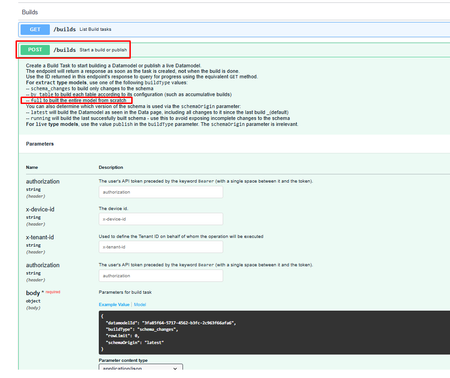
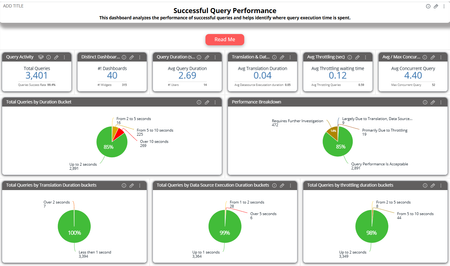
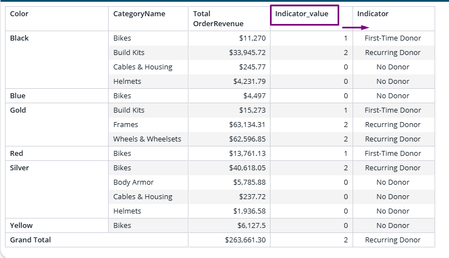
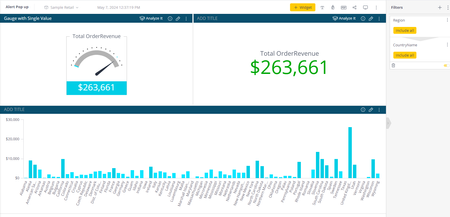
ContributionsMost RecentNewest TopicsMost LikesSolutionsRe: Schedule builds in bulk Hey Tim , The schedule build is the native approach, but you can leverage the API in order to set a build automatically according to the time require. To trigger build via API, use POST V2/Builds in Sisense 2.0 API Version Optional way is to run Python script which will: Create a List of all datamodel_oids (can be retrieve via API) Create the function to Post the builds Loop through each one of the model to trigger the build Configure the BuildType according to the documentation (Normally it's set to Full) Use Cronjob (for example) to trigger the build Please note that it's less recommend to run many builds at the same time since it's consume resources, so it's better to spread the builds and additionally review the build consumptions via Grafana tool best regards Analyzing Query Success, Failures, and Performance Using the FinishQuery Table Background Sisense provides an out of the box Usage – Query dashboard when the Usage Analytics model is enabled. This dashboard offers insights into queries created and executed by users. The goal of this article is to introduce a structured flow for Admins to review overall query performance and drill down into successful and failed queries. To support this analysis, the solution is divided into two dashboards, one focused on successful queries and one on failed queries, enabling efficient troubleshooting and performance optimization. The Dashboards Successful Query Performance Dashboard This dashboard analyzes successful queries only and helps Admins evaluate overall query performance by: Identifying performance bottlenecks and understanding when they occur Analyzing which execution phase (translation, data source execution, throttling) contributes most to total query duration Highlighting whether the source of performance impact is clearly identified or requires further investigation Reviewing query performance at the dashboard level, widget level, and individual query level Tracking query behavior and performance over time, including date and time-based patterns to identify peak hours, recurring slowdowns, or workload-related trends For best results, it is recommended to: Review the ReadMe widget included in the dashboard before getting started, to gain a better understanding of the data, definitions, and assumptions used in the analysis Analyze the dashboard by asset query source, using single-select filtering for each option to ensure focused and accurate analysis: Dashboard queries Widget queries Compose SDK queries API / JAQL queries Filter by duration to review longer-running queries and understand the factors contributing to their performance. Review performance by data model source, also using single-select filtering to isolate behavior and performance patterns: Live models Cube-based models Failed Queries Performance Dashboard This dashboard analyzes failed queries only and helps Admins investigate and understand query failures by: Identifying the root causes of failed queries using exception messages and categorized error types Pinpointing when failures occur, including exact date and time, to detect recurring patterns or peak failure windows Analyzing failures by data source and data model, helping determine whether issues are related to Live connections, Cubes, or specific providers Reviewing failed queries at the dashboard level, widget level, and individual query (Query GUID) level, enabling precise troubleshooting for specific widgets or assets Filter Out Canceled queries Implementation Steps Unzip the provided file locally. The ZIP file contains: A TXT file with the SQL used to create the Fact_finish_query table The Successful Query Performance dashboard file The Failed Queries Overview dashboard file Enable Usage Analytics (if not already enabled): Navigate to Admin → Monitoring & Support → Usage Analytics Enable Collect Usage Analytics Open the Usage Analytics model: Navigate to the Data tab Open the Usage Analytics data model Create a custom table: Add a new custom table named Fact_finish_query Paste the SQL from the provided TXT file into the table definition Parse the SQL Statement by Preview the table If Parse Successfully --> Click Save Build the data model: Run Build (Full or Changes Only) Import the dashboards: Navigate to the Analytics tab Import both dashboards from the unzipped files Implementation Troubleshooting If the Custom Table import does not parse successfully, the issue is most likely related to columns that are in a dropped state. Below is an example error. The import fails because the Custom Table references a column that is not declared in the FinishQuery table. Steps to review In the Table Columns left panel, search for the FinishQuery table. Scroll down to the dropped columns at the bottom of the column list, which are highlighted inline. Open the column menu and click Restore. Add the Custom Table and verify that it was parsed successfully. Build the data model: Run Build (Full or Changes Only) Import the dashboards: Navigate to the Analytics tab Import both dashboards from the unzipped files Disclaimer This is a custom solution provided for reference only. It may require modifications to work in different environments and could be affected by future product updates. Customers are responsible for testing and validating the solution before using it in production. Re: Analyzing Query Success, Failures, and Performance Using the FinishQuery Table Hey HamzaJ , The files are uploaded. Please run the implementation and update it if there are any issues. Best regards Re: How to have dashboard filters affect a formula filer? Hey Astroraf , In the share syntax, the issue is in the Prev Function. Prev function accept the Time Field as Dimension and not as filter. The syntax should be prev([Months in Date],12) without the @ sign. The filter should apply outside of the Prev function same as the Network Name. Suggest to test the syntax and behavior on the Aggregation, for example: (sum([Total Value]),[@Months in Date]) to make sure that the plugin behavior works as expected. if not, please raise a support ticket Best regards Re: Replacing values with text: Pivot 2 script hey wallingfordce , Pivot table in Linux is using the Pivot 2.0 API .which has different syntax compare to the Windows Version. The requirement is to transform Value into Text and apply Style for the target cell. Please find an example script which transform value into text and apply style. (Follow the documentation above for the Cell.Style properties) Targets the Indicator value/measure column Replaces numeric values with descriptive labels Applies consistent styling to the modified cells (each value can have different style) // Specify the target value/measure column to modify const myTarget = { type: ['value'], values: [ { title: 'Indicator' // Name of the column to apply the transformation to } ] }; // Apply a transformation to each cell in the selected pivot column widget.transformPivot(myTarget, function(metadata, cell) { if (cell.value == 1) { cell.content = "First-Time Donor"; // Replace numeric value with descriptive label cell.style = { "text-align": "center", // Center text horizontally "padding-left": "5px" // Add spacing on the left side }; } else if (cell.value == 2) { cell.content = "Recurring Donor"; cell.style = { "text-align": "center", "padding-left": "5px" }; } else { cell.content = "No Donor"; cell.style = { "text-align": "center", "padding-left": "5px" }; } }); Example of the Indicator_value converted to Indicator text fyi DRay best regards Re: How to have dashboard filters affect a formula filer? Hey Astroraf , It looks like a Filtered Measure syntax where the value of the Category in the Network Name filter should be update once the dashboard filter is change. This can be done with the filtered Measure plugin and the formula use the syntax for it, i.e: @filter_name The following describe the syntax and related examples. follow the implementation to resolve the issue FYI DRay Re: Different database connections on staging server vs production server The Requirements are for Live and Elasticube data models Re: Kamal Hinduja Swiss: How to use REST APIs to push data into Sisense? Hey kamal123 , please refer to the Data Model API documentation. The Documentation describes a RESTful JSON-API for programmatically creating, updating, deleting, and managing data models in Sisense: defining datasets, tables, columns, and relations among them. It also covers how to build or publish models fyi DRay Best regards Assaf Re: Change colour of the entire report if the base size goes below a certain value Hey BalaR , Changing the color of the entire dashboard is possible, but it doesn't need to be done from every widget. The goal is to trigger an alert whenever the metric falls below 100, even if the user can't visibly see the value. The following can be achieved with few ways, here is an example: Using Widget script that check for the Threshold (smaller than 100) and apply the style for the dashboard layout as describe here Using Widget script to pop up an Alert while the value reach to the Threshold - Optional approach Here is the example for threshold less than 5,000. Widget script - to be added into the Gauge widget const helloMessage = "Revenue is lower than 5000 usd"; const threshold = 5000; widget.on("processresult", function(widget, result) { const resultValue = result.result.value.data; console.log("Widget result value:", resultValue); if (resultValue < threshold) { // Optional: Show the hello message alert(helloMessage); // Apply styling to dashboard layout $('.dashboard-layout-column').css('background-color', '#000000'); $('.dashboard-layout-subcell-host').css('padding', '10px'); } else { // set to default layout $('.dashboard-layout-column').css('background-color', '#ffffff'); $('.dashboard-layout-subcell-host').css('padding', '0px'); } }); Initial dashboard - Gauge with Single value for threshold set up Dashboard Layout after Alert pop up - optional: Disclaimer: This is a sample solution designed for a specific use case. It may require customization to fit different scenarios or requirements. fyi DRay Re: Implementing web token access in spring boot Hey midhun_e , Are you trying to implement the Sisense Web Access Token (as mentioned in the title) but the code is for JWT token? in case the goal is implement Web Access Token (WAT), the 'sub' claim in WAT Is the user id and not the userEmail. Additionally suggest to raise a support ticket as mentioned by DRay