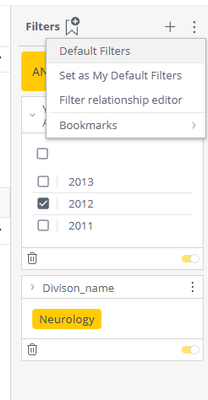
ContributionsMost RecentNewest TopicsMost LikesSolutionsRe: Single Filter against multiple columns Hi Raman, You can do that by adding both columns as filters and then clicking on Filter Relationship in filters menu: Then in new window create an OR logic between filters and that should add an additional indicator at the top of the filters. Hope this helps. If you would need any additional assistance feel free to reach out! Michael Becker qbeeq.io Re: pivot table modification harish I think it would be easier if you would create that second column separately in the data, so then you could add it as second measure in the table and format as percentage. Alternatively, if I understand the data and use case properly you can add second measure in Values and make it a formula like this = Total_bucket_value / (Total_bucket_value,all(ordered_category) - this will then calculate for each value it's percentage across all categories. Then you don't need that second column grouping which you are hiding anyway. Generally speaking the best approach to be able to display value and percentage in one go is to do it as two separate values. Hope this helps. Re: Custom color for pivot table header Hi tsaho8 , which version of Sisense your using on which OS (windows or Linux)? As those may vary in the approach for script building, especially on Pivot side. Also are you planning to do it for both Pivot/Table? At QBeeQ we develop a wide range of plug-ins, and of them is our Expandable Pivot that has the feature your are looking for built-in alongside many other powerful features, like Transpose, Viewers ability to change columns/rows/values displayed and many more. This is a very powerful Self-Service plug-in that allows Viewers to design their own views in Pivot and elevate them to next level of analytics! We are also on verge of releasing enhanced table with aggregation, which will incorporate design capabilities as well. Feel free to reach out for a live demo and free trial, we're always here to help, Always here to help, Michael from QBeeQ michael.becker@qbeeq.io QBeeQ - Gold Implementation and Development Partner www.qbeeq.io Re: Many to Many Hi Enrique, Every ElastiCube in Sisense has its' own pod running on Linux Kubernetes. That pod, should it encounter M2M will start utilizing quite a lot of RAM memory (natural effect of M2M and Cartesian result it produces) until a certain threshold is reached, and then Sisense will kill the query and display appropriate message. Generally speaking ElastiCube is In-memory entity which will hold in RAM contents of queries. Depending on type of queries it will start using more RAM, but if there are no M2M, memory usage should not be higher than then actual size of ElastiCube on hard drive. Upon rebuild or ElastiCube pod reset all memory is released. ElastiCubes can also utilize Query Recycler whci heffectively caches subsequent query results, so next time same query is executed it will take results from cache. This mechanism will also gradually add memory usage to specific ElastiCube. Hope that sheds some light on the whole mechanism. If you would have any additional questions feel free to reach out to me. Always here to help, Michael from QBeeQ michael.becker@qbeeq.pl QBeeQ - Gold Implementation and Development Partner www.qbeeq.pl Re: Retrieving previous rows data in Sisense Data Modeling Hi Aditya, possible solution to this is as follows: 1. Rank your main table by one or combination of columns to get Ranks 1,2,3 etc. 2.Create Custom SQL expression in which you can JOIN that main table to itself on the RANK column you just created but with offset: SELECT * FROM TABLE A JOIN TABLE A ON A.RANK = A.RANK-1 This way you create a table where every row will have access to information from previous row. Of course adjust the query to your liking and don't necessary use SELECT * 🙂 Hope it helps! Regards, Michael Becker qbeeq.pl Re: Can the indicator widget text be left aligned? Hi kthrapp , as Sijo1995 suggested try replacing indicator with Blox, as Indicator does not support alignment parameter. Best Reagrds, Michael Becker qbeeq.pl Re: Client Specific Custom Fields - Dynamic Field Names (Metadata Translator) Hi Vrice, so metadata documentation has been moved here . As for the solution there might be a different ways to achieve that as well so I'd like to suggest a quick call to discuss this. Feel free to reach out to us at info@qbeeq.pl Best Regards, Michael Becker qbeeq.pl Re: How to create a table with a range of dates? Hi Tomer, on Linux please ensure in Admin section of Sisense in Features, that Custom Code is enabled :