Sisense Meta-Management MCP Server: AI-Ready Tools for Environment Operations
⚠️ Experimental Project Notice
The Sisense Meta-Management MCP Server is a component developed and shared by Sisense Field Engineering on an experimental, "as-is" basis for learning and testing purposes within the community. It is not an officially supported, Generally Available (GA) Sisense feature, and standard Sisense Customer Support does not cover it.
Users are responsible for self-hosting this MCP Server in their own environment (on-premise or VPC). This includes controlling its location, security, and the credentials and permissions it uses. When integrated with third-party AI clients (such as Claude Desktop), data retrieved from Sisense is transmitted to the selected LLM provider via that client. It is strongly recommended that users first employ a sandbox environment to validate its behavior before wider adoption.
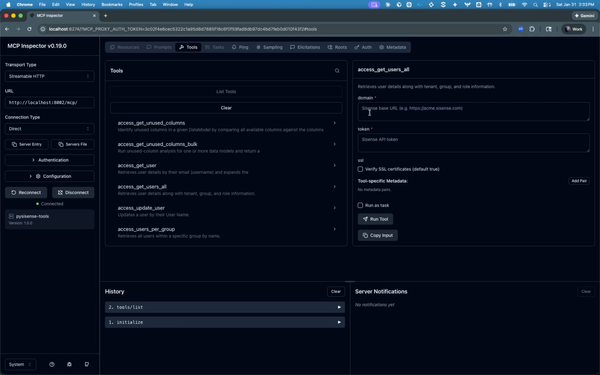
The Sisense Meta-Management MCP Server is a Streamable HTTP MCP server that exposes Sisense environment operations as “AI-ready tools” for external agents. Under the hood, it translates MCP tool calls into PySisense SDK method calls, so external agents can run real administrative workflows (governance checks, migrations, well-checks, and lifecycle operations) without you building a custom UI.
GitHub Repository: Meta-Management MCP Server
Meta-Management MCP Server: Core Objective
As AI agents become the new interface layer, teams want Sisense to participate in the same orchestration fabric as the rest of their enterprise tools. The official Sisense MCP use cases are focused on analytics-style interactions (discovering sources, listing fields, building charts). This server was created for a different category of work: Meta-Management.
It enables external agents to operate on the Sisense environment itself, including tasks that usually require manual admin effort or custom scripts: audits, governance, bulk operations, and cross-environment migrations.
Meta-Management MCP Server: Core Capabilities
1) Direct integration with external AI agents
Expose Sisense operational capabilities to any MCP-capable client (for example Claude Desktop) using Streamable HTTP. This allows an agent to call Sisense tools the same way it calls other enterprise systems.
2) Long-running operations with real-time progress
For heavy workflows like bulk migrations, the server emits progress updates over Server-Sent Events (SSE). Some MCP clients (including Claude Desktop today) may not display these progress events in the main UI, but the server still streams them and returns the final result when the operation completes.
3) A tool layer built on proven SDK workflows
Each MCP tool is a wrapper over a PySisense SDK method, so the tool behavior stays consistent with the SDK’s patterns (structured inputs, predictable outputs, and operational logging). The MCP server is not a separate implementation of Sisense logic; it is a protocol layer that exposes the SDK as tools.
4) Registry-driven tools (no manual tool coding)
Tools are published via a tool registry JSON generated from the SDK. The server reads this registry and serves the tools automatically through MCP discovery, which keeps the MCP surface area aligned with the SDK as it evolves.
Full tool catalog (auto-generated): Available MCP Tools
Target Audience for this Meta-Management MCP Server
- Teams using a central AI orchestrator to coordinate multiple enterprise tools, where Sisense needs to be one of the controllable systems.
- Platform owners who want agents (and not only custom apps) to trigger Sisense governance and migrations.
- Advanced users who want to connect Sisense operations into AI workflows without building a dedicated UI.
Operation Overview
At a high level, the MCP server provides a protocol boundary between AI agents and Sisense operations:
- Server framework: A Starlette app exposes Streamable HTTP MCP endpoints.
- Transport: JSON-RPC over HTTP, with optional SSE streaming for progress events.
- Tool discovery: tools/list is generated from a tool registry JSON.
- Tool execution: tools/call routes tool_id + args into a dispatcher layer.
- Dispatcher: tools_core resolves the tool definition, validates args, constructs the Sisense client(s), and calls the mapped PySisense method.
- Results: the server returns a normalized JSON-RPC result (and progress notifications when streaming is enabled).
Contributing and Support
This is an experimental, community-contributed project maintained by Sisense Field Engineering and provided “as-is.”
- Do not open a GSS ticket (this is not a GA Sisense feature).
- For usage questions or help getting started, contact your Customer Success Manager (CSM), who will route feedback to the Field Engineering team.
- For bugs and improvements, use GitHub Issues or submit a Pull Request.
- For feature requests, open a GitHub Issue with details.