Modifying Emails in Sisense
Summary: A participant initiated a topic regarding the modification of emails within Sisense but did not provide further details or context in the discussion.
Summary
This article provides a solution for users who want to modify the content of system-generated emails, such as the "activation required" email, in Sisense.
Main Content
Step-by-step instructions to resolve the issue:
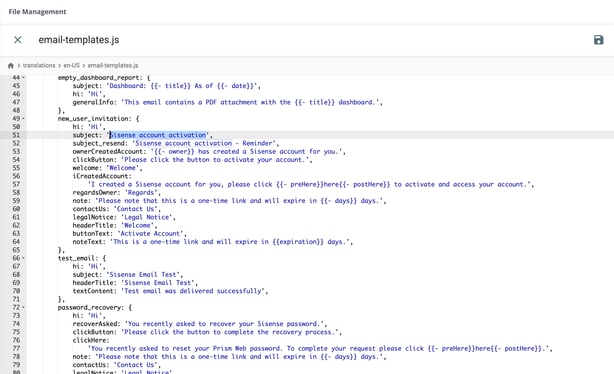
Navigate to the system templates by going to Admin -> Server & Hardware -> File Management -> translations -> en-US.
Edit the email-templates.js file to modify the email template.
Troubleshooting tips:
If you have made changes to the email-templates.js file and still do not see your changes, ensure that you are editing the correct tenant templates.
After making changes to the email-templates.js file, trigger an email to verify if the changes have been applied.
(on-prem) If the changes still do not reflect, it might be necessary to restart the component responsible for managing emails. In Sisense, this component is the galaxy pod.
Supplementary information:
The email-templates.js file contains the templates for system-generated emails. Modifying this file allows you to customize the content of these emails.
Always make a backup of the original email-templates.js file before making changes. This allows you to revert to the original templates if necessary.
If you encounter any issues while modifying the email templates, do not hesitate to reach out to Sisense Support for assistance.

